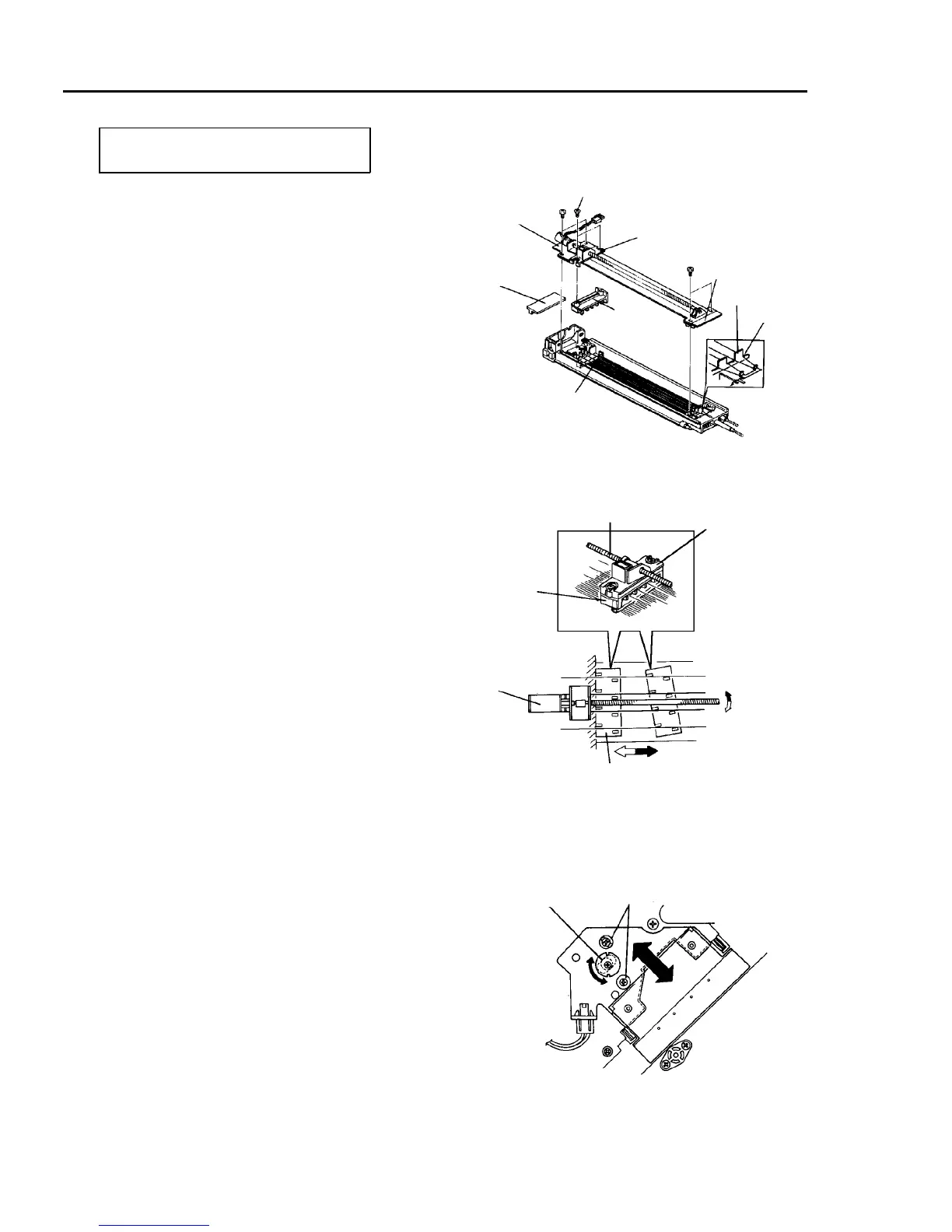
2.4 Charge Corona Unit, Eraser, and Potential Sensor
2.4.1 Replacing the charge corona wires and wire cleaners
PM cycle: Clean every 200K and replace
every 400K.
1. Turn off the main switch. Open the front door, and
remove two screws to allow it to open further.
2. Remove the inner cover (2 screws and one
connector).
3. Disconnect the connector from the charge corona
unit, and pull out the unit.
4. Remove the motor cover from the charge corona
unit.
5. Remove four screws to remove the cleaner unit.
6. Remove the two flat head screws to remove the
wire cleaners.
7. Clean the grid wires, end blocks, and casing.
8. Clean or replace the charge corona wires, corona
wire cleaner, and grid wire cleaner.
CAUTION
• Every 200K use a cloth damped with water
to clean the casing. Use a dry cloth to clean
the corona wires.
• The corona wire joint should be in the end
block and the wire should be in the L
groove corner.
• To prevent breaking the corona wire, turn
the screw shaft by hand and fit the cleaner
bracket with the front end block. Then,
install the wire cleaners and cleaner unit.
• Pay attention to the fitting direction of the
wire cleaner.
9. Reassemble in the reverse order of disassembly.
10. Check the copy image. Loose the height fixing
screws and turn the cam to adjust the position of
the front side of the unit if there is difference in
density between the front and rear of the copy
image.
Cleaner unit
Motor cover
Flat head screw
Cleaner bracket
End block
L groove
Grid wire cleaner
Corona
wire cleaner
Screw shaft
Cleaner bracket
Corona wire cleaner
Cleaning motor
Corona wire cleaner
Height adjusting cam
Height fixing screw













 To Next Page