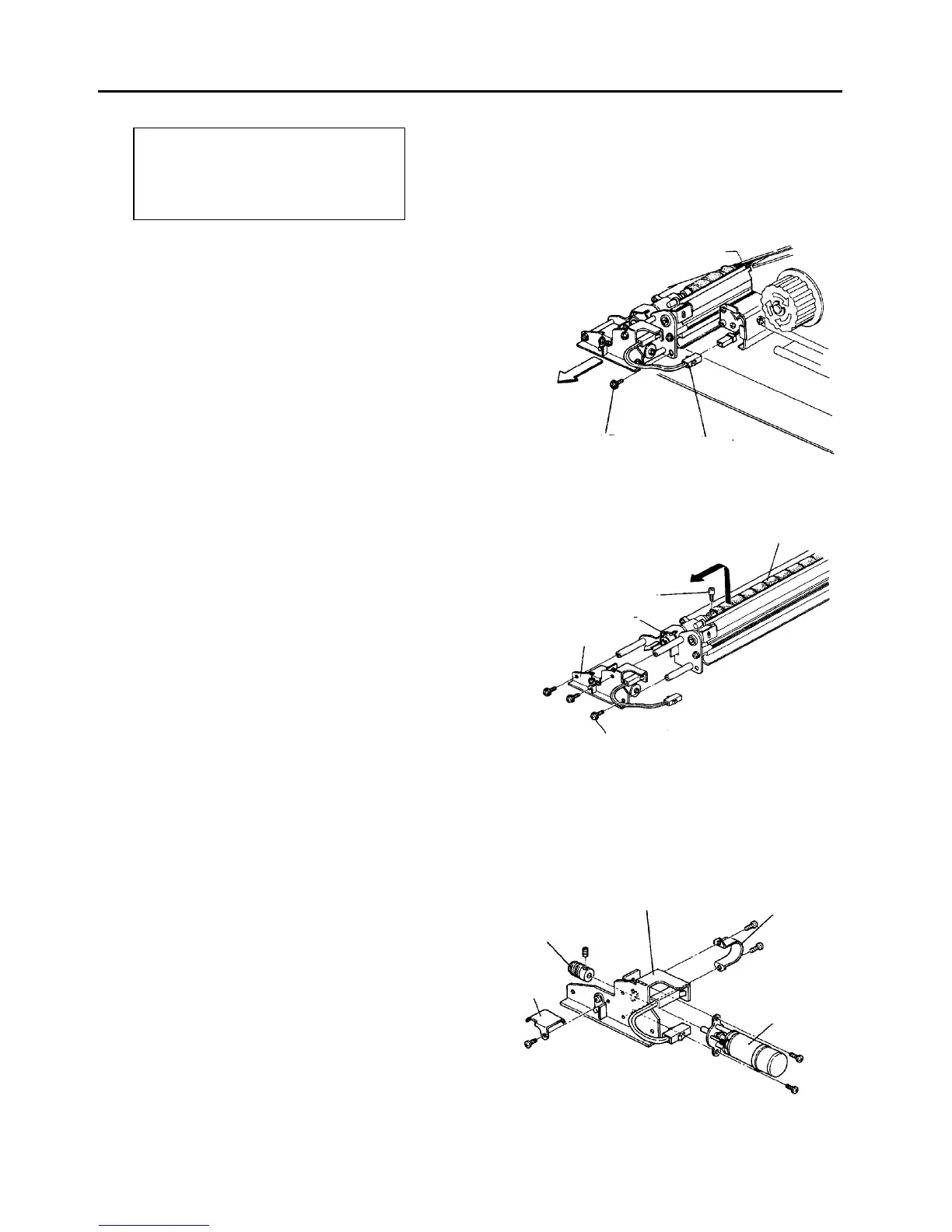
2.7 OPC Cleaning Unit
2.7.1 Replacing the OPC cleaning brush
PM cycle: Replace the brush roller and
lubricate the gear every 600K.
Clean the brush fibers scattered inside
and around the unit using a vacuum
cleaner every 600K.
1. Turn off the main switch.
2. Open the front door. Remove two screws to allow
it to open further.
3. Pull out the 2P connector for the oscillating motor.
4. Remove the OPC cleaning unit fixing screw.
5. Pull out the OPC cleaning unit.
6. Remove the oscillating motor assembly (3 screws).
7. Remove the brush roller set screw.
8. Pull the brush roller drive joint toward the front and
pull out the brush roller.
9. Replace the brush roller and assemble it in the
reverse order.
CAUTION
Give the oscillating gear and its groove
(including the pin) a thin coat of grease (G-40M)
every 600K.
NOTE
If the scattered brush fibers are not cleaned every
600K copies, the transfer or separation corona
leakage tends to occur.
2.7.2 Replacing the oscillating motor
1. Remove the oscillating motor assembly.
2. Remove the gear cover (one screw).
3. Remove the oscillating gear (one Allen screw).
4. Remove the motor support plate (2 screws).
5. Remove the oscillating motor (2 screws) and
replace the motor.
6. Reassemble in the reverse order.
Unit fixing screw
2P connector for
oscillating motor
Brush roller
Brush roller set screw
Drive joint
Oscillating motor
assembly
Fixing screws (3)
Motor gear
Oscillating motor
assembly
Motor support
plate
Oscillating
motor
Gear cover













 To Next Page