SteelFusion Edge Hardware and Maintenance Guide
17
2U SteelFusion Edge appliances SteelFusion Edge Overview
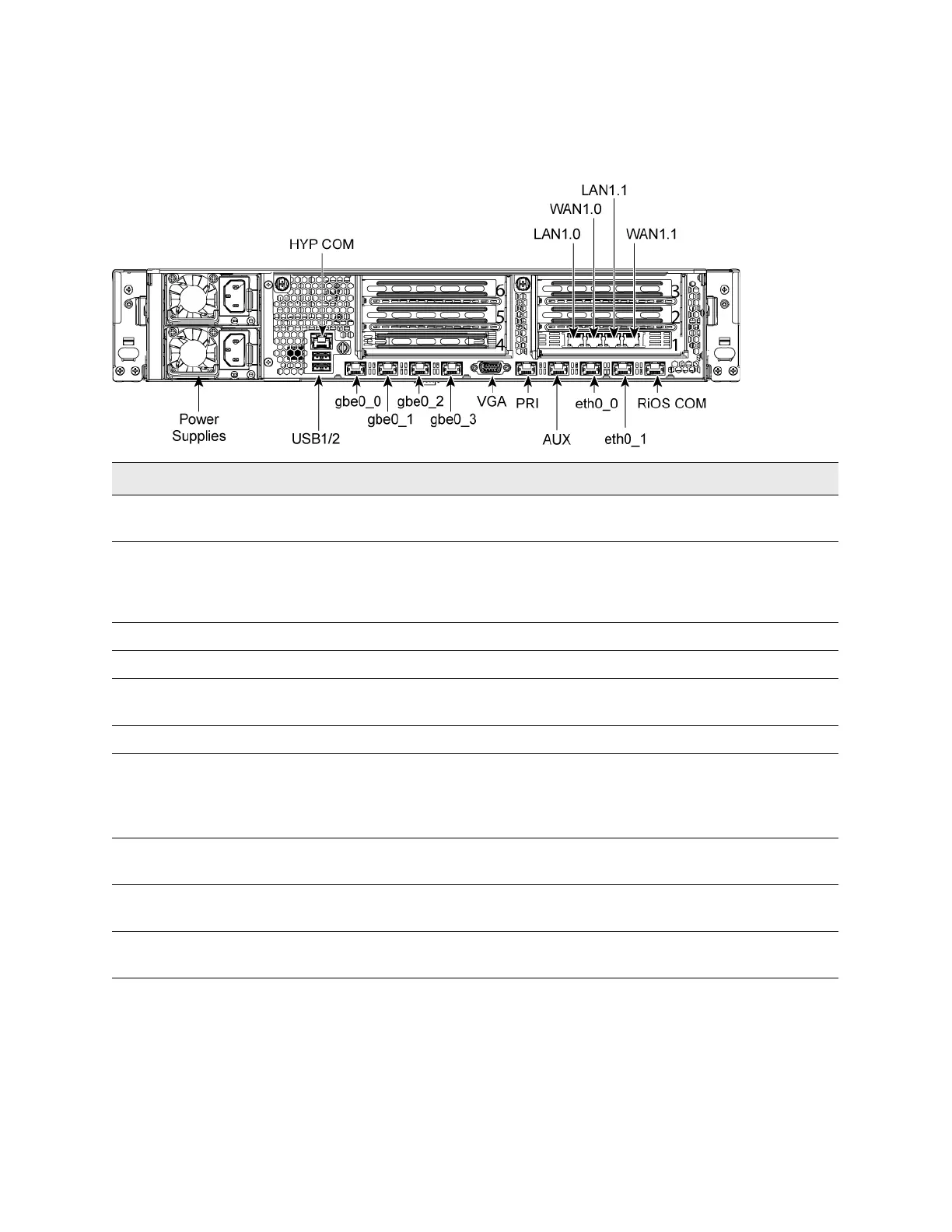
Figure 1-7 shows the port labels on the 2U SteelFusion Edge appliance. They are described in the
following table.
Figure 1-7. 2U SteelFusion Edge appliance port labels (back view)
Port Description
HYP COM HYP serial RJ45 COM port manages the hypervisor node. Serial settings: 9600 bps, 8
data bit, 1 stop bit, no parity.
LAN1.0, WAN1.0,
LAN1.1, WAN1.1
Provides access to the 10/100/1000 Base-TX.
• The LAN port connects the system to a LAN switch.
• A WAN port connects the system to the WAN router.
Power Supply Supplies power to the appliance.
USB 1, USB 2 Optional USB ports for hypervisor connectivity.
gbe0_0, gbe0_1,
gbe0_2, gbe0_3
1 Gbps interfaces used for hypervisor connectivity.
VGA DB15 connector used for hypervisor video connectivity.
PRI
(Primary)
The management interface that connects the SteelFusion Edge to a LAN switch. This
management interface enables you to connect to the Management Console and the
SteelFusion Edge CLI. The primary and auxiliary ports cannot share the same network
subnet.
AUX
(Auxiliary)
An optional port that provides an additional management interface for a secondary
network. The primary and auxiliary ports cannot share the same network subnet.
eth0_0, eth0_1 Data interfaces that support the use of iSCSI, BlockStream heartbeat, and
BlockStream sync.
RiOS COM RiOS serial RJ45 COM port manages the RiOS node. Serial setting: 9600 bps, 8 data
bit, 1 stop bit, no parity.



 To Next Page