C2 User Manual, Release 1.0.0
• Turn Off the Printer
• Take off the extruder cover
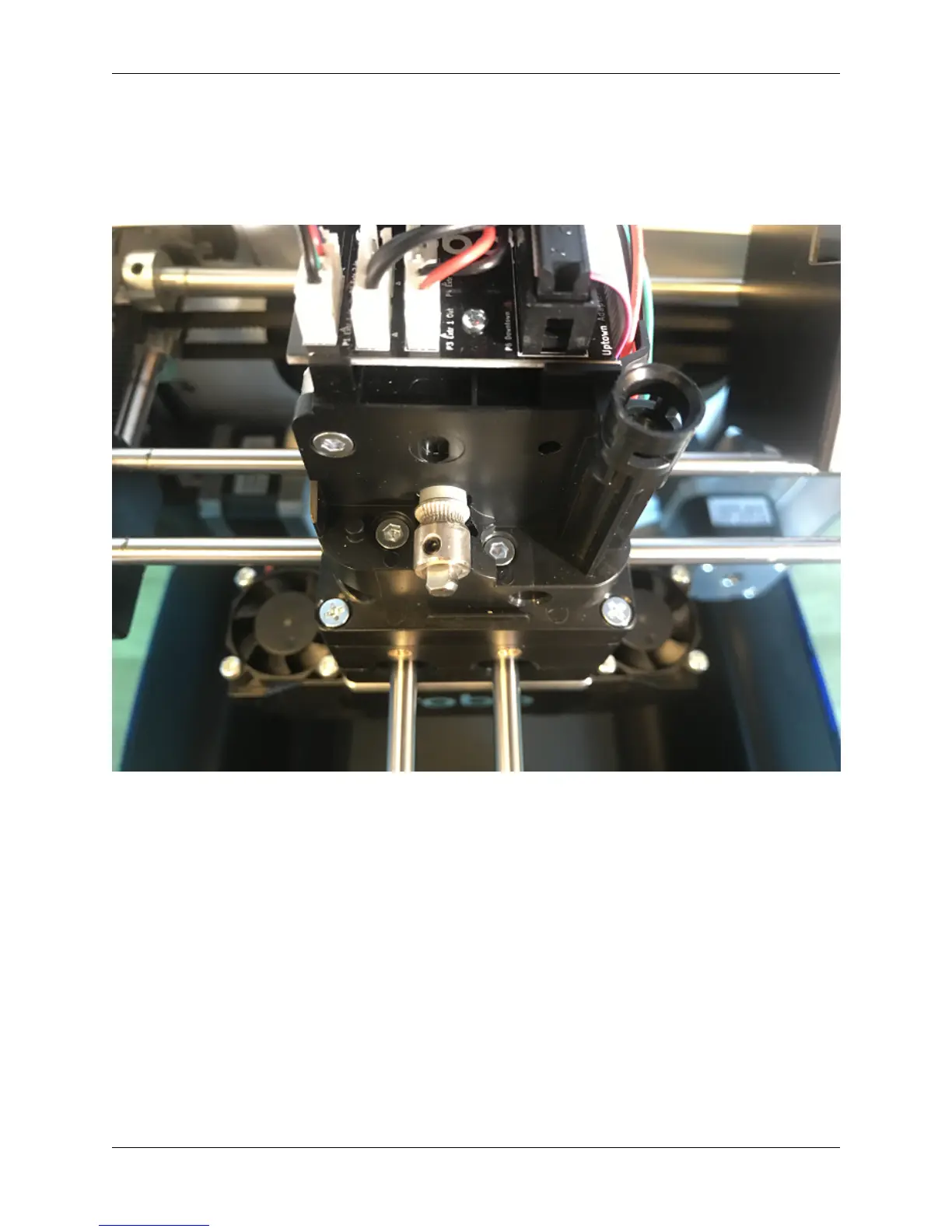
• Use a toothbrush to clean this drive gear of debris shown in the picture
• Turn the shaft, and continue scrubbing until it is cleaned of debris
3. Material is stuck around the spool
• Every so often, the material can get stuck on the spool holder or in the spool itself
• If the material is tangled on the spool holder, unwind about 12 inches or 25 cm of filament to loosen it, then reel
it back around the spool neatly, trying not to cross over plastic as it spools onto itself
• If the material is tangled within the spool, you will need to unwind some the spool and see where it is crossing
over itself. Cut the plastic where you find it is crossing over itself, and feed it back into the machine.
4. Drive Gear is not tightened down
• If your motor shaft is turning, but the drive gear is not, it means you need to tighten down your drive gear.
• To do this, turn off your machine and remove the extruder cover.
• Next, unscrew the extruder tensioner cover with a screwdriver.
4.3. Material Not Extruding 37



 To Next Page