C2 User Manual, Release 1.0.0
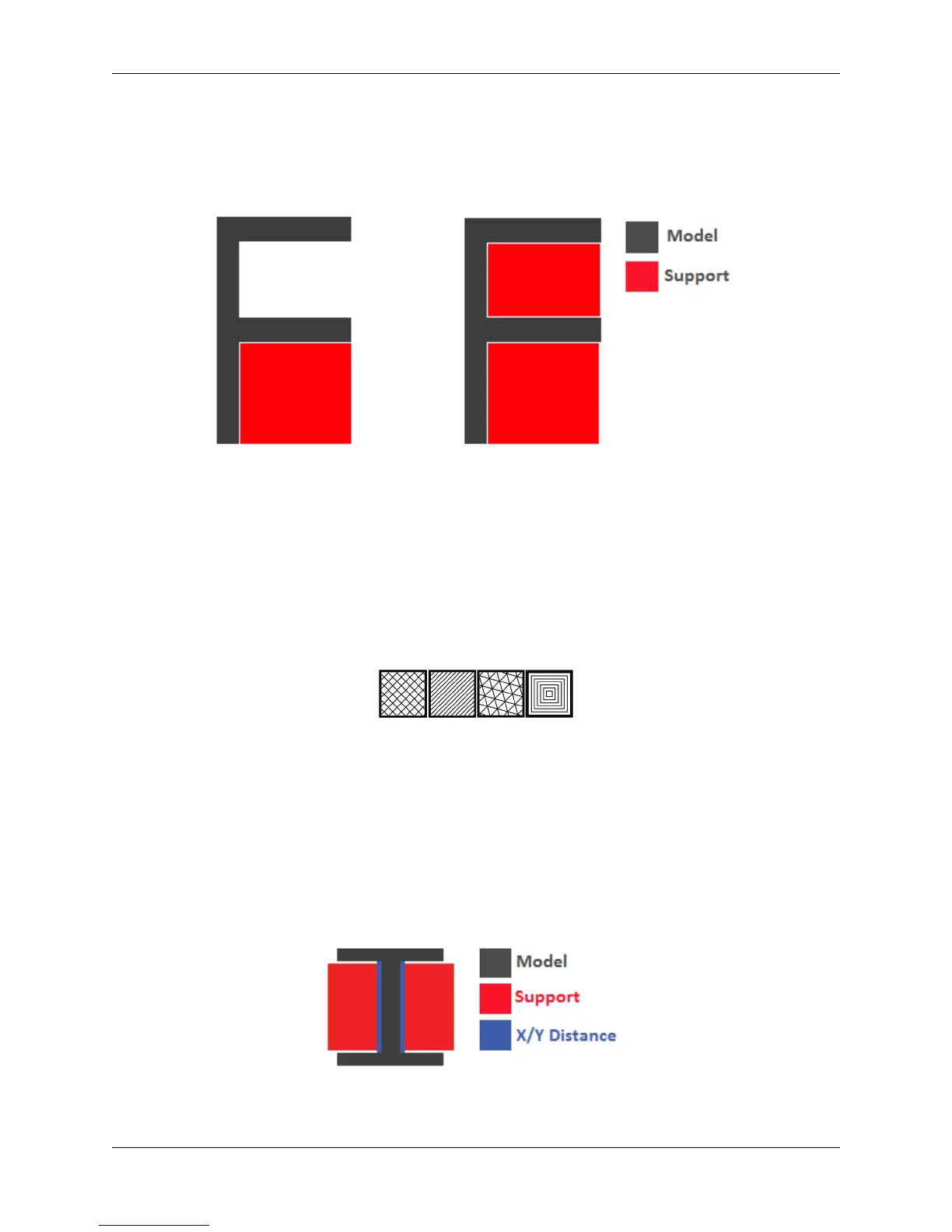
• Touching Buildplate: The support structure is only printed on overhangs that are directly over the
build platform.
• Everywhere: The support structure is printed everywhere there is an overhang, even if it is some-
where inside or on the model itself.
Left: Touching buildplate - Right: Everywhere
3. Overhang angle
The overhang angle determines the angle at which support material will be used. The larger the angle, the
less support material is used. If set at 90°, there will be no support material, whereas a 0° angle will use
supports everywhere on the model.
4. Support pattern
Support pattern determines the ease of removal and sturdiness of the support structure. There are five
patterns to choose from:
5. Support density
The density of your support will result in different strength of your support structure. A lower density will
be easier to remove, but not as strong compared to a higher density, which will be harder to remove from
the finished print, but give you a stronger support structure.
6. X/Y distance
X/Y distance determines the distance between the support structure and the model itself in the x and y
directions. A bigger value increases the distance, which will make the support structure less likely to
touch the model and fuse the support to the model. Be aware that as the value increases, the more likely a
small overhang in the x or y direction would not be supported because the distance is further away.
7. Z distance
72 Chapter 5. Cura for Robo Desktop



 To Next Page