Chapter 6 Navigating Your Cash Register Parameters
57 TS4240 User’s Guide
Options Dump Report
This report contains all the parameter option settings for the cash register
and in the following order:
• Print Options
• System Options
• Header text
• Footer text
• Other options programming
• Tax System
This report can use a lot of paper. Before you print, make sure you have
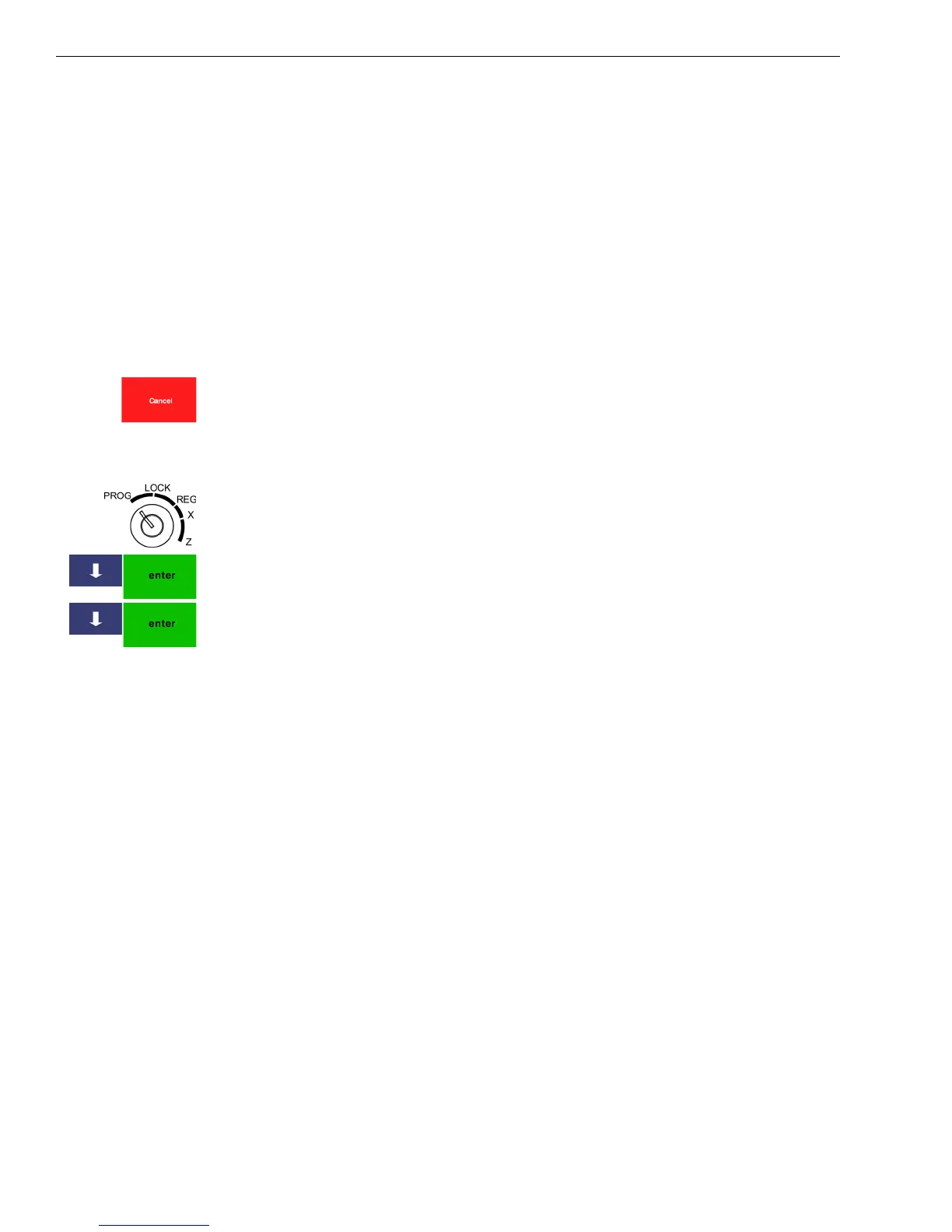
enough paper installed in the receipt printer. You can stop printing by
pressing the cancel key.
To print the Options Dump Report
406 -- OptionsOption Dump
1 Put the MGR key in the Mode key slot and turn it to the PROG
position. If prompted, enter the Manager passcode and press Enter.
2 Press the Arrow Down key to select 406 -- Options. Press Enter.
3 Press the Arrow Down key to select Option Dump. Press Enter.
407 Others
411 Direct PLU Setting
Specifies to link a previously programmed PLU to a specific key. When
the clerk presses the key, the item is automatically rung up. For more
information, see Mapping PLUs to Direct PLU Keys on page 40.
412 Coupon Setting
Specifies the preset price and the tax/HALO settings for a coupon. You
can over-ride this preset price at any time during a transaction.
413 Discount Setting
Specifies up to 3 percentage amounts. Specify a name and a percentage to
reduce the price of the item or a percentage to increase the price of the
item. This amount can be overridden at any time during a transaction.



 To Next Page