4.12
Section 4
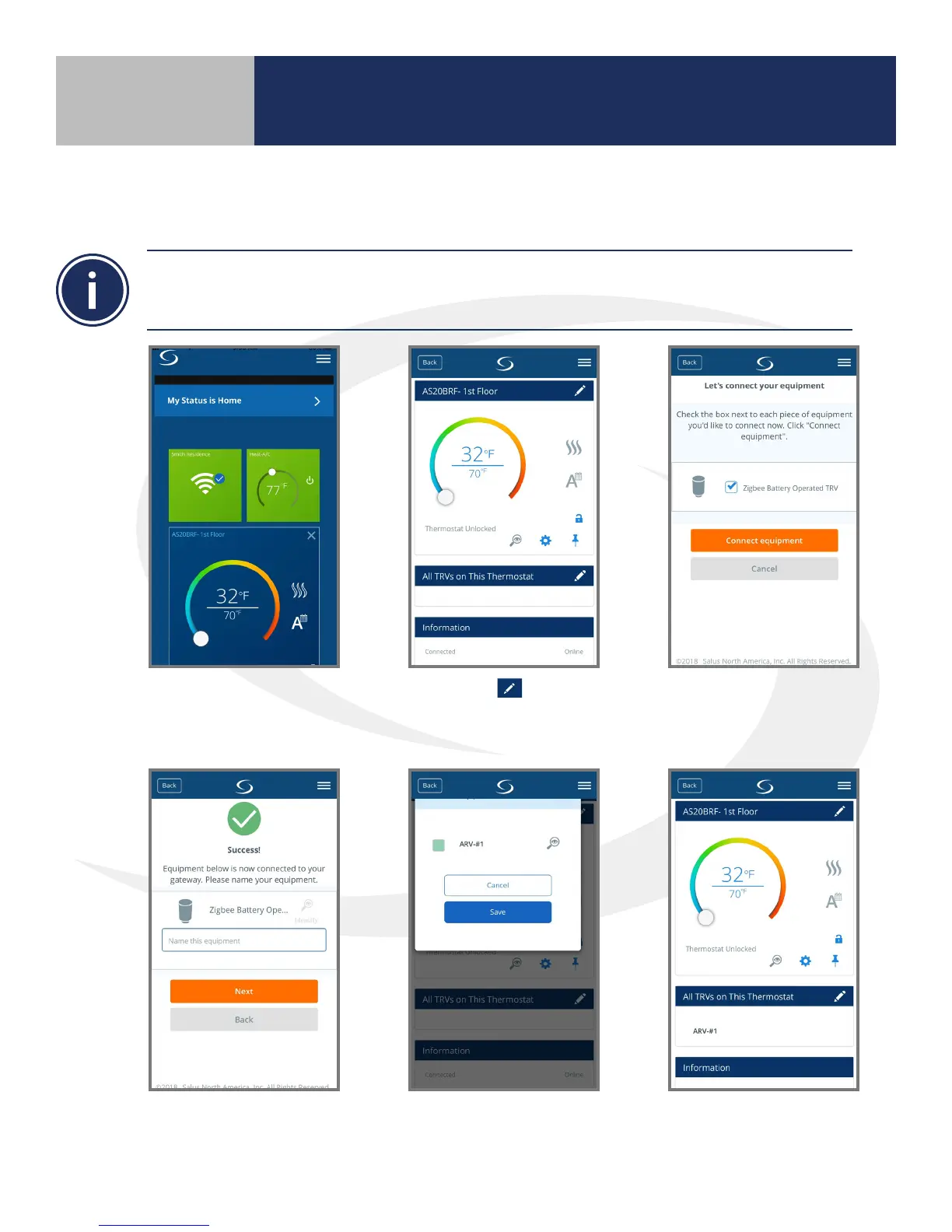
11. From the SALUS Smart Home application, select the thermostat with which the ARV10RFM Radiator Valve
Actuators are to be associated
12. Press the thermostat
name to enter the
conguration menu.
13. Select the tool
next to “All TRV’s on
This Thermostat”
14. Press scan for equipment and
check all boxes for ARV10RFM
Actuators to be connected.
All ARV10RFM Actuators
will be listed under “All
TRV’s on This Thermostat”
15. Give each ARV10RFM
Actuator a unique name
16. Check o all actuators to
be connected (The box
turns green when selected)
Device Pairing & Setup
with Internet Connection
The SALUS wireless system allows up to 6 actuators to communicate with one AS20WRF/BRF
thermostat. All ARV10RFM Radiator Valve Actuators to be associated with a single thermostat MUST
BE IN PAIRING MODE before nalizing the AS20WRF/BRF setup.”



 To Next Page