(ADIMN MENU _ Value setting/ Fitness/ Export fitness level)
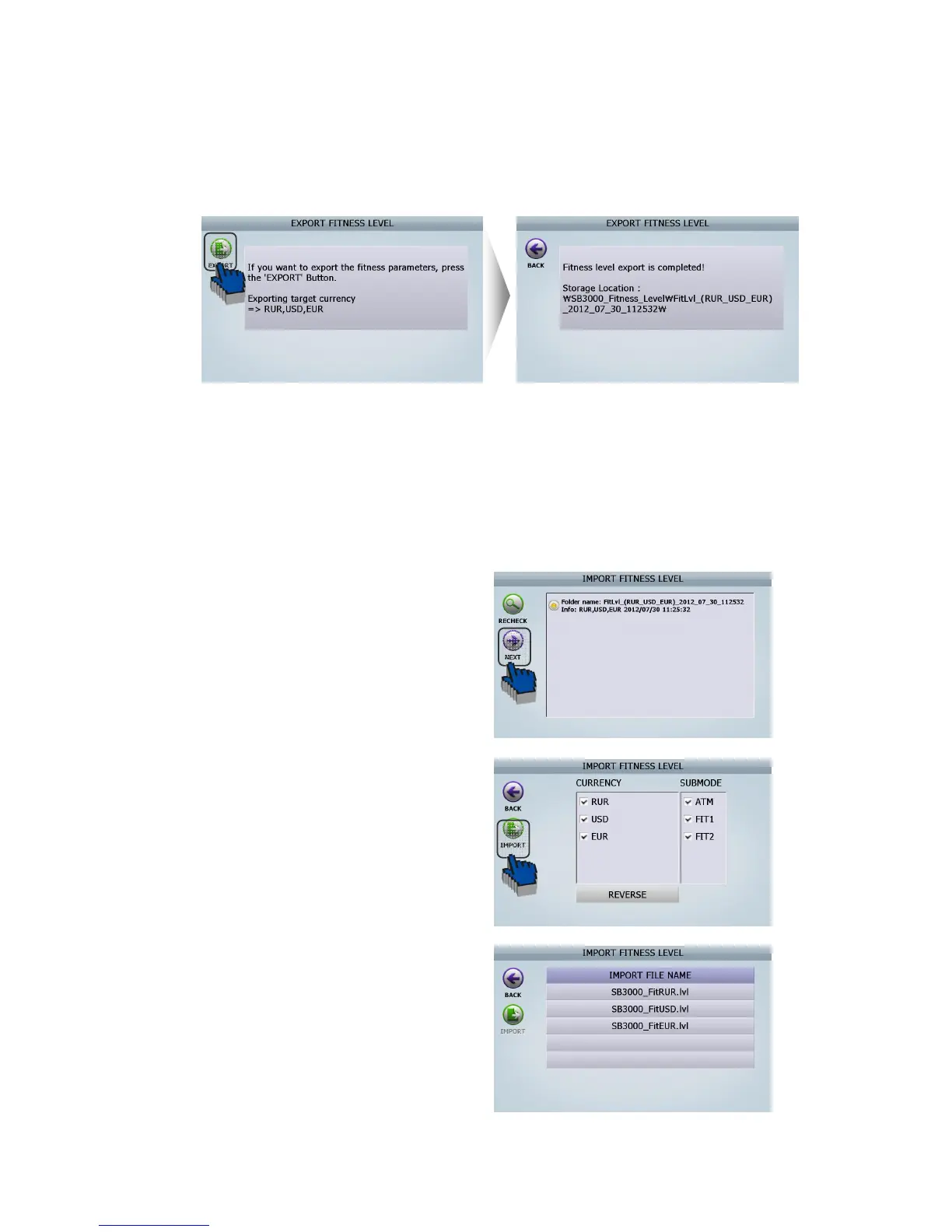
[3] Touch on [EXPORT] Icon. Then LCD will be displayed as follows
[4] The file is created in USB memory stick.
(File folder name: SB3000_Fitness_Level)
[5] Insert USB Memory Stick, which has ‘SB3000_Fitness_Level’ folder, to another SB-3000 that
supervisor want to input previously fitness level to.
[6] Select ‘Import fitness level’ in this menu.
(ADIMN MENU _ Value setting/ Fitness/ Import fitness level)
[7] LCD of another SB-3000 will be displayed as
follows
-1 After checking the file which you want to apply to
another SB-3000. And then touch [NEXT] Icon
-2. Select the currencies and fitness Sub-Mode which
supervisors want to apply to another SB-3000. And
touch [IMPORT] Icon
-3. Finish
(FIG 8-26)



 To Next Page