[8] Finishes
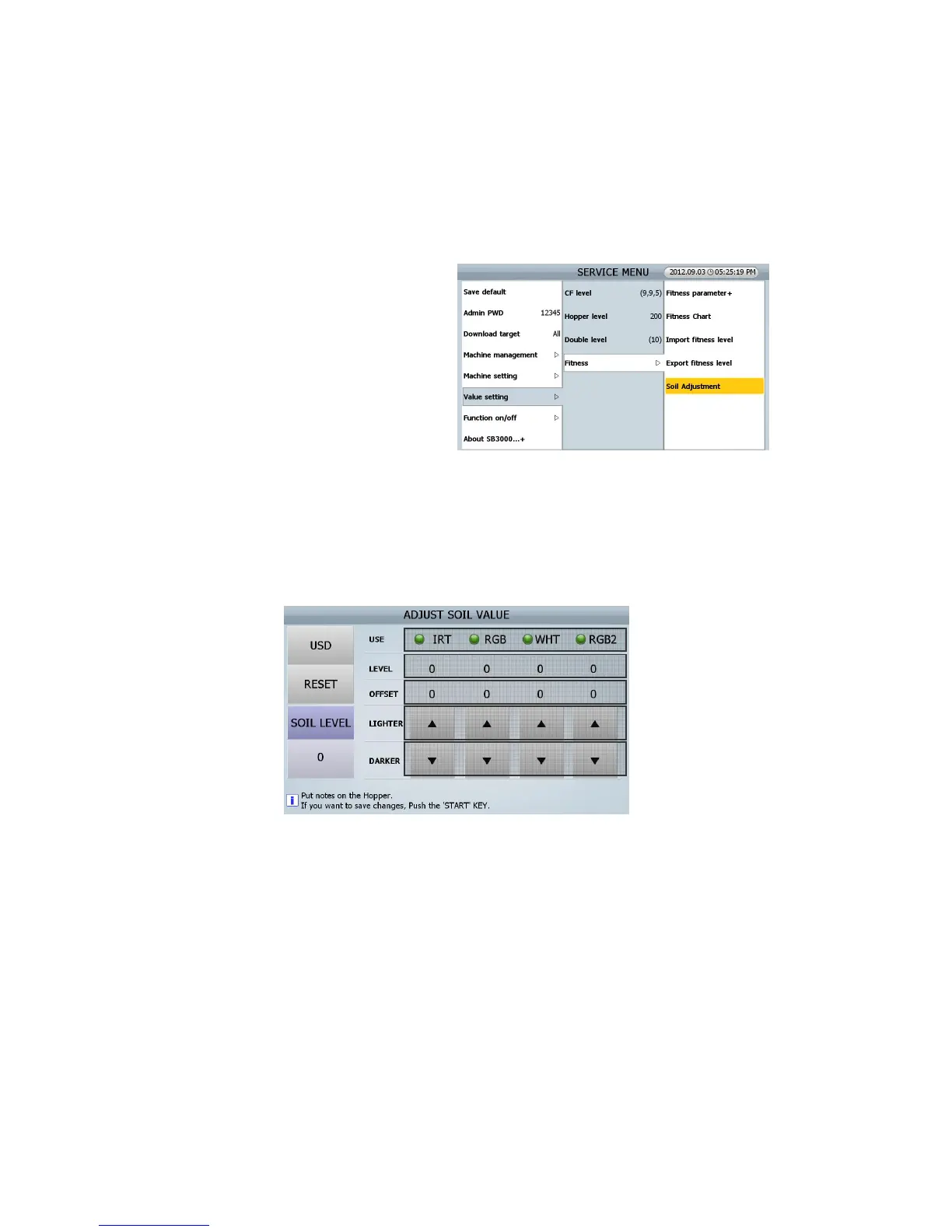
■ Soil adjustment
1. Explanation
1) Due to tolerance between SB-3000, each
machine has the different sorting level
even if same soil level is set
2) To correct this tolerance between SB-3000,
“ADJUST SOIL VALUE” menu in service
mode has been added
3) In this menu “ADJUST SOIL VALUE”, it is
possible to manually adjust the quantity of
IR, RGB, WHT, and RGB 2 to reduce the tolerance
4) For example, When the Image or Option Board are changed or CIS sensors are changed, the Soil
level need to be adjusted in order to reduce to the tolerance between the sets.
2. MENU
① CURRENCY: Currency which needs correction of the tolerance of SOIL LEVE
In SB-3000, wee use US 1$ need for ADJUST SOIL VALUE in all currency.
② RESET: reset all adjusting offset.
③ SOIL LEVEL: key for changing value of LIGHT SOURCE
④ USE: Light Source
IRT (IR Transmission), RGB (CIS1 Reflection), WHT (WHITE), and RGB2 (CIS2 Reflection)
⑤ LEVEL: Value of each Light Source
⑥ OFFSET: the Adjusting value of each Light Source
⑦ & ⑧ LIGHTER & DARKER: Key for changing the adjusting value.
④
⑤
②
①
③
⑥
⑦
⑧
(FIG 8-30)



 To Next Page