8.6
SEL-587Z Instruction Manual Date Code 20020903
Front-Panel Interface
Front-Panel Operation
Secondary Functions
After a primary function is selected (see Figure 8.2 on page 8.5), the
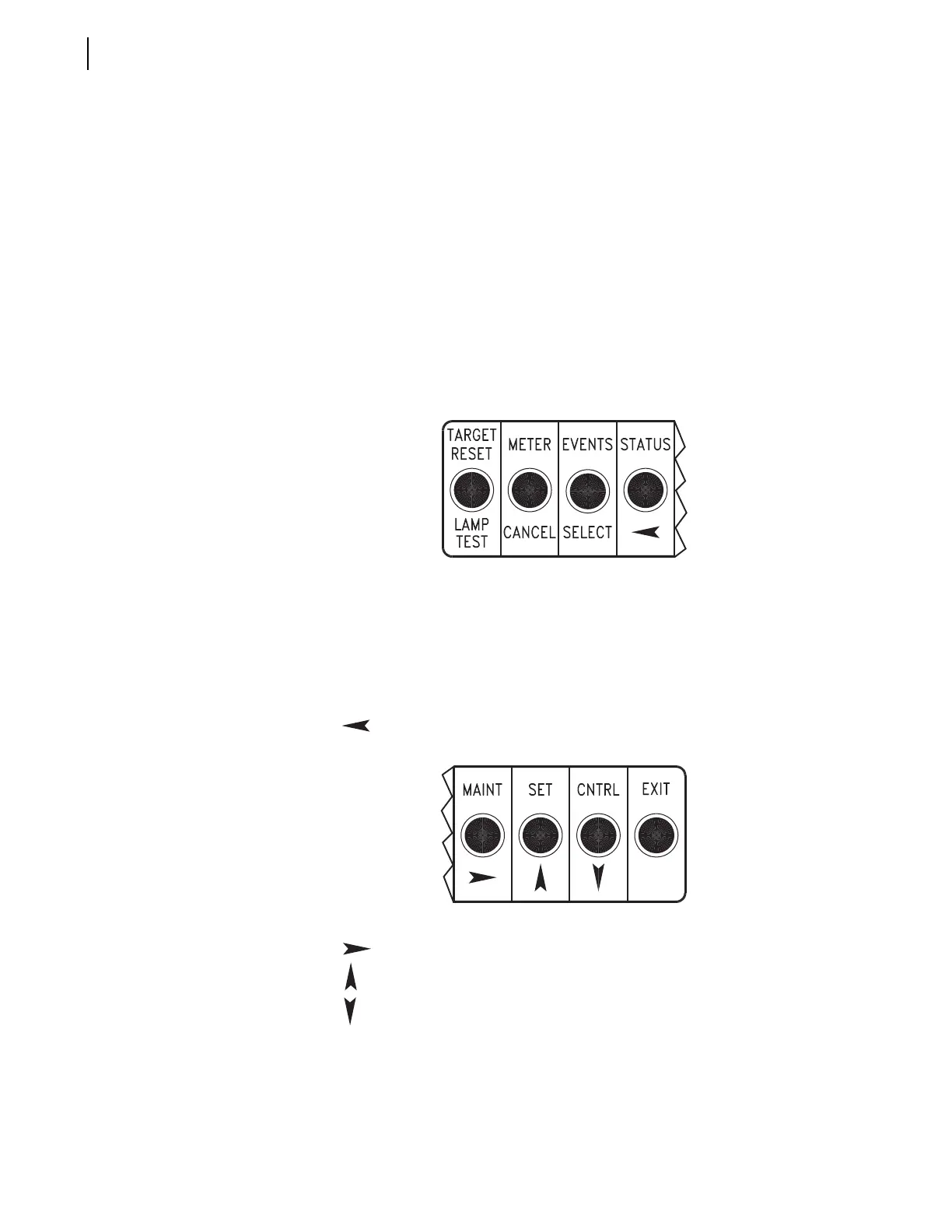
pushbuttons revert to operating on their secondary functions (see Figure 8.3).
Use the left/right arrows to underscore a desired function. Then press the
{SELECT} pushbutton to select the function.
Use left/right arrows to underscore a desired setting digit. Then use the up/
down arrows to change the digit. After the setting changes are complete, press
the {SELECT} pushbutton to select/enable the setting.
Press the {CANCEL} pushbutton to abort a setting change procedure and
return to the previous display.
Press the {EXIT} pushbutton to return to the default display and activate the
primary pushbutton functions again (see Figure 8.2 on page 8.5 and
Figure 8.3).
Figure 8.3 Front-Panel Pushbuttons–Secondary Functions.
Function Description
Function Description
Password
Password
LAMP TEST
CANCEL
SELECT
Provides help screen information when viewing or changing
settings with pushbutton {SET}; provides help screen information
when viewing or operating local control with pushbutton {CNTRL}.
Cancel Setting
Edit or Escape to upper setting level
Select displayed option or setting
Scroll left on display to underline desired function or setting digit
Scroll left on display to underline desired function or setting digit
Scroll up on display; increment setting value
Scroll down on display; decrement setting value
The front-panel display indicates the arrow button to use (shows symbols: ← → ↑ ↓).


 To Next Page