Navigation (NAV)* 139
Operating RADIO, MEDIA (audiovisual
systems)
NAME, TEL NAV, INFO CAR, SETUP
The software version of the current navigation DVD will be displayed.
Note
You can obtain information on updates for the navigation DVD from your
Dealer.
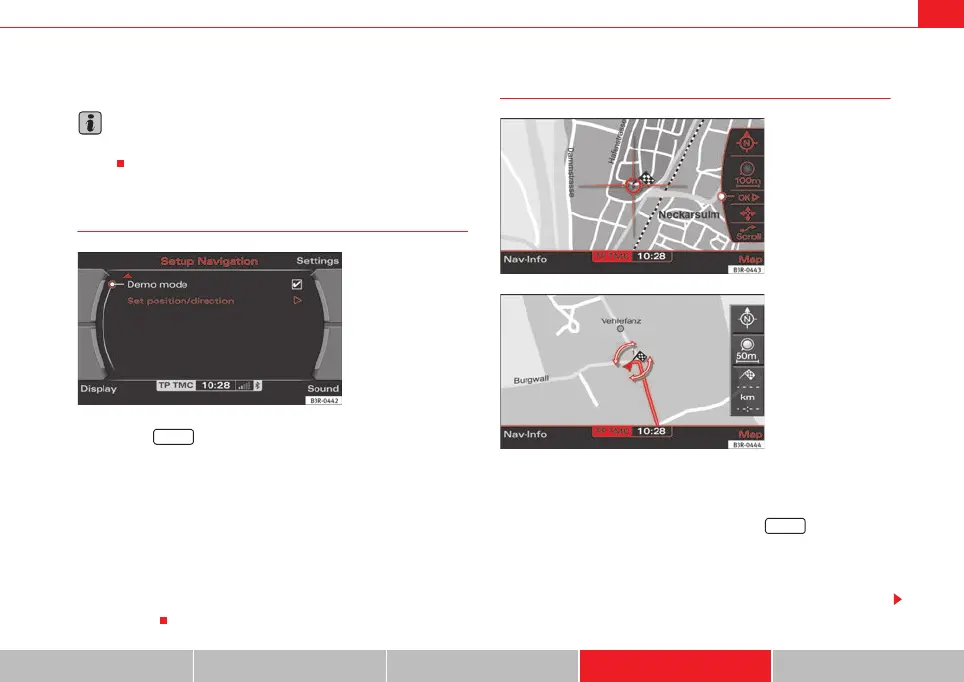
Demo mode
– Press the ⇒ page 9 function button in the navigation
menu.
– Place a tick
⇒ fig. 174 next to the option Demo mode to acti-
vate the option.
The Demo mode provides a simulation of the route you have entered. This
allows you to effectively plan and display your destination by showing
specific map content ⇒ page 134 or route criteria ⇒ page 121.
The map type “Location 3D” ⇒ page 133 cannot be displayed in Demo mode.
If you have selected map type “Location 3D”, the simulation is shown in map
type "location".
Setting the position/direction manually
– Enter the desired location data in the destination entry menu
⇒ page 104, fig. 121.
– Press the function selector button marked ⇒ page 9.
– Select Set position/direction ⇒ fig. 174.
– Select the desired starting point for route guidance on the map
using the cursor ⇒ page 129.
Fig. 174 Navigation
settings: Activating the
demo mode
SETUP
Fig. 175 Navigation
settings: Entering posi-
tion/direction manually
Fig. 176 Navigation
settings: Set direc-
tion/position
SETUP
media_systemE_EN.book Seite 139 Montag, 21. September 2009 1:48 13



 To Next Page