Introduction
Voice control (NAVIGATION)*
ENTER AN ADDRESS
Enter address
Navigate to City, Street,
Number
a)
SEARCH FOR POIs
a)
Nearest car park
Search for restaurants
near destination.
HOME ADDRESS Home address
LAST DESTINATIONS Last destinations
NAVIGATE TO CON-
TACTS
Navigate to Forename
Surname
ROUTE GUIDANCE
Start route guidance
Route information
a)
Only available for the model: “Navi System Plus”
Voice control
VOICE CONTROL
Pardon?
Back
Main menu
Cancel voice control
Pause voice control
HELP
Help
What can I say?
PUSH-TO-TALK
Note
Voice control is unavailable during parking
manoeuvres
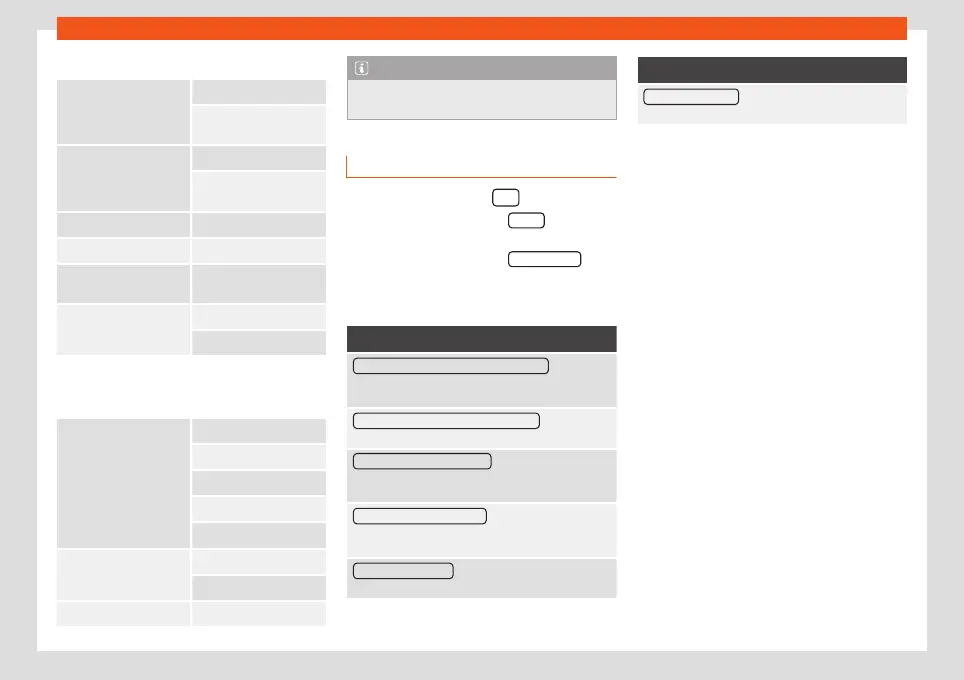
Voice control settings
●
Press the infotainment button.
●
Press the function button Setup to access
the system setup.
●
Press the function button Voice control .
When you close a menu, the changes will
take effect automatically.
Function button: function
Example commands (infotainment system) : View voice
command examples on the infotainment system
screen.
Example commands (instrument cluster)
a)
: View voice
command examples on the instrument panel.
Starting tone of voice control : a signal will be emitted
when enabling voice control. Press to deactivate the
signal.
Ending tone of voice control : a signal will be emitted
when disabling voice control. Press to deactivate the
signal.
Dialogue input tone: the input tone to confirm a
command is activated.
Function button: function
Dialogue end tone: the end tone to confirm a com-
mand is deactivated.
a)
Available depending on equipment
17



 To Next Page