Telephone management system
Note
Some telephones need to be restarted to
re-download the most recent contacts
added.
Connectivity Box* / Wireless
Charger*
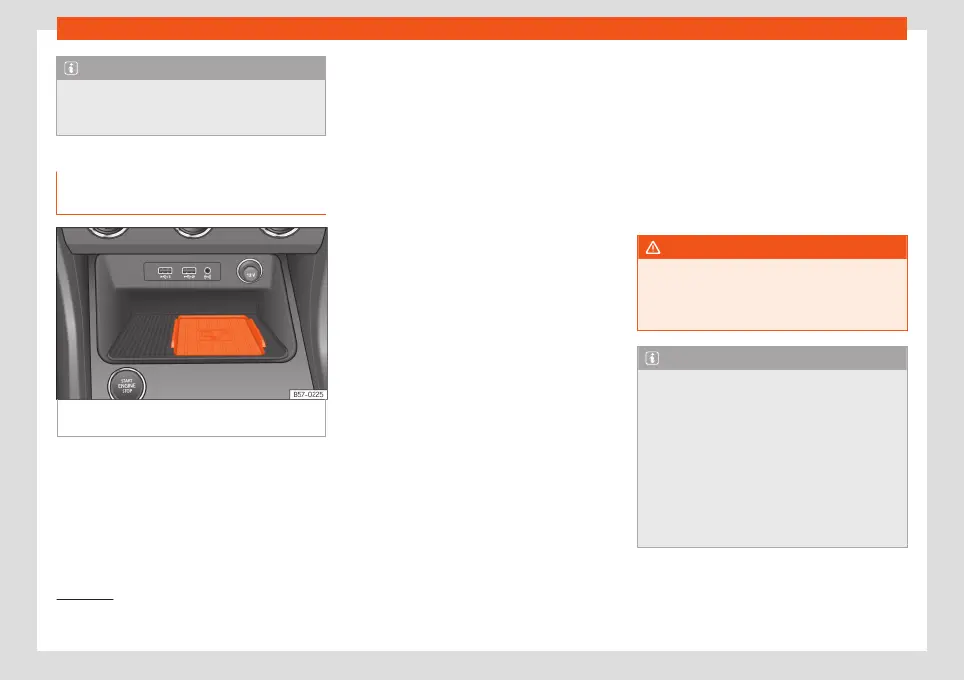
Fig. 78
Centre console: slot for mobile phone
connection.
The Connectivity Box includes different func-
tions that will help to use your mobile device.
They are the “Wireless Charger” and the
“Mobile Signal Amplifier”.
The Wireless Charger only features the
“Wireless Charger” function.
“Wireless Charger”
The “Wireless Charger” allows mobile devi-
ces with Qi
1)
technology to be charged with-
out a cable.
To charge your mobile phone wirelessly:
●
Place your mobile device with Qi technolo-
gy
1)
in the middle of the pad with the screen
facing up
›››
Fig. 78.
When you do so, make sure there are no ob-
jects between the pad and the mobile phone.
The mobile phone will start charging auto-
matically. For further information about
whether your mobile device uses Qi technol-
ogy, please check your mobile phone's user
manual or visit the SEAT website.
“Mobile Signal Amplifier”
The “Mobile Signal Amplifier” allows you to
reduce the radiation in your vehicle and enjoy
better reception.
For safety reasons, it is recommended that
you pair the radio and the mobile device us-
ing Bluetooth
®
and place the mobile phone
on the Connectivity Box pad, so as to have
better reception without having to handle the
mobile phone.
To establish a connection with the vehicle's
external aerial:
●
Place your mobile device in the middle of
the pad with the screen facing up
›››
Fig. 78.
When you do so, make sure there are no ob-
jects between the pad and the mobile phone.
Your mobile phone will automatically be
ready to make use of the external aerial.
WARNING
The mobile phone may heat up due to the
wireless charging. Think about the temper-
ature of your device before you pick it up,
and take care when removing it.
Note
●
Your mobile device must support the Qi
wireless inductive charging interface
standard for proper operation.
●
If your mobile phone has a cover or a pro-
tective casing, this may affect the Connec-
tivity Box functions.
●
There must be no metallic objects be-
tween the pad and the mobile device that
might affect the wireless charging or the
connection with the external aerial.
1)
Qi technology allows you to charge your mo-
bile phone wirelessly.
90



 To Next Page