Operation • 103
17-10-07-654-100_01-2020B
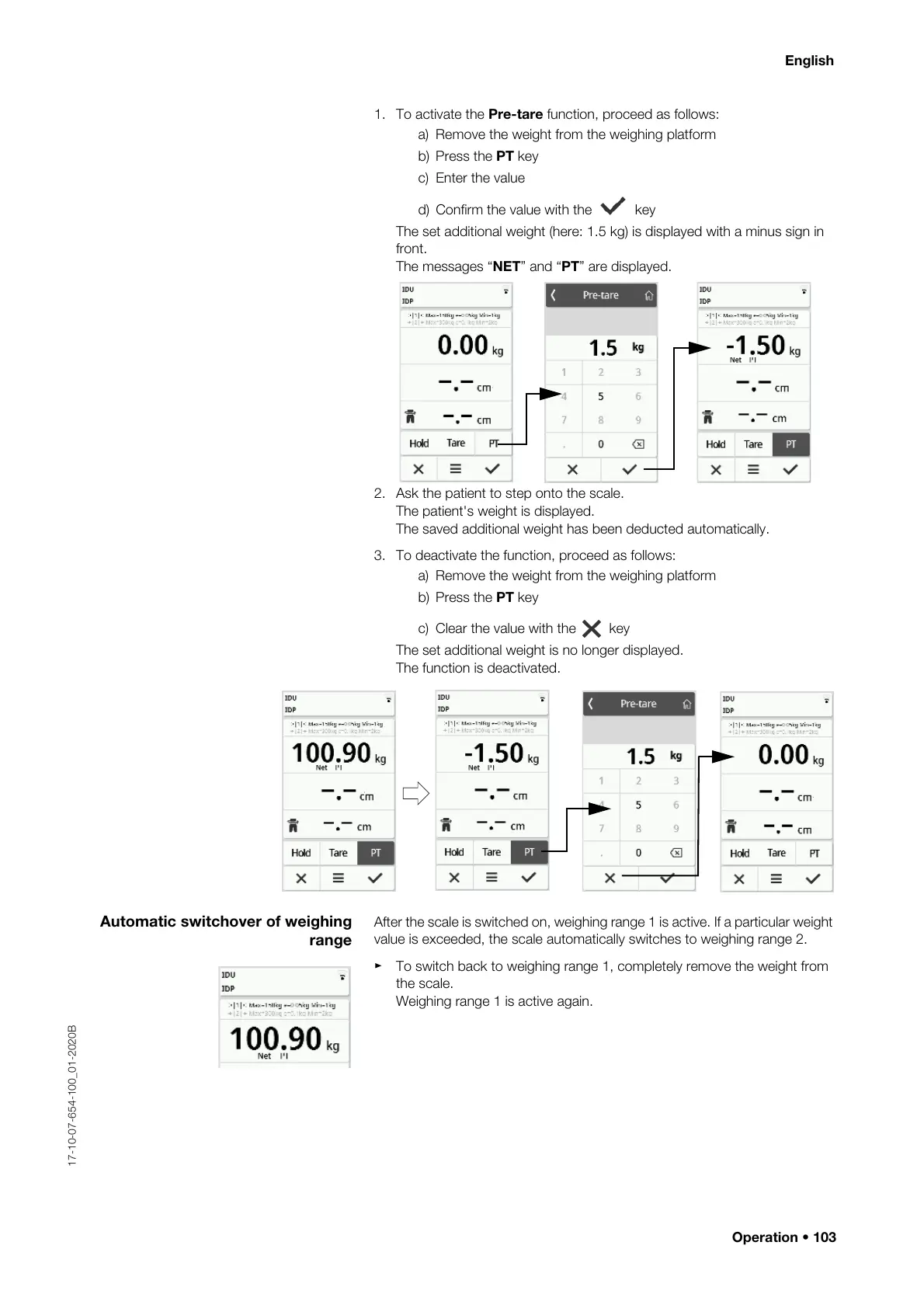
1. To activate the Pre-tare function, proceed as follows:
a) Remove the weight from the weighing platform
b) Press the PT key
c) Enter the value
d) Confirm the value with the key
The set additional weight (here: 1.5 kg) is displayed with a minus sign in
front.
The messages “NET” and “PT” are displayed.
2. Ask the patient to step onto the scale.
The patient's weight is displayed.
The saved additional weight has been deducted automatically.
3. To deactivate the function, proceed as follows:
a) Remove the weight from the weighing platform
b) Press the PT key
c) Clear the value with the key
The set additional weight is no longer displayed.
The function is deactivated.
Automatic switchover of weighing
range
After the scale is switched on, weighing range 1 is active. If a particular weight
value is exceeded, the scale automatically switches to weighing range 2.
► To switch back to weighing range 1, completely remove the weight from
the scale.
Weighing range 1 is active again.



 To Next Page