Configuration • 109
17-10-07-654-100_01-2020B
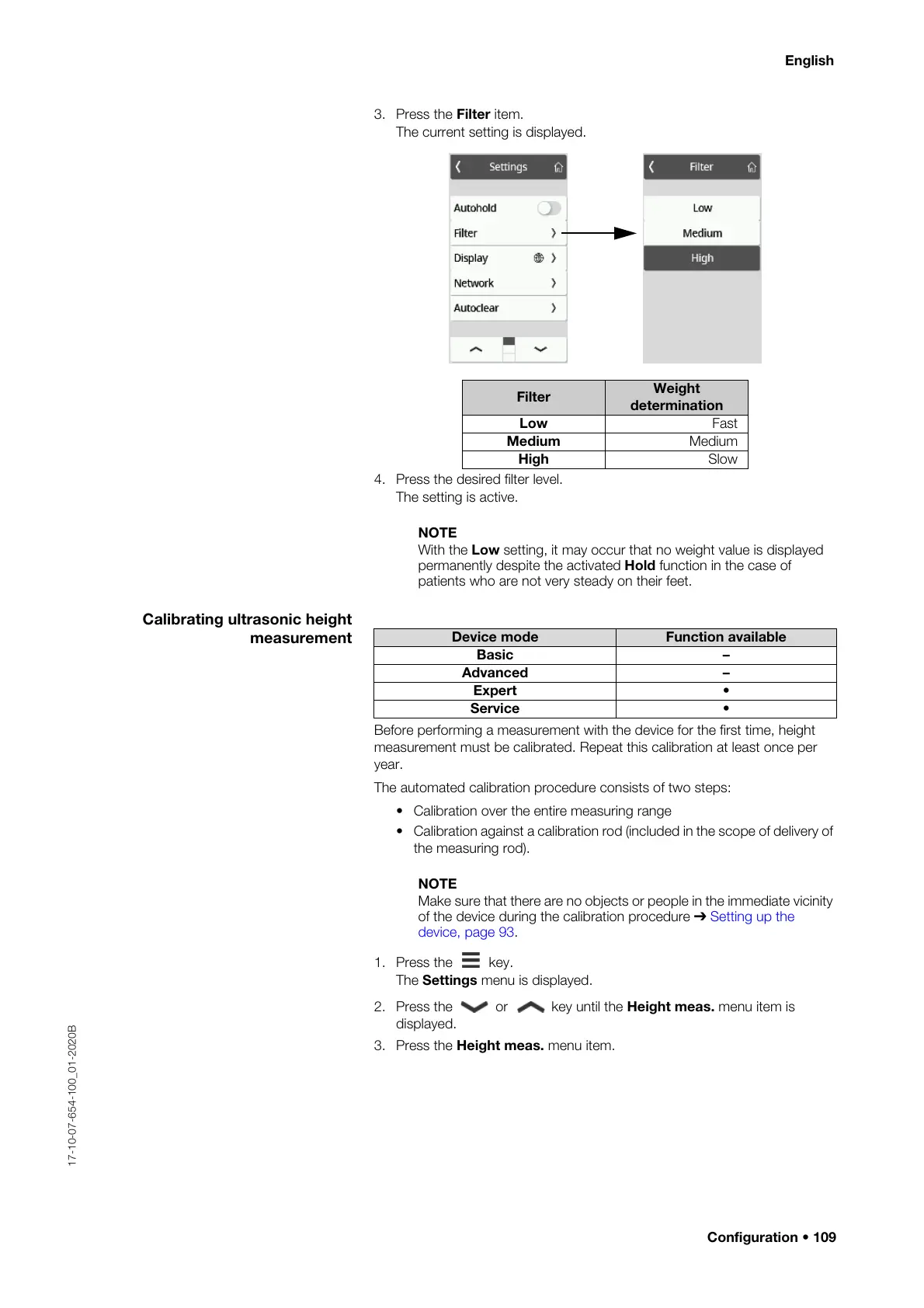
3. Press the Filter item.
The current setting is displayed.
4. Press the desired filter level.
The setting is active.
NOTE
With the Low setting, it may occur that no weight value is displayed
permanently despite the activated Hold function in the case of
patients who are not very steady on their feet.
Calibrating ultrasonic height
measurement
Before performing a measurement with the device for the first time, height
measurement must be calibrated. Repeat this calibration at least once per
year.
The automated calibration procedure consists of two steps:
• Calibration over the entire measuring range
• Calibration against a calibration rod (included in the scope of delivery of
the measuring rod).
NOTE
Make sure that there are no objects or people in the immediate vicinity
of the device during the calibration procedure ➔
Setting up the
device, page 93.
1. Press the key.
The Settings menu is displayed.
2. Press the or key until the Height meas. menu item is
displayed.
3. Press the Height meas. menu item.
Filter
Weight
determination
Low Fast
Medium Medium
High Slow
Device mode Function available
Basic –
Advanced –
Expert •
Service •



 To Next Page