Configuration • 113
17-10-07-654-100_01-2020B
WARNING!
Electric shock
The device is not de-energized when the display goes off.
► The device is not equipped with an on/off switch. Remove the
power supply connector if the device has to be de-energized, e.g.
for hygiene processing or maintenance work.
1. Press the key.
The Settings menu is displayed.
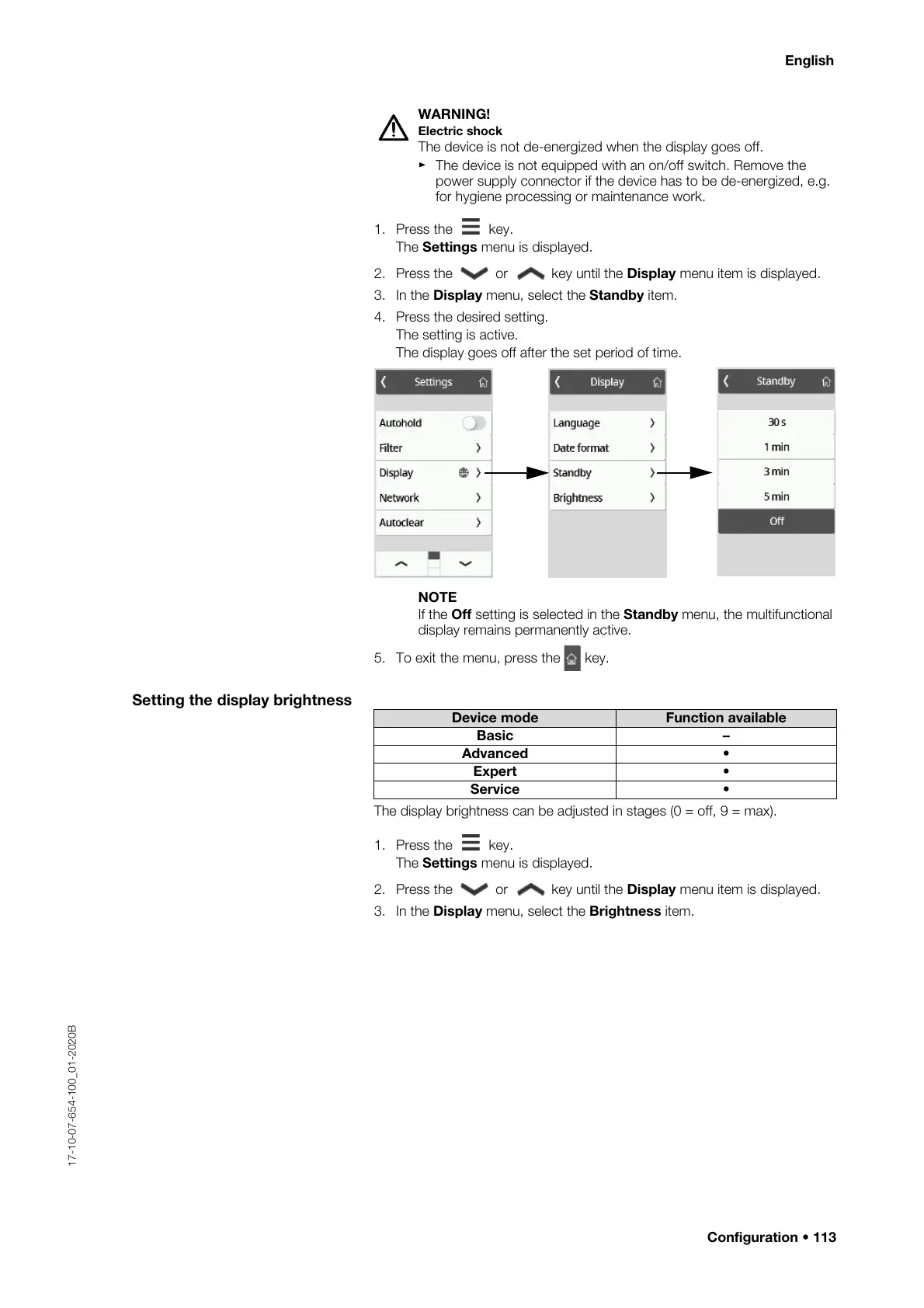
2. Press the or key until the Display menu item is displayed.
3. In the Display menu, select the Standby item.
4. Press the desired setting.
The setting is active.
The display goes off after the set period of time.
NOTE
If the Off setting is selected in the Standby menu, the multifunctional
display remains permanently active.
5. To exit the menu, press the key.
Setting the display brightness
The display brightness can be adjusted in stages (0 = off, 9 = max).
1. Press the key.
The Settings menu is displayed.
2. Press the or key until the Display menu item is displayed.
3. In the Display menu, select the Brightness item.
Device mode Function available
Basic –
Advanced •
Expert •
Service •



 To Next Page