122 • seca 655/654
17-10-07-654-100_01-2020B
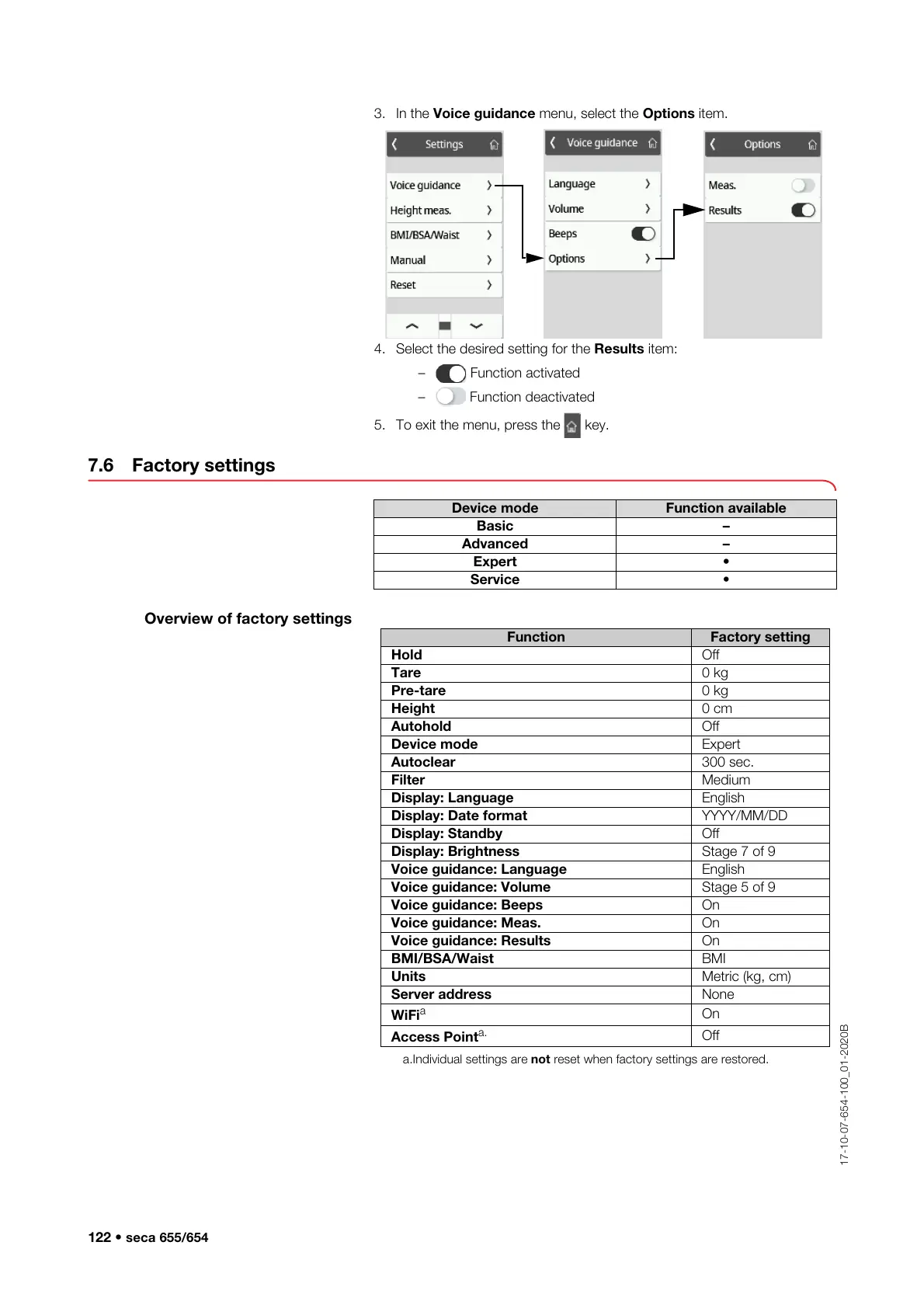
3. In the Voice guidance menu, select the Options item.
4. Select the desired setting for the Results item:
– Function activated
– Function deactivated
5. To exit the menu, press the key.
7.6 Factory settings
Overview of factory settings
Device mode Function available
Basic –
Advanced –
Expert •
Service •
Function Factory setting
Hold Off
Tare 0 kg
Pre-tare 0 kg
Height 0 cm
Autohold Off
Device mode Expert
Autoclear 300 sec.
Filter Medium
Display: Language English
Display: Date format YYYY/MM/DD
Display: Standby Off
Display: Brightness Stage 7 of 9
Voice guidance: Language English
Voice guidance: Volume Stage 5 of 9
Voice guidance: Beeps On
Voice guidance: Meas. On
Voice guidance: Results On
BMI/BSA/Waist BMI
Units Metric (kg, cm)
Server address None
WiFi
a
a.Individual settings are not reset when factory settings are restored.
On
Access Point
a.
Off



 To Next Page