128 • seca 655/654
17-10-07-654-100_01-2020B
10.4 Data transmission
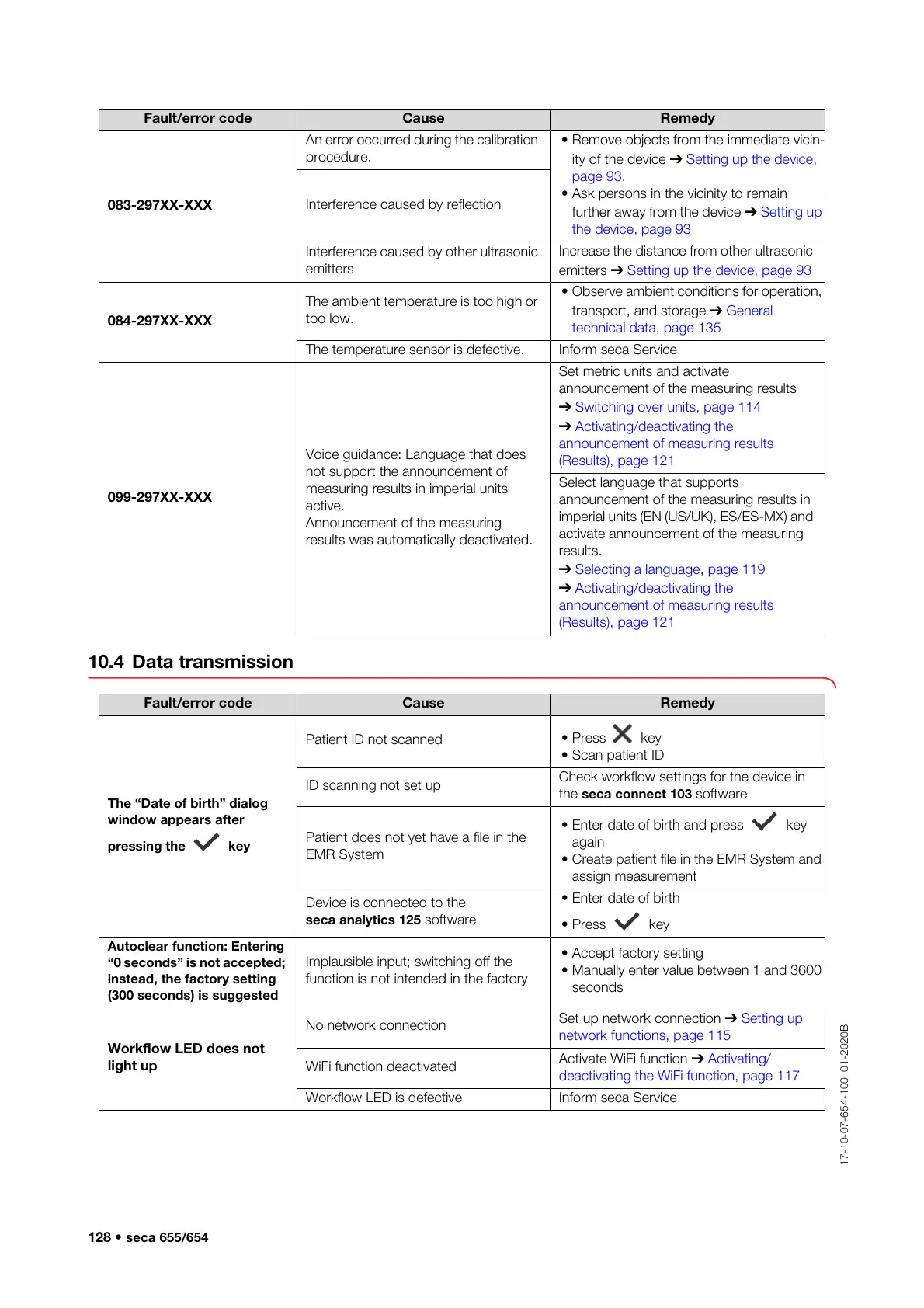
083-297XX-XXX
An error occurred during the calibration
procedure.
• Remove objects from the immediate vicin-
ity of the device ➔ Setting up the device,
page 93.
• Ask persons in the vicinity to remain
further away from the device ➔ Setting up
the device, page 93
Interference caused by reflection
Interference caused by other ultrasonic
emitters
Increase the distance from other ultrasonic
emitters ➔ Setting up the device, page 93
084-297XX-XXX
The ambient temperature is too high or
too low.
• Observe ambient conditions for operation,
transport, and storage ➔ General
technical data, page 135
The temperature sensor is defective. Inform seca Service
099-297XX-XXX
Voice guidance: Language that does
not support the announcement of
measuring results in imperial units
active.
Announcement of the measuring
results was automatically deactivated.
Set metric units and activate
announcement of the measuring results
➔
Switching over units, page 114
➔ Activating/deactivating the
announcement of measuring results
(Results), page 121
Select language that supports
announcement of the measuring results in
imperial units (EN (US/UK), ES/ES-MX) and
activate announcement of the measuring
results.
➔ Selecting a language, page 119
➔ Activating/deactivating the
announcement of measuring results
(Results), page 121
Fault/error code Cause Remedy
Fault/error code Cause Remedy
The “Date of birth” dialog
window appears after
pressing the key
Patient ID not scanned
• Press key
• Scan patient ID
ID scanning not set up
Check workflow settings for the device in
the seca connect 103 software
Patient does not yet have a file in the
EMR System
• Enter date of birth and press key
again
• Create patient file in the EMR System and
assign measurement
Device is connected to the
seca analytics 125 software
• Enter date of birth
• Press key
Autoclear function: Entering
“0 seconds” is not accepted;
instead, the factory setting
(300 seconds) is suggested
Implausible input; switching off the
function is not intended in the factory
• Accept factory setting
• Manually enter value between 1 and 3600
seconds
Workflow LED does not
light up
No network connection
Set up network connection ➔ Setting up
network functions, page 115
WiFi function deactivated
Activate WiFi function ➔ Activating/
deactivating the WiFi function, page 117
Workflow LED is defective Inform seca Service



 To Next Page