Troubleshooting • 129
17-10-07-654-100_01-2020B
10.5 Display message traffic light system
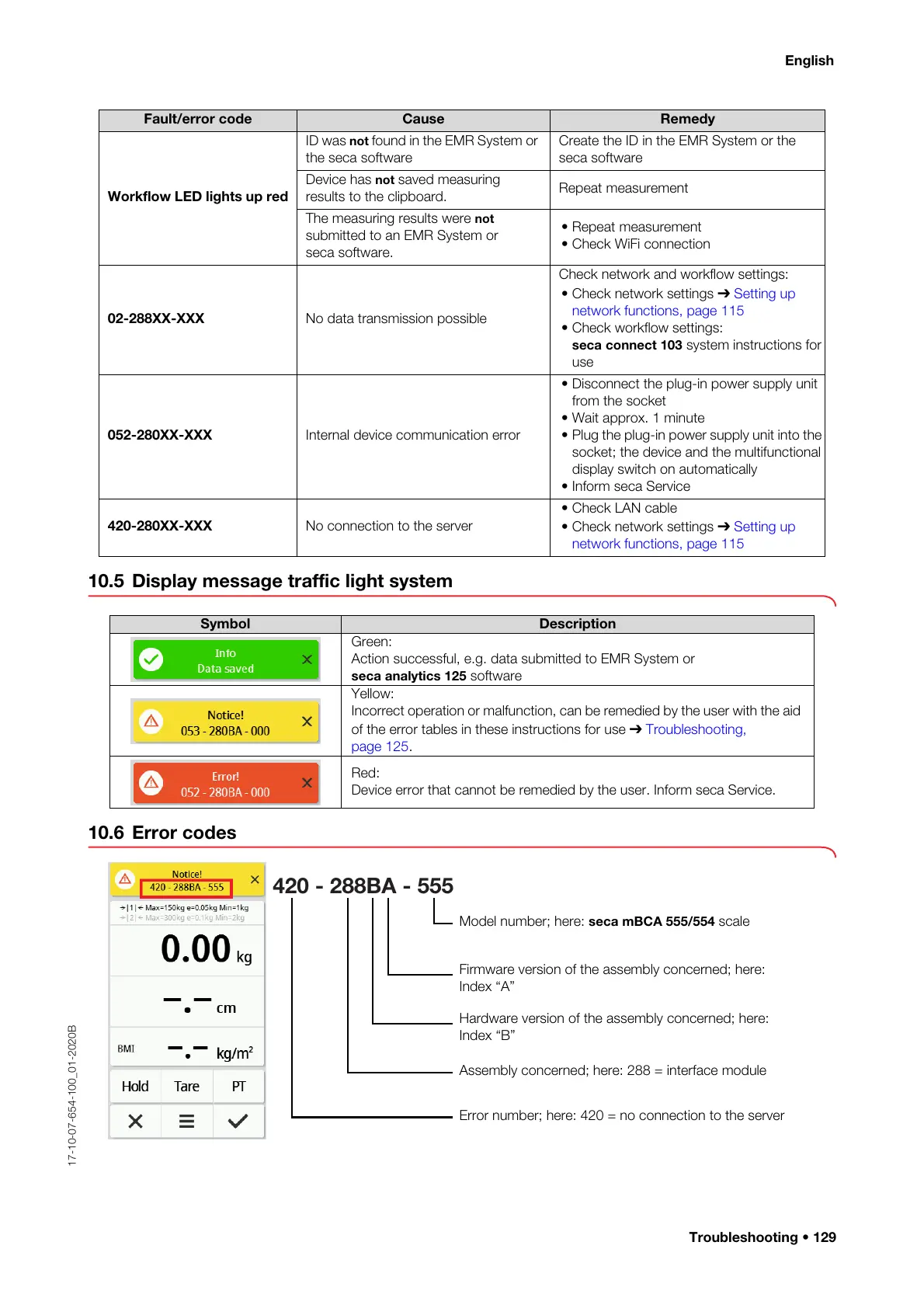
10.6 Error codes
Workflow LED lights up red
ID was not found in the EMR System or
the seca software
Create the ID in the EMR System or the
seca software
Device has not saved measuring
results to the clipboard.
Repeat measurement
The measuring results were not
submitted to an EMR System or
seca software.
• Repeat measurement
• Check WiFi connection
02-288XX-XXX No data transmission possible
Check network and workflow settings:
• Check network settings ➔ Setting up
network functions, page 115
• Check workflow settings:
seca connect 103 system instructions for
use
052-280XX-XXX Internal device communication error
• Disconnect the plug-in power supply unit
from the socket
• Wait approx. 1 minute
• Plug the plug-in power supply unit into the
socket; the device and the multifunctional
display switch on automatically
• Inform seca Service
420-280XX-XXX No connection to the server
•Check LAN cable
• Check network settings ➔ Setting up
network functions, page 115
Fault/error code Cause Remedy
Symbol Description
Green:
Action successful, e.g. data submitted to EMR System or
seca analytics 125 software
Yellow:
Incorrect operation or malfunction, can be remedied by the user with the aid
of the error tables in these instructions for use ➔ Troubleshooting,
page 125.
Red:
Device error that cannot be remedied by the user. Inform seca Service.
420 - 288BA - 555
Firmware version of the assembly concerned; here:
Index “A”
Model number; here: seca mBCA 555/554 scale
Hardware version of the assembly concerned; here:
Index “B”
Error number; here: 420 = no connection to the server
Assembly concerned; here: 288 = interface module



 To Next Page