Configuration • 121
17-10-07-654-100_01-2020B
Activating/deactivating the
announcement of patient
instructions (Measurement)
The device can be set so that the patient is guided through the measurement
procedure by voice outputs.
NOTE
Select a language the patient understands ➔ Selecting a language,
page 119.
1. Press the key.
The Settings menu is displayed.
2. Press the or key until the Voice guidance menu item is
displayed.
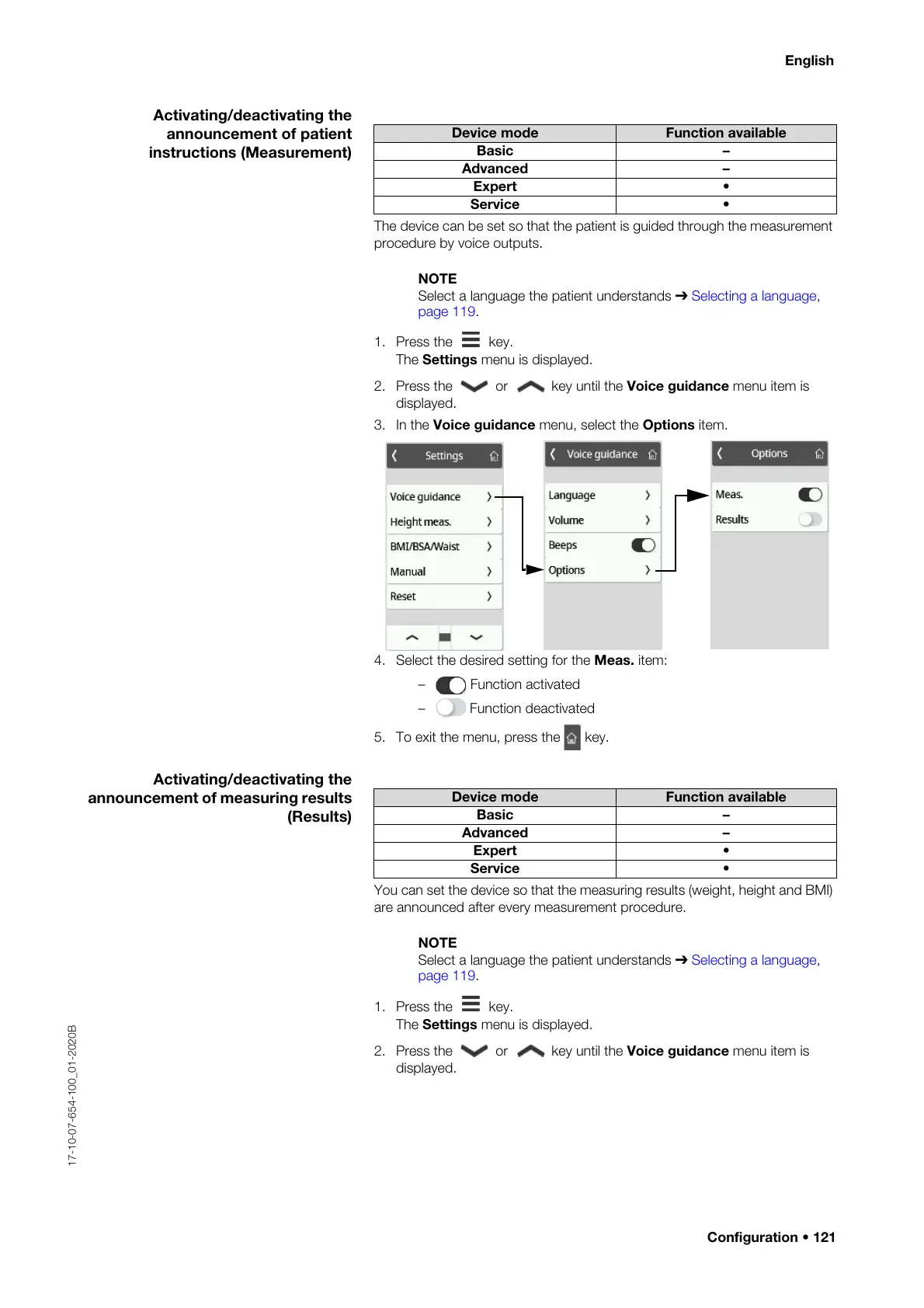
3. In the Voice guidance menu, select the Options item.
4. Select the desired setting for the Meas. item:
– Function activated
– Function deactivated
5. To exit the menu, press the key.
Activating/deactivating the
announcement of measuring results
(Results)
You can set the device so that the measuring results (weight, height and BMI)
are announced after every measurement procedure.
NOTE
Select a language the patient understands ➔ Selecting a language,
page 119.
1. Press the key.
The Settings menu is displayed.
2. Press the or key until the Voice guidance menu item is
displayed.
Device mode Function available
Basic –
Advanced –
Expert •
Service •
Device mode Function available
Basic –
Advanced –
Expert •
Service •



 To Next Page