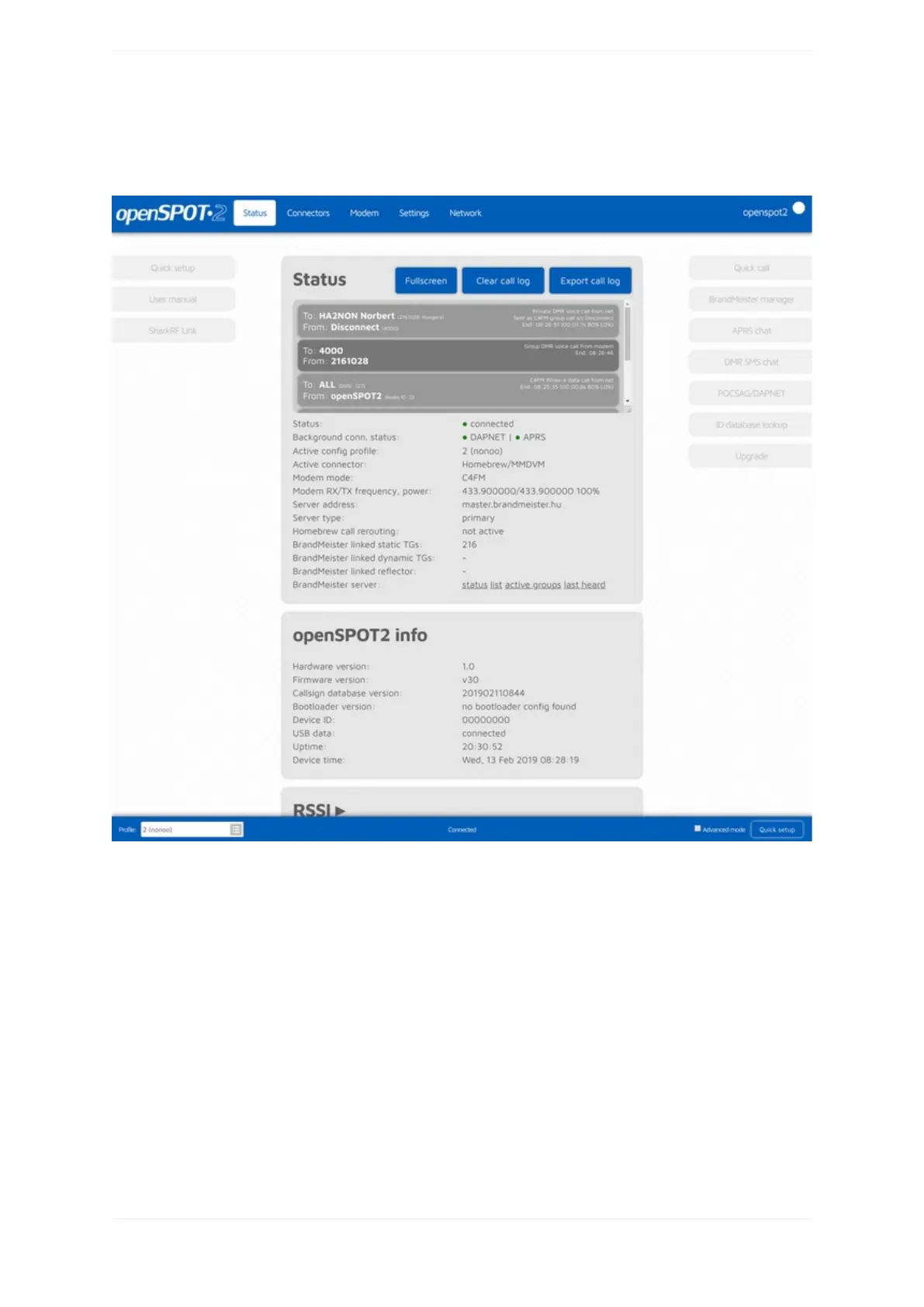
Aboutthewebinterface
TheopenSPOT2'shostnameisdisplayedattherightoftheheader.Thedevice'sIPaddressisdisplayedby
hoveringthemouseabovethehostname.Thehostnamewillbehiddenonsmalldisplays(mobilephones).Inthis
case,youcangetthecurrentIPaddressontheNetworkpage,Networksettingssection.Youcanalsoseethe
device'sIPaddressontheNetworkpage,Currentconfigurationsection.
WhenthewebinterfaceiscommunicatingwiththeopenSPOT2,aloaderanimation(2pulsatingcircles)is
displayednexttothehostnameattherightoftheheader.
Thecurrentlyactiveconfigurationprofilenumberandnameisdisplayedattheleftofthefooter.Youcanalso
switchbetweenconfigurationprofilesthere.PleasereadtheNotesonconfigurationprofilessectionformore
informationaboutconfigurationprofileswitching.
TheopenSPOT2'sstatusisdisplayedatthemiddleofthefooter.
TheAdvancedmodecheckboxisattherightofthefooter.Ifthisischecked,alladvancedmodesettingsshow
up.Advancedmodeisnotneededfornormaloperation.



 To Next Page