YoucansimplyusetheETSIformatifyouwanttosendmessagesthroughthenetwork.Notethatthenetwork
mustknowaboutthelocationofyourSourceID.IfyouwanttoreceiveDMRSMSmessagesfromthenetwork,
youhavetosettheSourceIDtotheDMRIDyousetattheconnectorsettings,orifyouwanttouseanotherID,
thenyouhavetostartashortcallfromthatDMRIDwithyourradio,sothenetworkwillknowthatyourcustom
DMRIDcanbereachedthroughthisopenSPOT2.
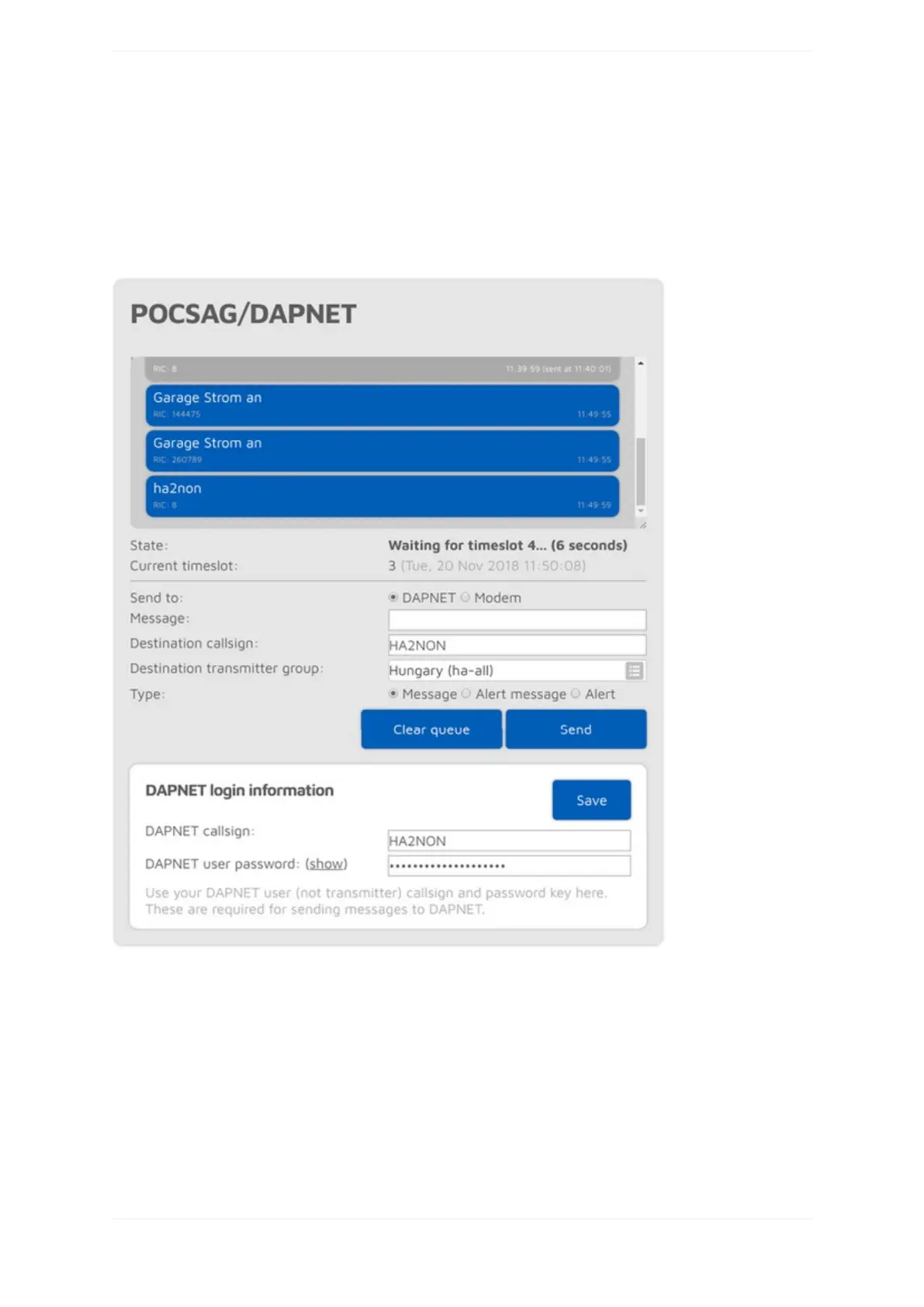
POCSAG/DAPNET
YoucanseethePOCSAGmessagequeuehere.Queuedunsentmessagesaredisplayedwithabluebackground,
sentmessagesaregray.AllmessagesreceveidfromDAPNETorsentfromthisinterfacearefirstplacedinthe
POCSAGmessagequeue.
Notethatthedisplayedcurrenttimeslotnumberandtimeiscalculatedbythebrowserandisnotequaltothe
openSPOT2'sinternaldevicetimeandtimeslotframingwhichismoreprecise.
IftheSendtoradiobuttonissettoModemthenyoucandirectlyaddmessagestothequeuewhichwillbe
transmittedbytheopenSPOT2.



 To Next Page