105
■ PLU/EAN
• In this manual, the word “EAN” represents EAN (European Article Number) and UPC
(Universal Product Code).
• With regard to the EAN codes applicable to this register, please refer to the chapter 12.
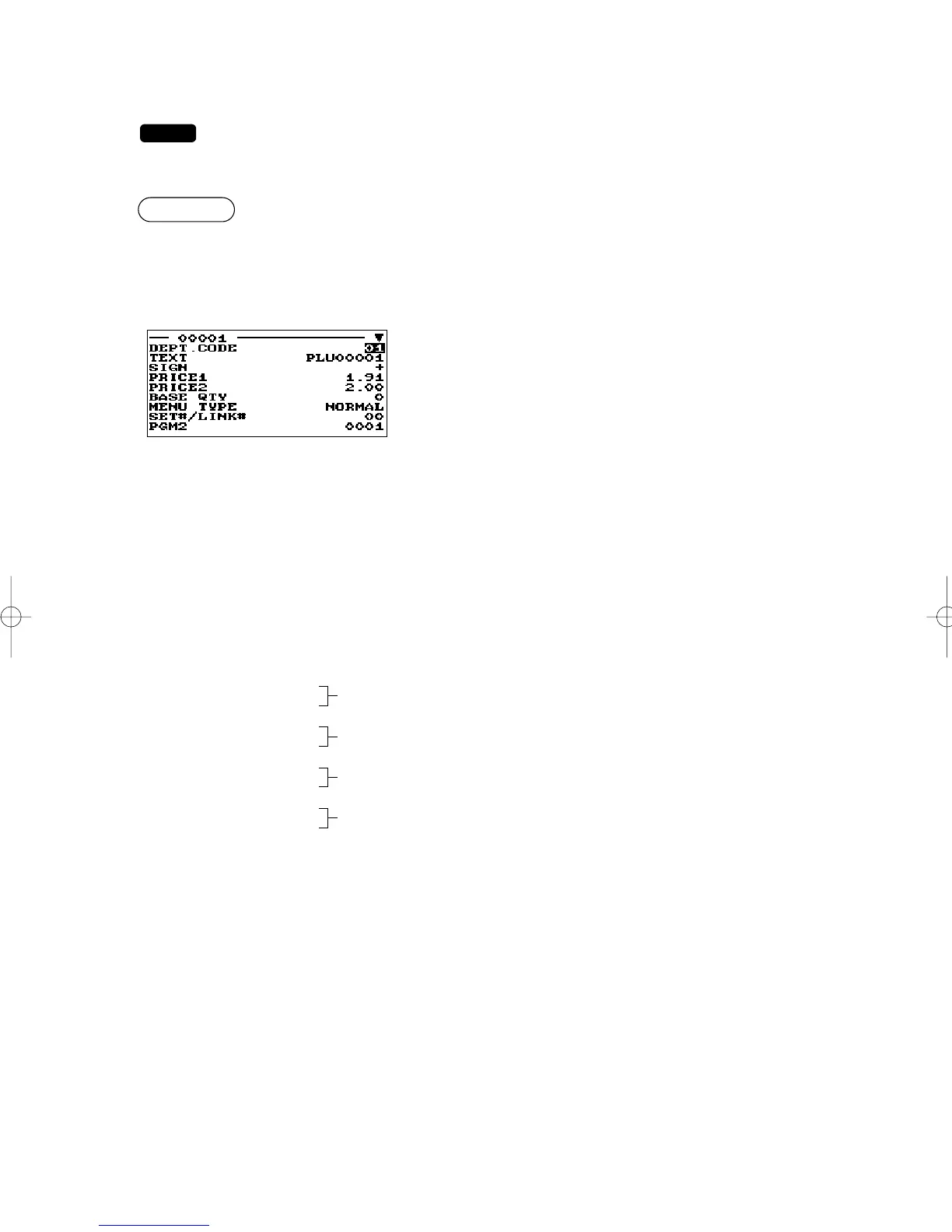
Program each item as follows:
• DEPT. CODE (Use the numeric entry)
Department code to be associated with the entered PLU/EAN
(01 through 99)
When a PLU/EAN is associated with a department, the
following functions of the PLU/EAN depend on the
programming for the department.
• Grouping (group 1 through 17)
• Item validation print compulsory/non-compulsory
• Single item cash sale/Single item finalize
• HALO (only for subdepartments)
• TEXT (Use the character entry)
Description for a PLU/EAN. Up to 16 characters can be entered. (Default text: PLUnnnnn (PLU)/ space
(EAN))
• SIGN (Use the selective entry)
+: Plus PLU/EAN
-: Minus PLU/EAN
The function of every PLU/EAN varies according to the combination of its sign and the sign of its
associated department as follows:
Department: +
PLU/EAN: +
Serves as a normal plus PLU/EAN.
Department: -
PLU/EAN: -
Serves as a normal minus PLU/EAN.
Department: +
PLU/EAN: -
Accepts store coupon entries, but not split-pricing entries.
Department: -
PLU/EAN: +
Not valid; not accepted
• PRICE 1 or 2 (Use the numeric entry)
Unit price of each price level (max. 8 digits)
• BASE QTY (Use the numeric entry)
Base quantity for each PLU/EAN that should be applied only to split-pricing entries (max. 2 digits: 0 to
99)
▼
Select a pertinent PLU code, or
directly enter a PLU code or EAN
code.
The screen continues.
ER-A280F_N(SEEG)(E)-6 09.6.18 6:53 AM Page 105


 To Next Page