SOFTWARE UPDATES
6-2
SIG-QG-20-02 JANUARY 2021
Version : A.2
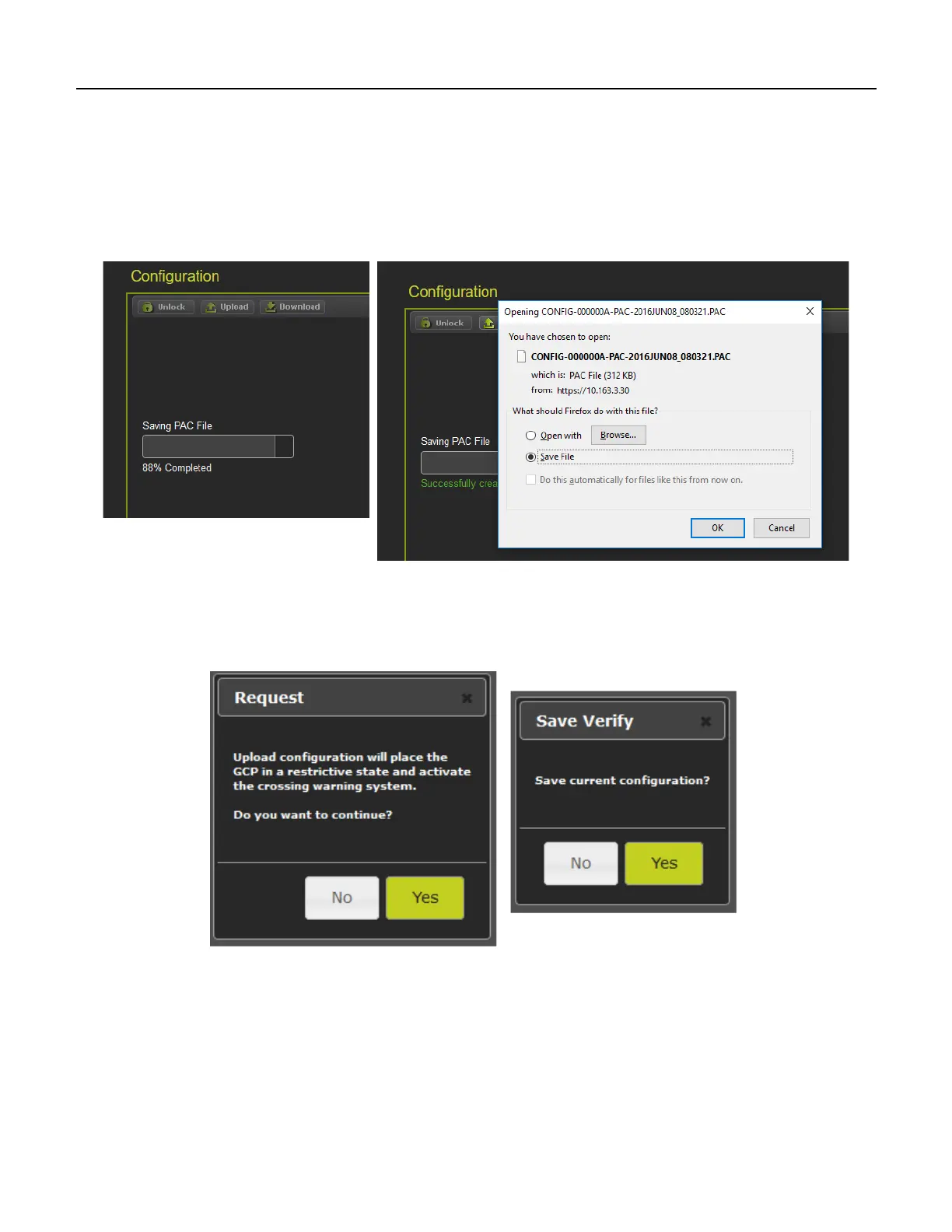
First, unlock the screen if needed. To download the configuration, select the download button. The
WebUI will start to download the file and show the progress as in figure below left. Occasionally the
download may fail, if this happens, select the download again.
Once the download is complete, the WebUI will ask to Save or open the file (exact format of this
depends on browser used). Select to save the file, as the file is in binary format and cannot be opened
using standard Windows software. The PAC file name is created from the combination of the DOT
number and date - e.g. CONFIG-{DOT number}-PAC-{date}...{time}..
Figure 6-3 WebUI Configuration Download
To upload a new configuration file, select the Upload button. The WebUI will show the warning message
illustrated in the figure above on the left. If Yes is selected, the WebUI will ask to save the current
configuration first. Select the desired option.
Figure 6-4 WebUI Configuration Upload Messages










 To Next Page