SOFTWARE UPDATES
6-11
SIG-QG-20-02 JANUARY 2021
Version : A.2
6.1.5.2 WebUI Display / CPU Connecting
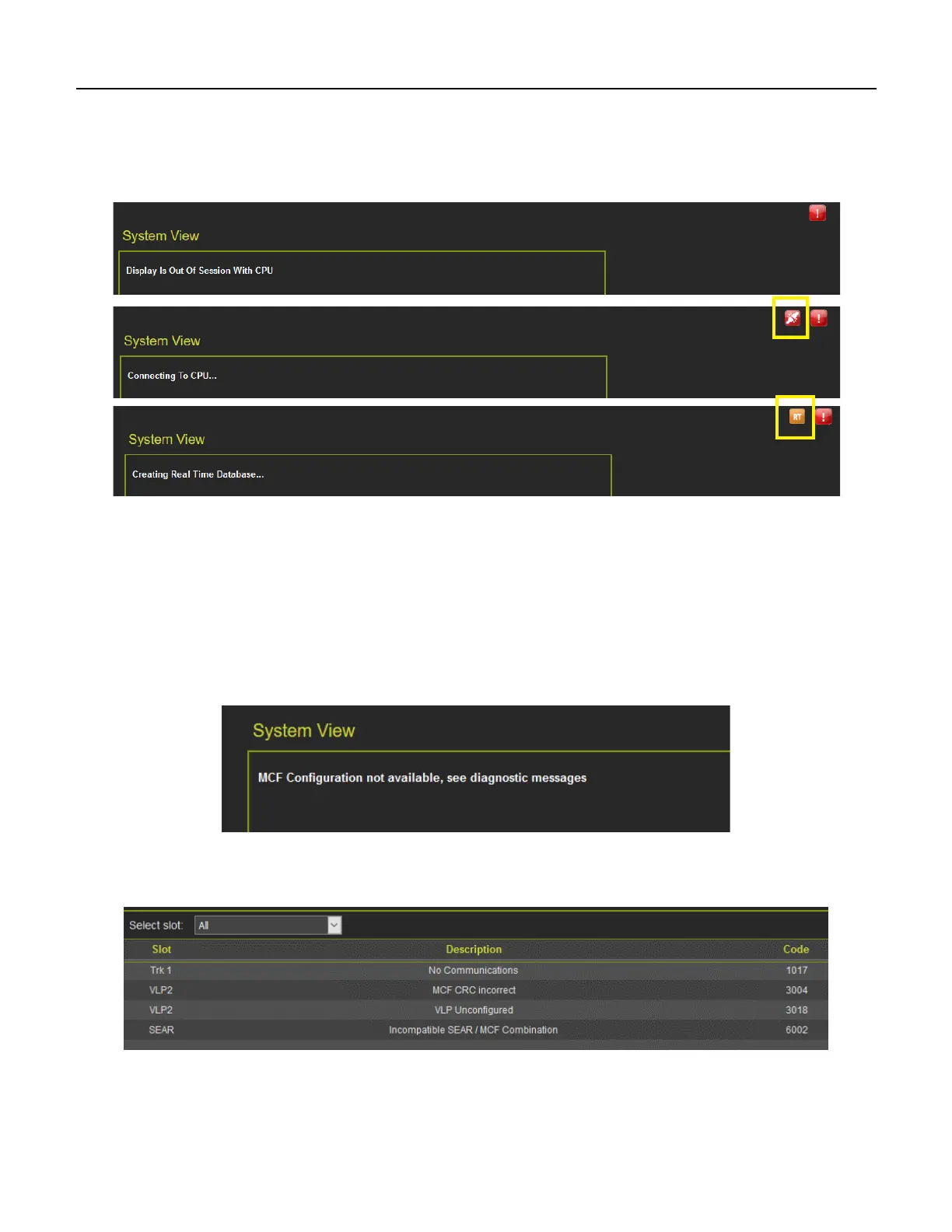
If the Display module is not in session with the CPU, it will be indicated with just a red exclamation point
as illustrated in the top pane below. During the connection process, the display will show the icon in the
second pane below (boxed in yellow). The last pane indicates Creating Real Time Database.
Figure 6-18 Display Module Not in Session
When this is complete, the display will show the Diagnostics screen (if Diagnostic messages are present)
or it will show the System View.
If the VLP is in the unconfigured state, for example, the user has started the upload configuration
process, but not gone through the final step of rebooting the VLP, then the WebUI System View will show
an indication of this at the bottom of the screen.
If the system is in an unconfigured state for a different reason, for example, the MCF CRC is incorrect,
the System View will show the message in the following figure:
Figure 6-19 WebUI System View when VLP Unconfigured due to MCF CRC Error
At this point, check the diagnostic messages to see what the problem is. Examples are shown in Figure
6-20.
Figure 6-20 WebUI System Diagnostics when VLP is Unconfigured due to MCF CRC Error










 To Next Page