Operating Manual - English Triax QUATTRO
- 24 - Copyright Silca 2011
1
5 OPERATING GUIDE
The Operating Guide explains how to use the Triax QUATTRO without the aid of a personal computer.
The operations are explained step by step so that the key-cutting machine can be used in manual mode.
The PC programs that can be connected to the key-cutting machine can transmit the data needed to perform
cutting or engraving operations.
PC programs eliminate manual execution of some functions and skip some of the Operating Guide video screens
once the data have been transmitted.
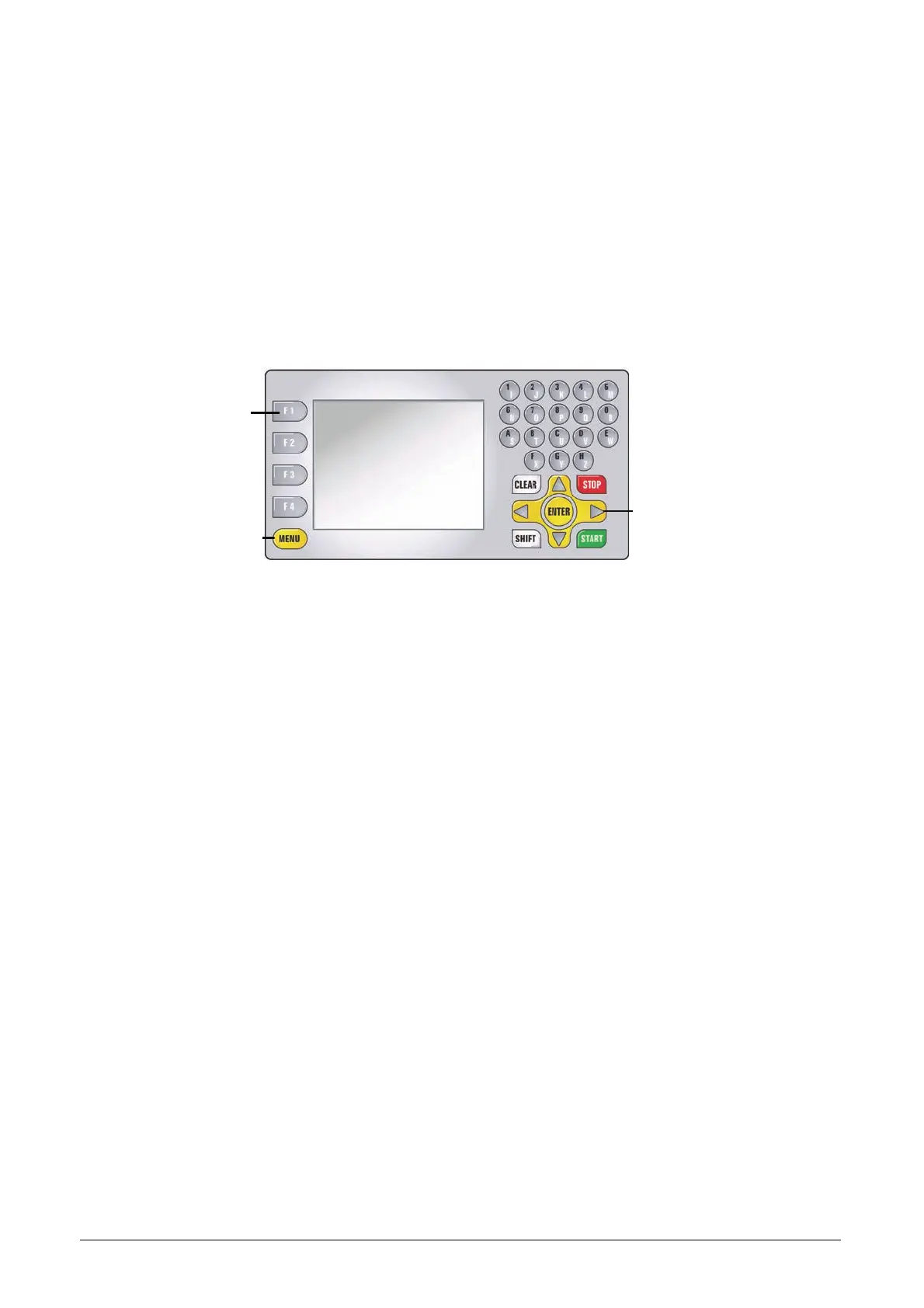
5.1 MACHINE KEYPAD AND FUNCTION BUTTONS
Tasto
funzione
Tasto
MENU
Tasto
freccia
Fig. 22
The MENU button shows a list of the main functions:
The MENU button is always active from any window.
Function buttons F1 - F2 - F3 - F4 select the options shown on the screen.
Arrow keys (right/left/up/down) are used to navigate in the fields on the screen.
CLEAR button used to delete a single character.
SHIFT+CLEAR buttons held down together to delete a whole line.
SHIFT+ENTER buttons held down together to insert a space when entering data.
START button to begin the procedure.
STOP button cancels the operation and/or goes back to previous menu.
Function
button
MENU
button
Arrow
ke



 To Next Page