Operating Manual - English Triax QUATTRO
- 88 - Copyright Silca 2011
1
7.10.3
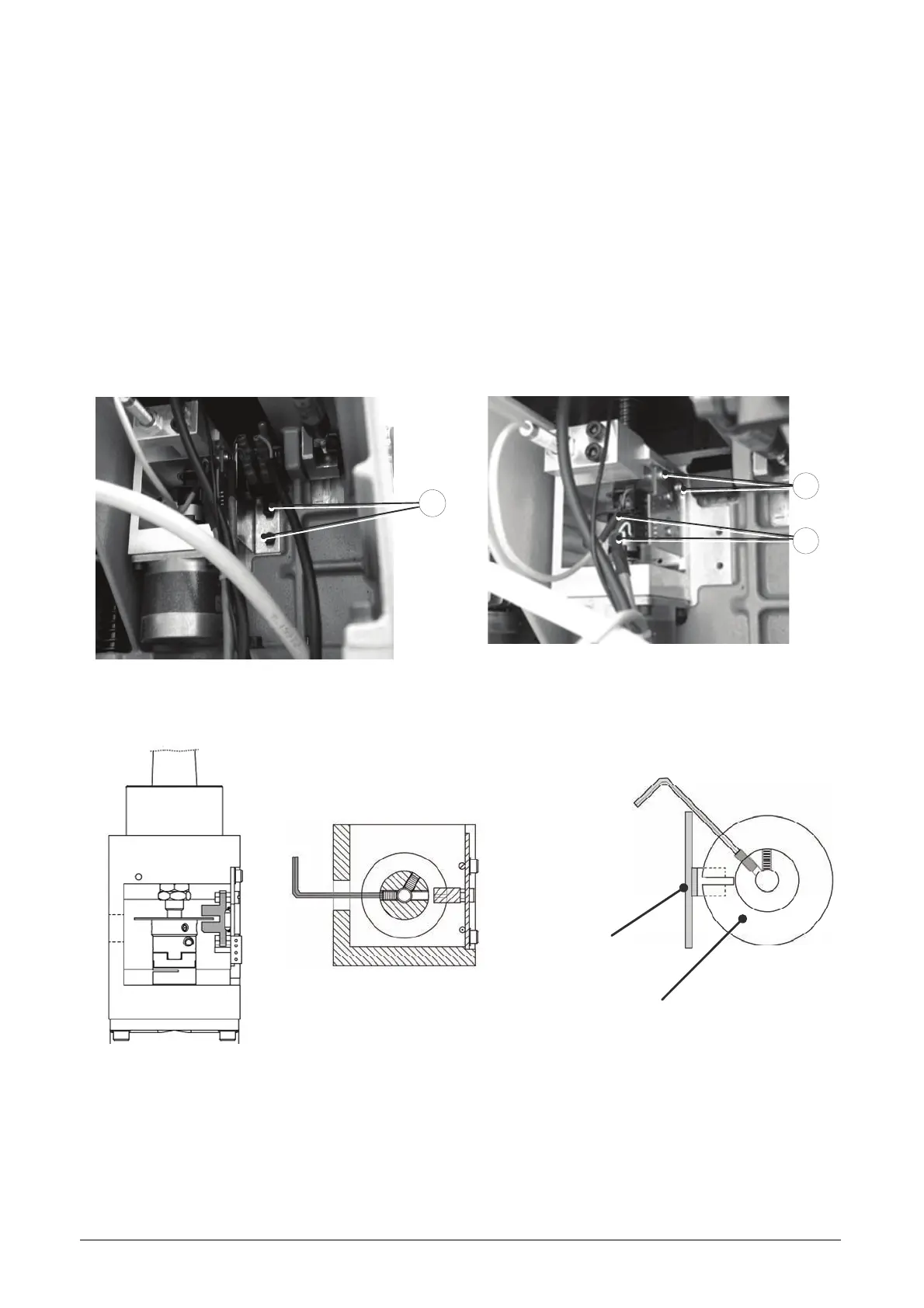
REPLACING PHOTOCELL FOR VERTICAL AXIS (Z)
1. Switch off the machine and disconnect the power lead.
2. Remove the rear metal plate (see ACCESS TO REAR).
3. Loosen the two screws (J1) and remove the microswitch support plate.
4. Disconnect the photocell and sensor cable (J3).
5. Loosen the 2 photocell fixing screws (J2) and remove.
6. Place the new photocell in position and secure with the screws (J2), connect the two cables (J3).
7. Replace the microswitch support plate and secure with the screws (J1).
8. Secure the rear metal plate.
9. Reconnect the power lead and Switch on the machine.
10. Calibrate the machine (see CALIBRATION functions).
J1
Fig. 42
J2
J3
Fig. 43
REGULATION OF PHOTOCELL DISK (SEE MACHINE ZEROS)
Photocell
Photocell disk



 To Next Page