Operating Manual - English Triax QUATTRO
Copyright Silca 2011 - 53 -
5.10.3
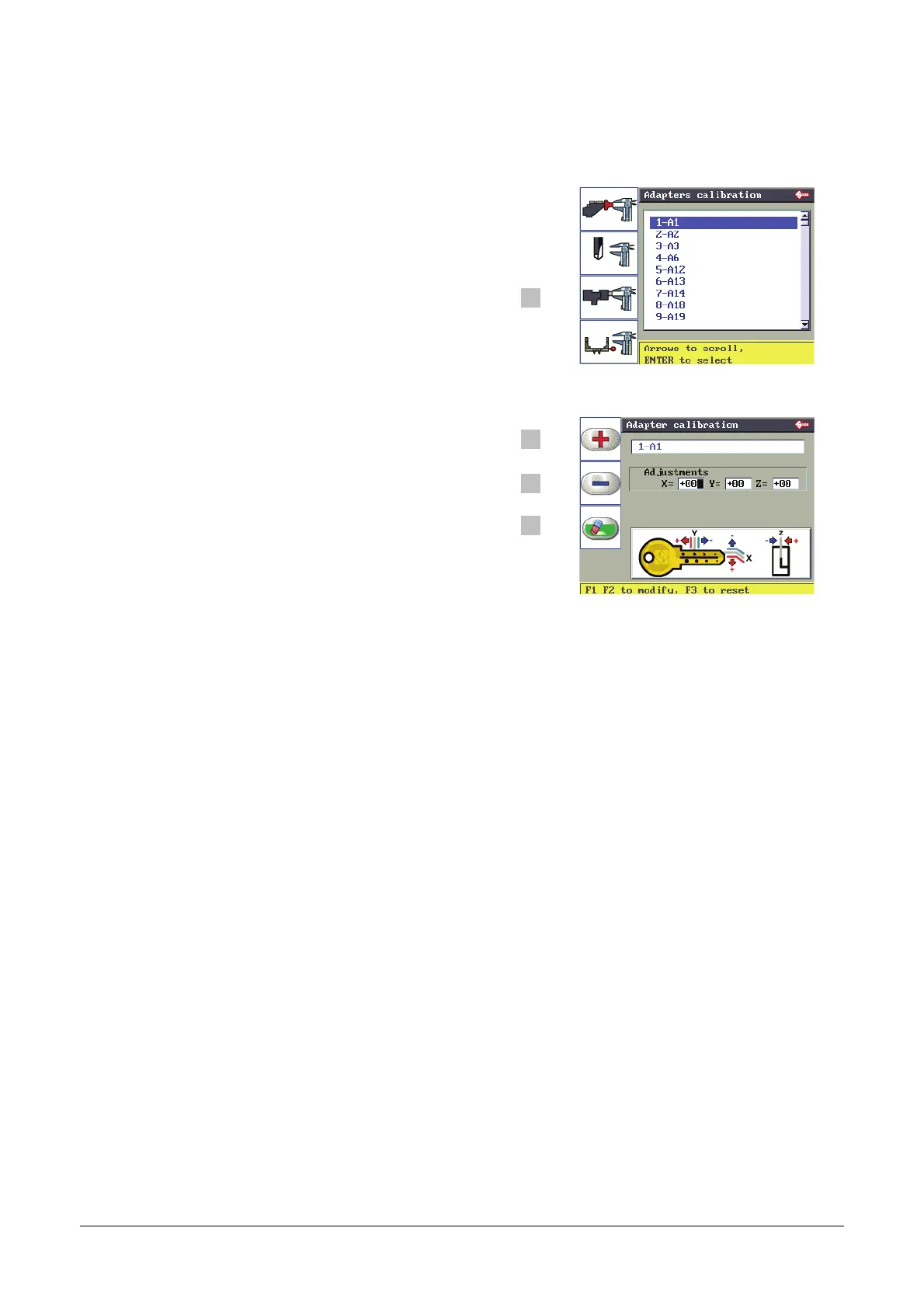
ADAPTER CALIBRATION
F1
F2
F3
F3 to enable the adapter calibration function.
Select the adapter to be calibrated and press ENTER.
F4
F1
F2
F3
F1 for positive values (+).
F2 for negative values (-).
F3 to delete the adjustments made.
F4
Positive value of Y: takes cut closer to stop.
Negative value of Y: takes cut away from stop.
Positive value of X: moves cut to the right of the axis.
Negative value of X: moves cut to the left of the axis.
Positive value of Z: lowers the cut from the axis.
Negative value of Z: raises the cut from the axis.
Adjustments to Spaces/Depths/Heights (-50 to +50 hundredths of mm).


 To Next Page