Operating Manual - English Triax QUATTRO
- 36 - Copyright Silca 2011
1
5.5.6
FAVORITE SERIES LIST UPDATE
F1
F2
F3
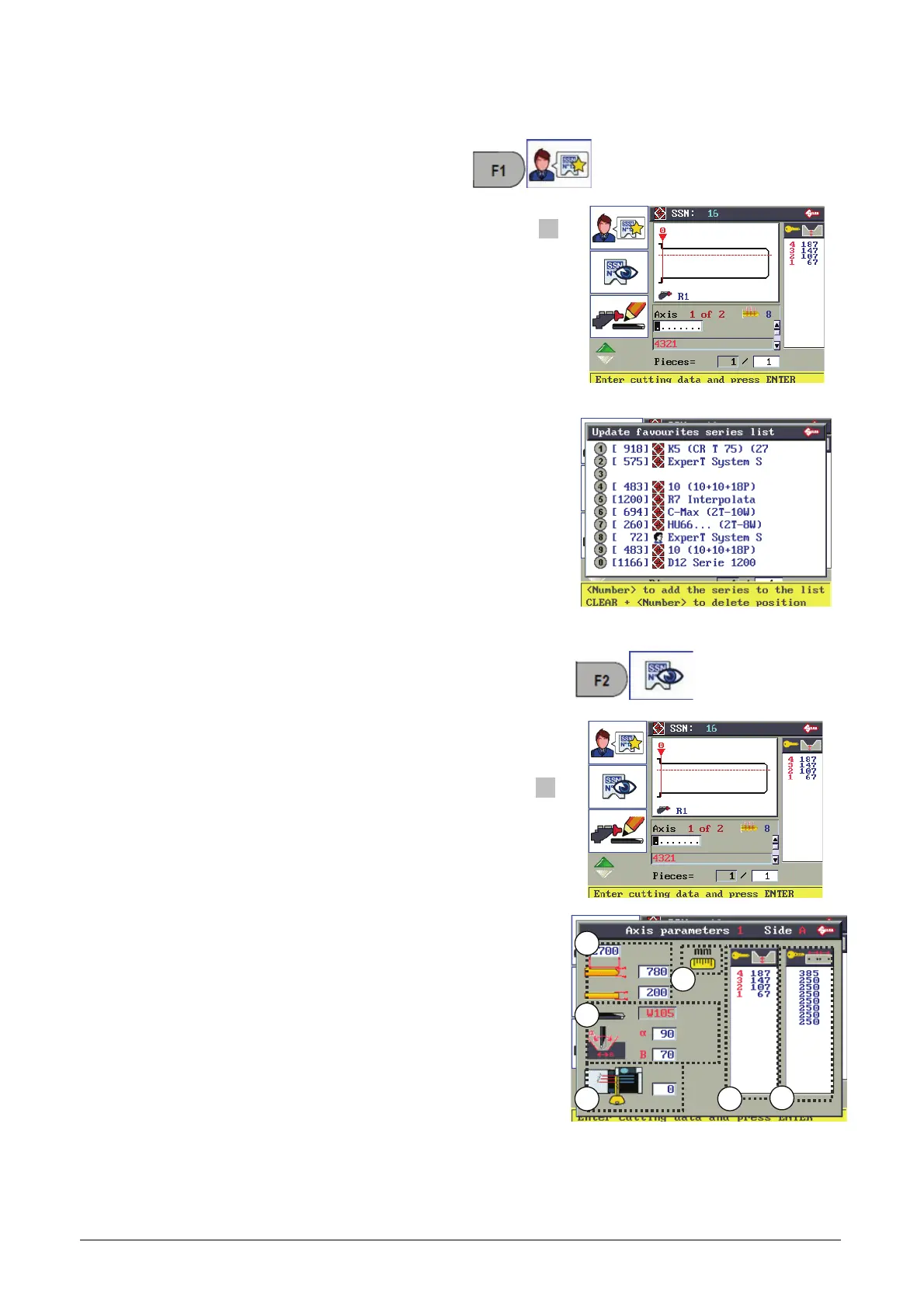
From the system in use access can be gained to the
function Favorite series list update using F1.
The Favorite Series list is shown.
The SSN in use can be added to the list.
F4
Numerical buttons (1 to 0) to enter the series in the list.
CLEAR + numerical buttons (1 to 0) to eliminate a Series from the list.
5.5.7
VIEW SERIES AXIS PARAMETERS
F1
F2
F3
From the system in use access can be gained to the function
with F2.
The parameters relative to the cuts in the SSN in use are
shown.
F4
Available:
1. Parameters referring to the key.
(stem length/width and thickness).
2. Name of cutter to use with angle and base of cut parameters.
3. STOP for key in clamp.
4. Measuring unit in use.
5. Depth symbols and values
6. Values for cut spacing (pitches).
1
2
3
4
5
6



 To Next Page