12
Electronic Controller
Service Manual
SKOPE TME/SKT ActiveCore
Running the Fridge
Operating
Modes
The electronic controller will automatically switch the fridge between Normal and Energy
Saving modes depending on usage. During Normal mode, the lights are on and product is fully
chilled. During Energy Saving mode the lights are off and the product temperature is
moderated.
Note: Normal and Energy Saving mode are both suitable for perishable product (all shelves
maintain temperature below 5°C).
If the door is not opened for 3 hours (parameter r6), the fridge will automatically enter Energy
Saving mode and the sign and interior lights will switch off. To manually switch the fridge
between Normal and Energy Saving modes, press and hold the Energy Save (up) button on
the electronic controller faceplate. If not manually bought into Normal mode (by pressing
Energy Save up button or opening door), the electronic controller will automatically bring the
fridge into Normal mode after 9 hours (parameter r7) in Energy Saving mode.
During some refrigeration system alarms, the electronic controller will shut down the lights and/
or refrigeration system. Refer to “Messages and Alarms” on page 13 for alarm information.
Compressor
and Fans
The compressor and condenser fan will start approximately one minute after the fridge is
turned on. During Normal mode, the compressor and condenser fan will turn off when the
control probe temperature reading reaches 2°C (parameter St), and on again when it reaches
4°C (parameter St + rd). During Energy Saving mode, the compressor and condenser fan will
turn off when the control probe temperature reading reaches 3°C (parameter St + r4), and on
again when it reaches 5°C (parameter St + r4 + r5).
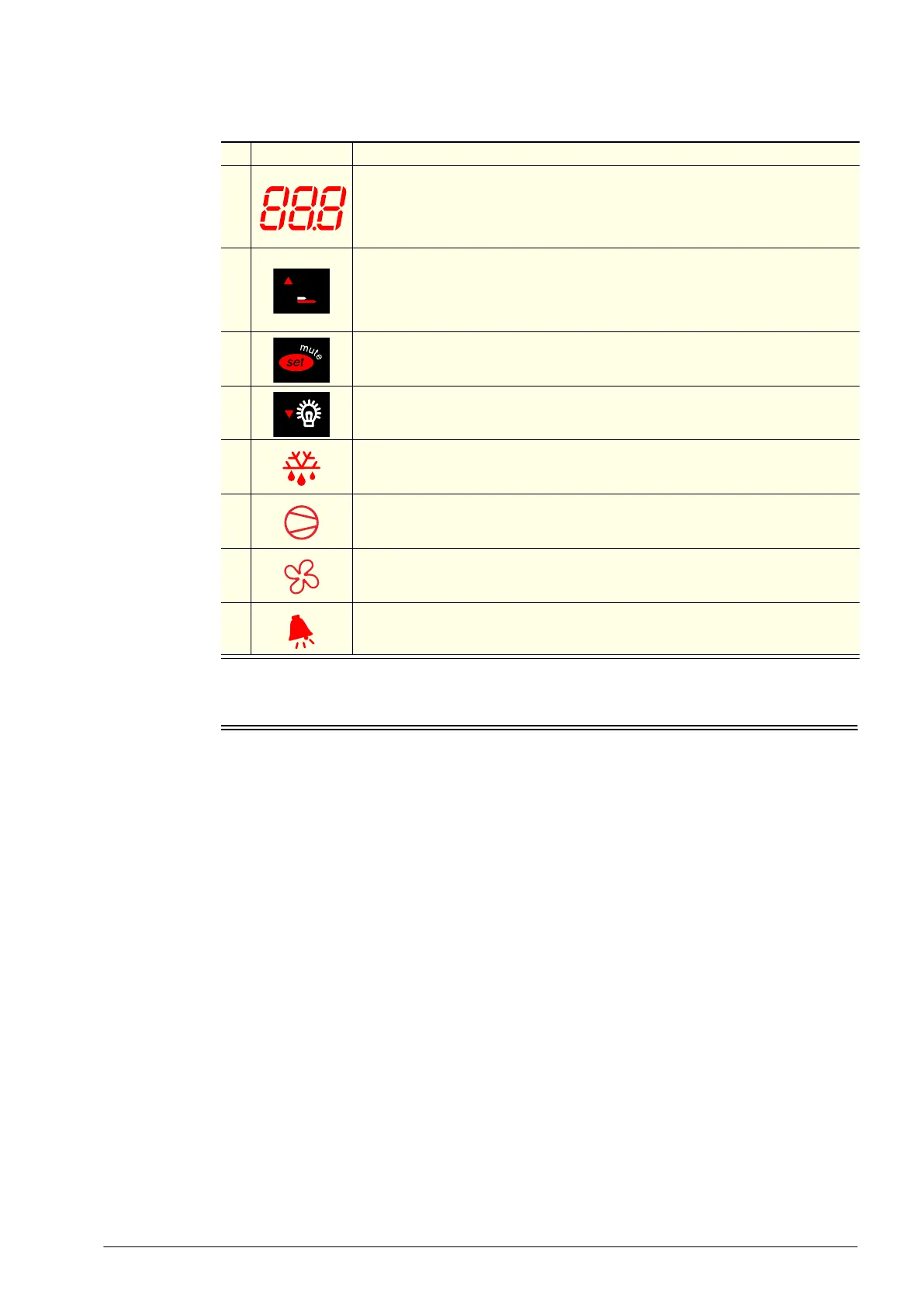
Table 2: Controller faceplate
No. Item Description
1
Digital display of cabinet temperature or messages.
The temperature is what the sensor inside the fridge detects, and not necessarily
the product temperature. However, they may be very close depending on how the
controller is set to sense temperature.
2
Energy Save (up): Press and hold for 3 seconds to switch the fridge between
‘Energy Save’ and ‘Normal’ mode.
Press to display mode that the fridge will switch to. ‘ECO’ = Energy Saving and
‘nor’ = Normal.
3 Set (mute): Press to mute the alarm. Press and hold to access parameters.
4 Light (down): Press and hold to switch the cabinet lights on and off.
5
Defrost: ON when the defrost is activated. Flashes when the activation of the
defrost is temporarily delayed due to procedures in progress.
6
Compressor: ON when the compressor and condenser fan starts. Flashes when
activation of the compressor is temporarily delayed.
7
Fan: ON when the internal cabinet fans are activated. Flashes when activation of
the fans is temporarily delayed.
8 Alarm: ON when alarm is signalled.



 To Next Page