24
Replacement Procedures
Service Manual
SKOPE TME/SKT ActiveCore
Modular
Lighting
Modular lighting is made up of three components which are replaceable:
• LED modular shelf light (1 per shelf)
• LED driver power supply (1 per cabinet)
• Interior wiring loom (1 per door)
Power is supplied to the lights by the LED driver power supply (located on the cabinet roof) via
the wiring loom/s which run down the sidelight channel.
Modular lighting components are all non serviceable items. If a component is faulty, it should
be removed and a new replacement component fitted.
Refer to the diagnostics table below to determine what component may be at fault, and the
procedures over the next few pages for component replacement instructions.
Ensure the cabinet is isolated from the power supply before cleaning or removing parts.
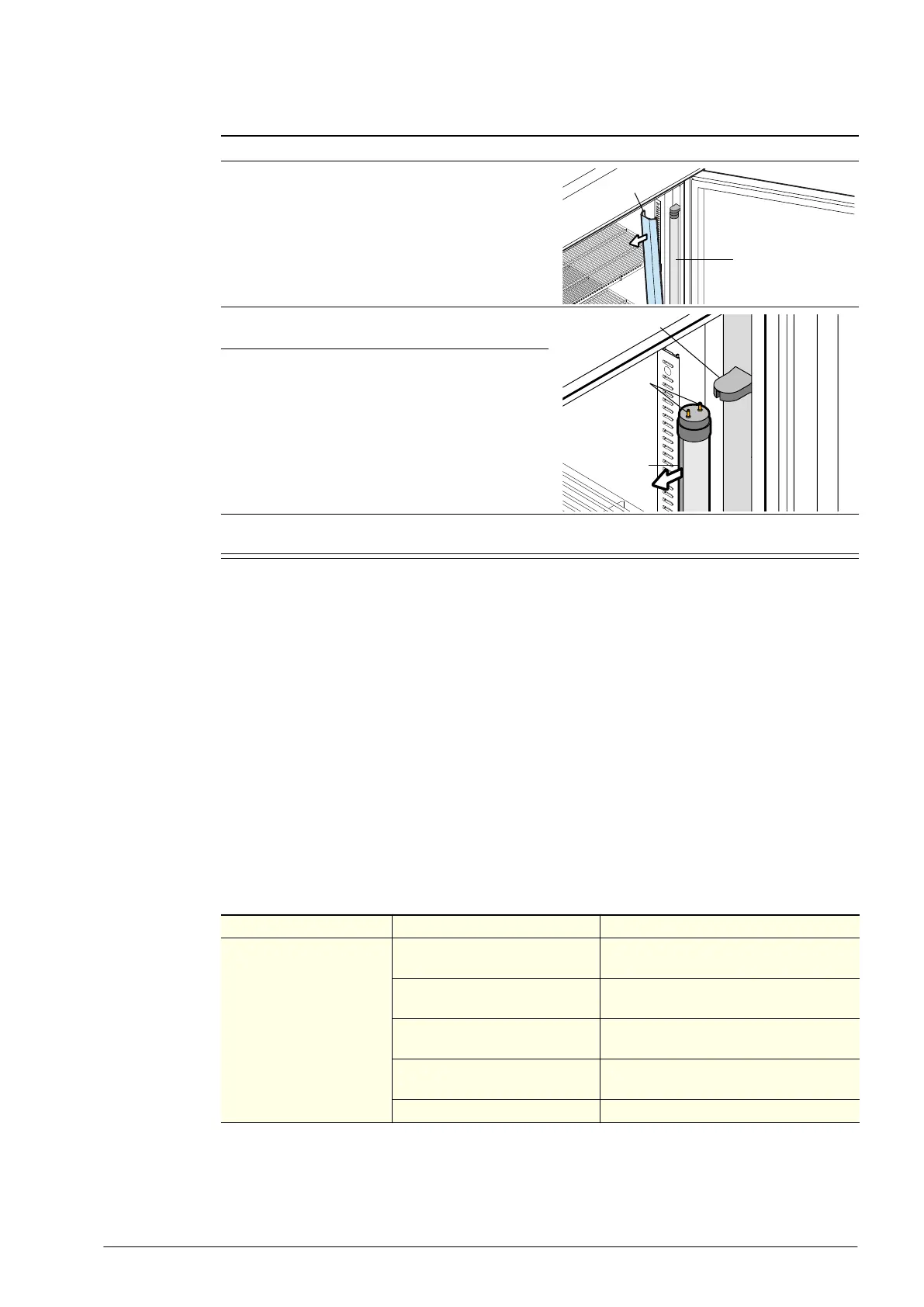
Procedure 11: To replace an LED tube side light
1. Isolate the fridge from the power supply.
2. Remove the diffuser by squeezing it until it is
released from the aluminium housing, and then
push the diffuser out of the way.
3. Rotate the LED tube until the pins on the ends of
the tube align with the slots, then slide it out.
4. Fit a new LED tube. Ensure the LED tube is
fitted with the ‘Power’ end at the top (usually
marked ‘POWER’ or similar). Note: If present,
the pointer at each end of the tube should be set
to the “0” position.
5. Refit the diffuser by slipping the back section into the housing, then squeezing and snapping the
front section of the diffuser into place as you work down the length of the light.
Diffuser
LED tube
Pins
LED tube
Lamp holder
Table 8: Modular lighting fault diagnostics
Problem Possible cause Repair
No lights working. Cabinet
is dark.
Lights switched off.
Switch lights on at electronic controller
faceplate (see page 11).
Controller is in Energy Saving
mode.
Open the door to bring the controller into
Normal mode.
High pressure switch activated.
Investigate possible high pressure event
(see page 41).
Plug not connected properly.
Check and clean plugs on top of the
cabinet.
LED driver power supply fault. Replace LED driver power supply.



 To Next Page