13
SKOPE TME/SKT ActiveCore
Electronic Controller
Service Manual
The evaporator fan starts approximately 3 seconds (parameter F0) after the compressor and
condenser fan. To verify, check that the FAN light is lit on the electronic controller.
Temperature
Probes
Two temperature probes feed data to the electronic controller: the control probe and the
evaporator probe. The control probe monitors and controls the fridge temperature, provides
the fridge temperature for the electronic controller to display, and notifies the electronic
controller of any erratic or abnormal temperatures that could identify an issue within the
refrigeration system. The evaporator probe controls the refrigeration system defrost initiation
and termination.
Door Switch The fridge is fitted with a door switch below each door. A small magnet in the door frame
activates the switch. The door switch tells the electronic controller to turn off the evaporator fan
motor (when door opened) and compressor (if door left open for 2 minutes [parameter A10])
during normal run operation, initiate Energy Saving mode if the door is not opened for 3 hours
(parameter r6), and to reactivate Normal mode if the door is opened during Energy Saving
mode.
Defrost Cycle The defrost cycle will begin after 2 hours (parameter dl) of cumulative compressor run time (not
real time) or during no-downward tendency protection (see over page). During the defrost
cycle the compressor stops and the evaporator fan runs continuously. The defrost cycle will
terminate when the evaporator probe reaches 4.5°C (parameter dt), or after the defrost cycle
has been running for 90 minutes (parameter dP).
Lighting Depending on the model, the cabinet may be fitted with an LED lit sign, LED interior sidelights
and/or LED module shelf and side lights.
The electronic controller will automatically switch the lights on when the fridge enters Normal
mode, and off when the fridge enters Energy Saving mode. Press the Light button on the
electronic controller faceplate to manually switch the lights on and off.
Messages and Alarms
Controller
Display
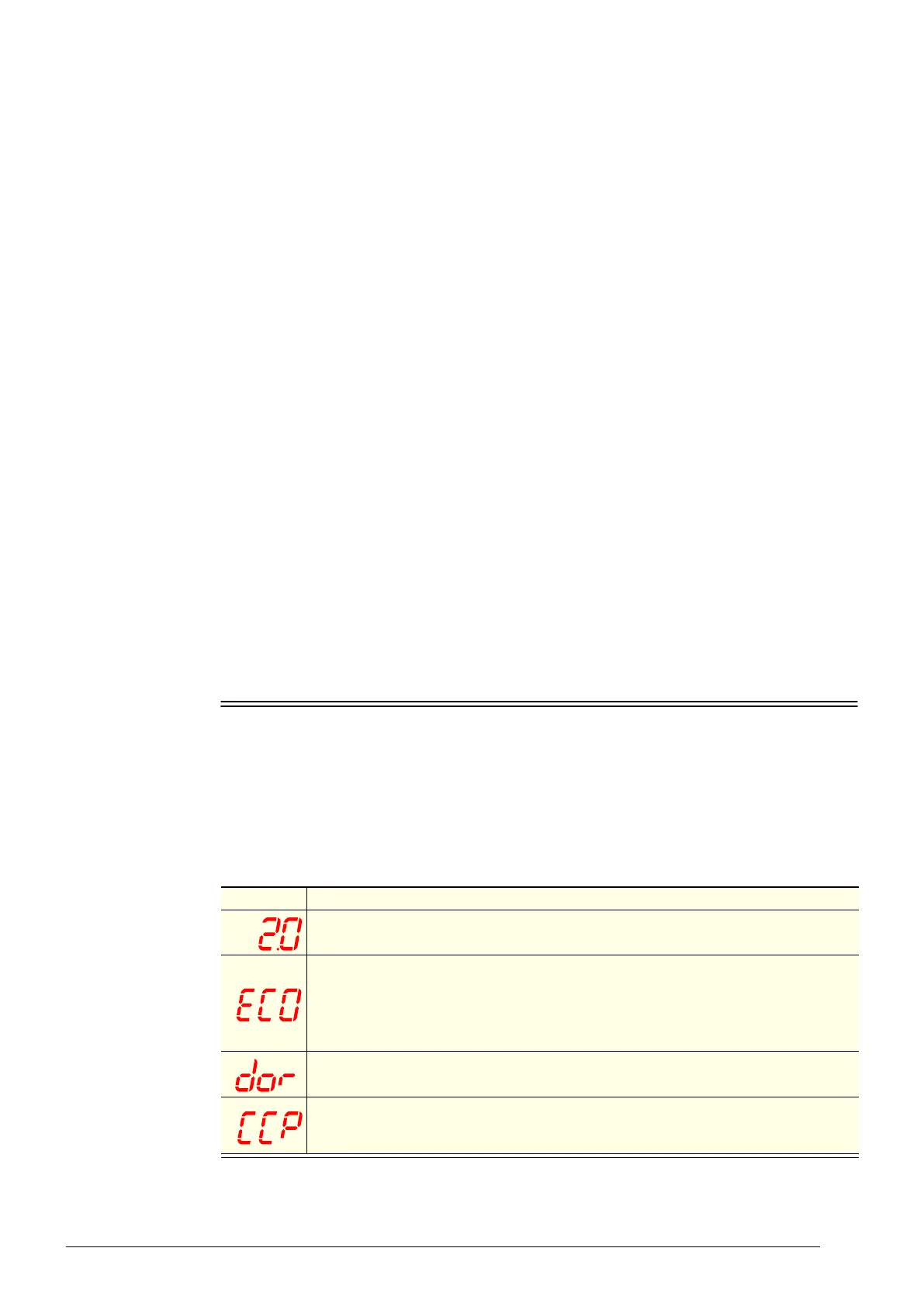
The following table explains messages and alarms that the electronic controller displays.
Alarms signal unexpected operational changes in the fridge and can be muted by pressing the
alarm set (mute) button on the electronic controller faceplate (see page 11).
Refer to “Controller Alarms” on page 70 for alarm diagnostics and actions.
Table 3: Messages
Display Description
The fridge is in Normal mode and the electronic controller displays the fridge
temperature.
Message: The fridge is in Energy Saving mode. When in Energy Saving mode the
temperature inside the fridge is moderated and the cabinet lights turn off. The lights can
be switched on and off by pressing the light button on the controller faceplate, and the
fridge can be switched into Normal mode by pressing the Energy Saving button on the
electronic controller faceplate.
Alarm: The front door has remained open for over two minutes. An alarm sounds, and the
compressor and evaporator fan turn off.
The fridge is in Cold Climate Protection mode. The fridge enters cold climate protection
mode if the room ambient temperature gets too cold. The lights remain on and cannot be
switched off.



 To Next Page