Clearing Memory
Text typed remains in memory until you clear
it
(or the typewriter
is
turned off.) In order to
create a new text, you must erase text currently in memory. Be sure to Store current text to
MicroDisk first if you need to save it for future use.
• To Clear the Memory:
1.
Depress the
MENU KEY
on the
KEYPAD
to return to the list of action choices.
2.
Depress the number
1 KEY
(indicating Create, View or Edit Text).
3.
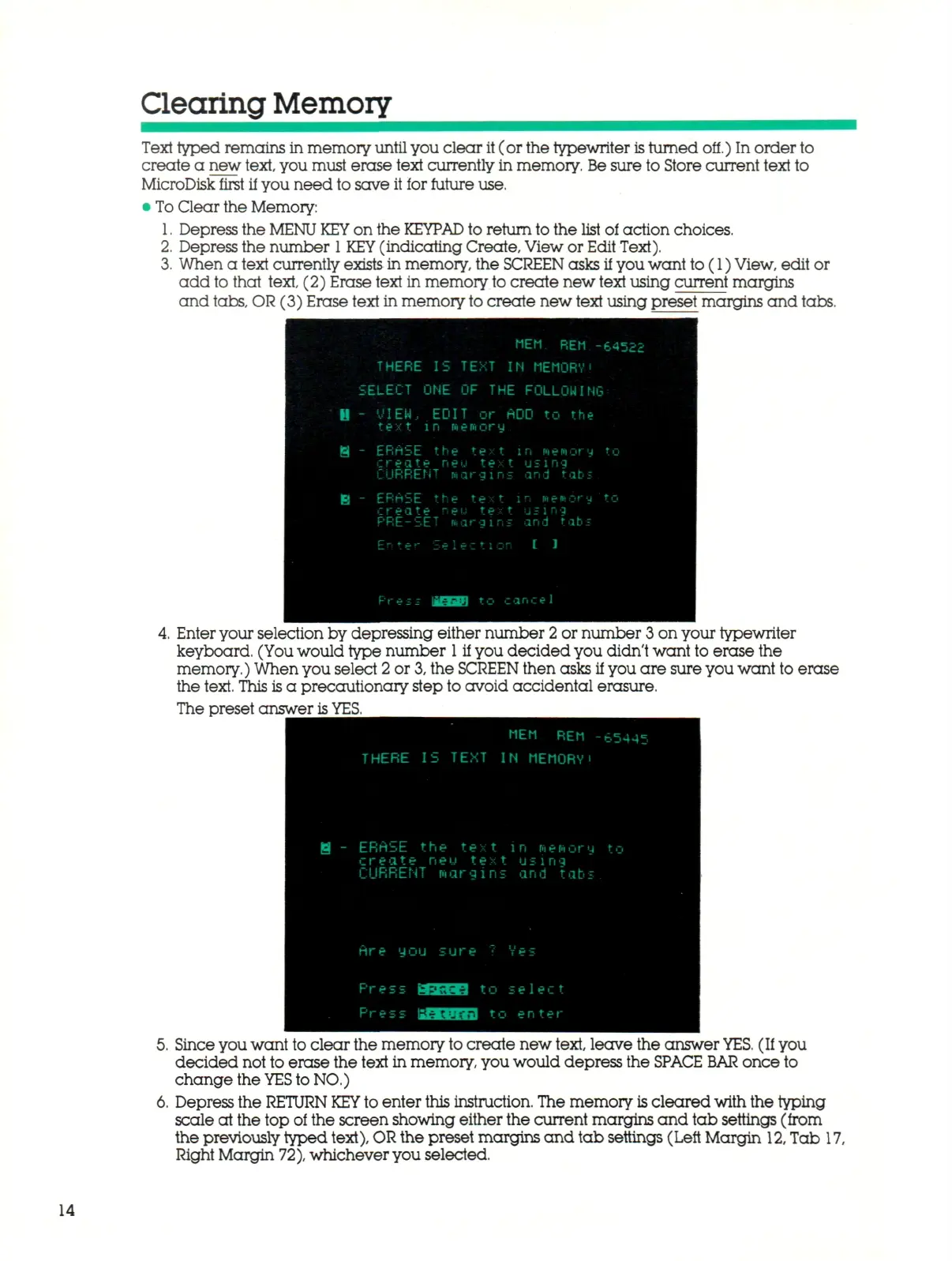
When a text currently exists in memory, the SCREEN asks if you want to (1)
View,
edit or
add to that text, (2) Erase text in memory
to
create new text using current margins
and tabs, OR (3) Erase text in memory
to
create new text using preset margins and tabs.
-——
H
i
B
MEM REM -
THERE IS TEXT IN MEMORY!
SELECT ONE OF THE FOLLOW I Ni
- VIEH.. EDIT or ADO to the
t ex t l
n
R e f t o r
y
- ERriSE the text in memory
create neu t
e x
t using
CURRENT nargins and tats
- ERASE the text in newery
create neu text using
PRE-SET nargins and tabs
Enter Select!or I ]
Press MBM t r, .;
a n
c
e
1
•€4522
i
:
t o
to
Enter your selection by depressing either number
2
or number 3 on your typewriter
keyboard. (You would type number
1
if you decided you didn't want to erase the
memory.) When you select 2 or
3,
the
SCREEN
then asks if you are sure you want to erase
the text. This is a precautionary step to avoid accidental erasure.
The preset answer
is
YES.
H -
MEM REM •
THERE IS TEXT IN MEMORY•
- ERriSE the text in memory
c r
e
a.
t e
n
e
u
t e
x
t using
CURRENT margins and tabs
tire you sure
?
Ves
Press rUiUM to select
Pres
- bfMJfiii] to en te r
-65445
to
Since you want to clear the memory
to
create new text, leave the answer
YES.
(If you
decided not to erase the text in memory, you would depress the
SPACE BAR
once to
change the
YES
to NO.)
Depress the
RETURN KEY
to enter this instruction. The memory
is
cleared with the typing
scale at the top of the screen showing either the current margins and tab settings (from
the previously typed
text),
OR
the preset margins and tab settings (Left Margin
12,
Tab 17,
Right Margin
72),
whichever you selected.
14



 To Next Page