MicroDisk Directory
The MicroDisk Directory lists all documents stored on a particular MicroDisk as well as the
number of available characters left for storage.
•
To
see the Directory:
1.
Insert a MicroDisk.
2.
Depress the
MENU
KEY.
3.
Depress the number
8 KEY
on your typewriter (indicating MicroDisk Directory). The first 12
document names stored to that MicroDisk are displayed. If more documents are on the
disk, simply depress the DOWNWARD DIRECTIONAL
KEY
^
once to
vi
e w t h e next
'
2
names. Continue in this manner to view all document names on the MicroDisk.
The stored titles also appear each time you activate Recall, Store, or Delete.
How
to Recall Documents from a MicroDisk
In order to print or edit a document that is currently stored to MicroDisk, you first have to recall
it into memory. You can recall one document or you can recall several to form a new
document.
• To Recall a Document
1.
Insert the appropriate MicroDisk.
2.
Return to the Menu by depressing the
MENU KEY
on the
KEYPAD.
3.
Depress the number 5
KEY
on your typewriter (indicating Recall Document from
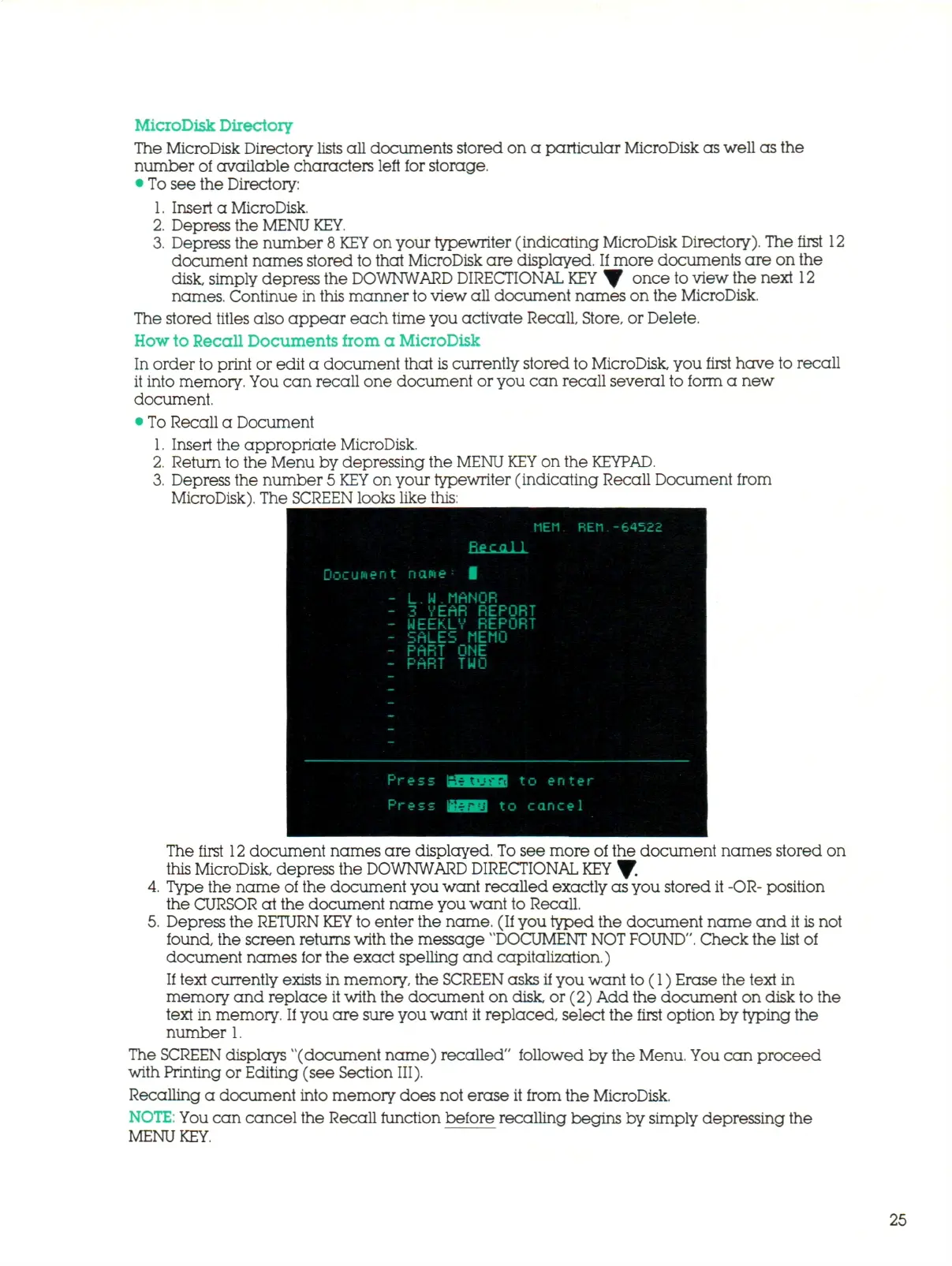
MicroDisk). The SCREEN looks like this:
MEM REM.-64522
Docutoen t nane
L.
W
. M A N O R
3 VEAR REPORT
WEEKLY REPORT
SALES MEMO
PART ONE
PART TWO
The first
12
document names are displayed. To see more of the document names stored on
this MicroDisk, depress the DOWNWARD DIRECTIONAL
KEY
Y-
4.
Type the name of the document you want recalled exactly as you stored it -OR- position
the CURSOR at the document name you want to Recall.
5.
Depress the RETURN
KEY
to enter the name. (If you typed the document name and it
is
not
found, the screen returns with the message "DOCUMENT
NOT
FOUND".
Check the list of
document names for the exact spelling and capitalization.)
If text currently exists in memory, the SCREEN asks if you want to (1) Erase the text in
memory and replace it with the document on disk, or (2) Add the document on disk to the
text in memory.
If
you are sure you want it replaced, select the first option by typing the
number 1.
The SCREEN displays "(document name) recalled" followed by the Menu. You can proceed
with Printing or Editing (see Section III).
Recalling a document into memory does not erase it from the MicroDisk.
NOTE:
You c a n cancel the Recall function before recalling begins by simply depressing the
MENU
KEY.
25



 To Next Page