Required Page End
There are times that you may require a page ending other than that set automatically by the
word processor, for example, at the end of a chapter or before and after a chart.
• To Set a Required Page End:
1.
When you are entering or editing text, depress the
RETURN
KEY
at the desired page end
location.
2.
Depress the PAGE
END
Key on your
KEYPAD.
You see the Required Page End Symbol ( • )
appear on the
SCREEN.
The Page Indicator at the top left of your
SCREEN
changes
accordingly.
3.
Depress the RETURN
KEY
again.
Required Page Endings c a n be deleted or inserted during the Editing
process.
Reformatting
will not delete Required Page Endings. They can only be deleted by the user.
When reformatting after typing a multi-page text, or after editing text (see Section
III),
the
system
will
"look" one line a h e a d for a Required Page End before inserting an Automatic Page
End.
This
will eliminate a page from containing only a single line. The system will begin again
to calculate page endings immediately following a Required Page End.
Required Return
When your
PWP is
turned on, Auto Return is automatically activated. Line lengths, therefore,
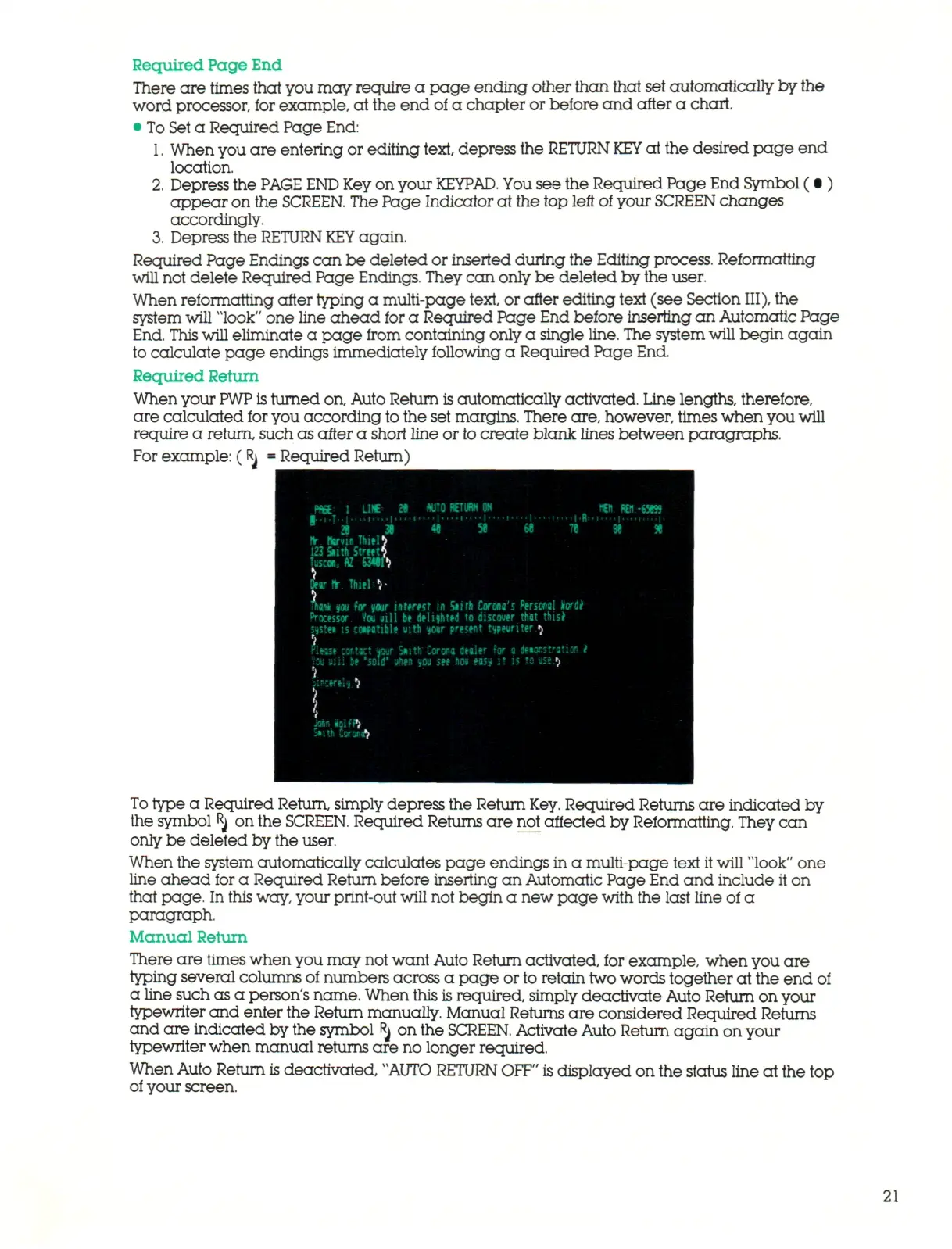
are calculated for you according to the set margins. There are, however, times when you will
require a return, such as after a short line or
to
create blank lines between paragraphs.
For example: (Rj
=
Required Return)
AUTO RETURN ON
W l RBI-65B5
ft.
ftarvin Tluel
r
123 i ith Street*,
Tuscan,
AZ
63«ft
'or
ft.
Thiel
V
%m
m for mr
interest
in
S»ith Corona's Personal Horde"
Processor You
»iU be
d e lis t e d
to
discover that this*
;jstM
;s
compatible »ith \tour present typewriter
^
'l
Hltsse CMtKt
wtr
Snith Corona dealer
for a
deMStratiOfl
I
'<%
m i l be
'iQii' iihen
w
see hov eass
it ;s to
Ht.$
'* • *
jisaren ^
\
J**
<D:fP>
5»ith CoronJ)
To
type a Required Return, simply depress the Return
Key.
Required Returns are indicated by
the symbol
R
j on the
SCREEN.
Required Returns are not affected by Reformatting. They can
only be deleted by the user.
When the system automatically calculates page endings in a multi-page text it will "look" one
line ahead for a Required Return before inserting an Automatic Page End and include it on
that page. In
this
way, your print-out will not begin a new page with the last line of a
paragraph.
Manual Return
There are times when you may not want Auto Return activated, for example, when you are
typing several columns of numbers across a page or to retain two words together at the end
of
a line such as a person's name. When this is required, simply deactivate Auto Return on your
typewriter and enter the Return manually. Manual Returns ar e considered Required Returns
and are indicated by the symbol Rj on the
SCREEN.
Activate Auto Return again on your
typewriter when manual returns are no longer required.
When Auto Return is deactivated, "AUTO
RETURN
OFF"
is displayed on the status line at the top
of your screen.
21



 To Next Page