3.
Position the CURSOR at your desired left margin by depressing the appropriate CURSOR
DIRECTIONAL
KEY.
4.
Set the Left Margin by depressing the
LEFT
MARGIN
KEY
on your typewriter. An "L"
appears on the SCALE.
5.
Move the CURSOR to your desired first tab position.
6. Depress the
TAB SET KEY
on your typewriter.
A
"T appears on the SCALE.
7.
Set other tab stops you require in the same way.
8. Position the CURSOR at your desired right margin.
9. Set the Right Margin by depressing the
RIGHT
MARGIN
KEY(s)
on your typewriter. An "R"
appears on the SCALE.
10.
Depress the
RETURN
KEY.
The Format Screen is displayed.
You can set up to
16
tab
positions.
Tabs can be cleared by positioning the CURSOR at a tab
setting and clearing it via your typewriter keyboard.
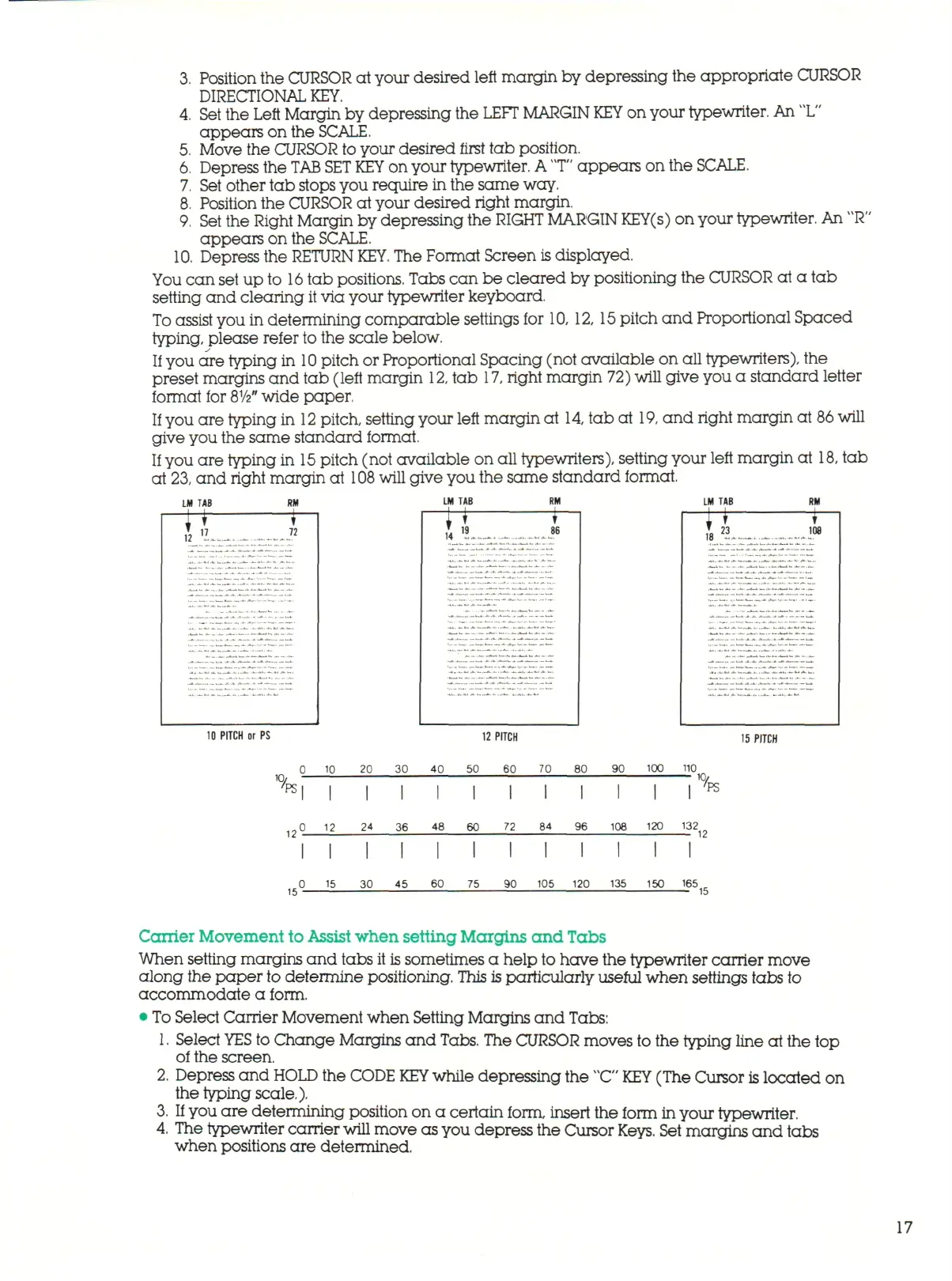
To assist you in determining comparable settings for 10, 12,
15
pitch and Proportional Spaced
typing, please refer to the scale below.
If you are typing in
10
pitch or Proportional Spacing (not available on all typewriters), the
preset margins and tab (left margin
12,
tab 17,
right
m a r g i n 72) will give you a standard letter
format for
8
1
/2"
wide paper,
If
you are typing in
12
pitch, setting your left margin at
14,
tab at
19,
and right margin at
86
will
give you the same standard format.
If
you are typing in
15
pitch (not available on all typewriters), setting your left margin at
18,
tab
at
23,
and right margin at
108
will give you the same standard format.
LM TAB
LM TAB LM TAB
10 PITCH
or PS 12
PITCH
15
PITCH
0 10 20 30 40 50 60 70 80 90 100 110
10,
1C,
PSl
PS
0 12 24 36 48 60 72 84 96 108 120 132
0 15 30 45 60 75 90 105 120 135 150 165
r
15 15
Carrier Movement to Assist when setting Margins and Tabs
When setting margins and tabs it is sometimes a help to have the typewriter carrier move
along the paper to determine positioning. This
is
particularly useful when settings tabs to
accommodate a form.
• To Select Carrier Movement when Setting Margins and Tabs:
1.
Select
YES
to Change Margins and
Tabs.
The CURSOR moves to the typing line at the top
of the screen.
2.
Depress and
HOLD
the CODE
KEY
while depressing the
"C" KEY
(The Cursor is located on
the typing scale.).
3. If
you are determining position on a certain form, insert the form in your typewriter.
4.
The typewriter carrier will move as you depress the Cursor
Keys.
Set margins and tabs
when positions are determined.
17



 To Next Page