Section
VI:
Enhanced Typewriter Feature Instructions
The operation of some of the enhanced typewriter features varies slightly whe n using the
Personal Word Processor. Refer to the instructions below when activating these features with
your
PWP.
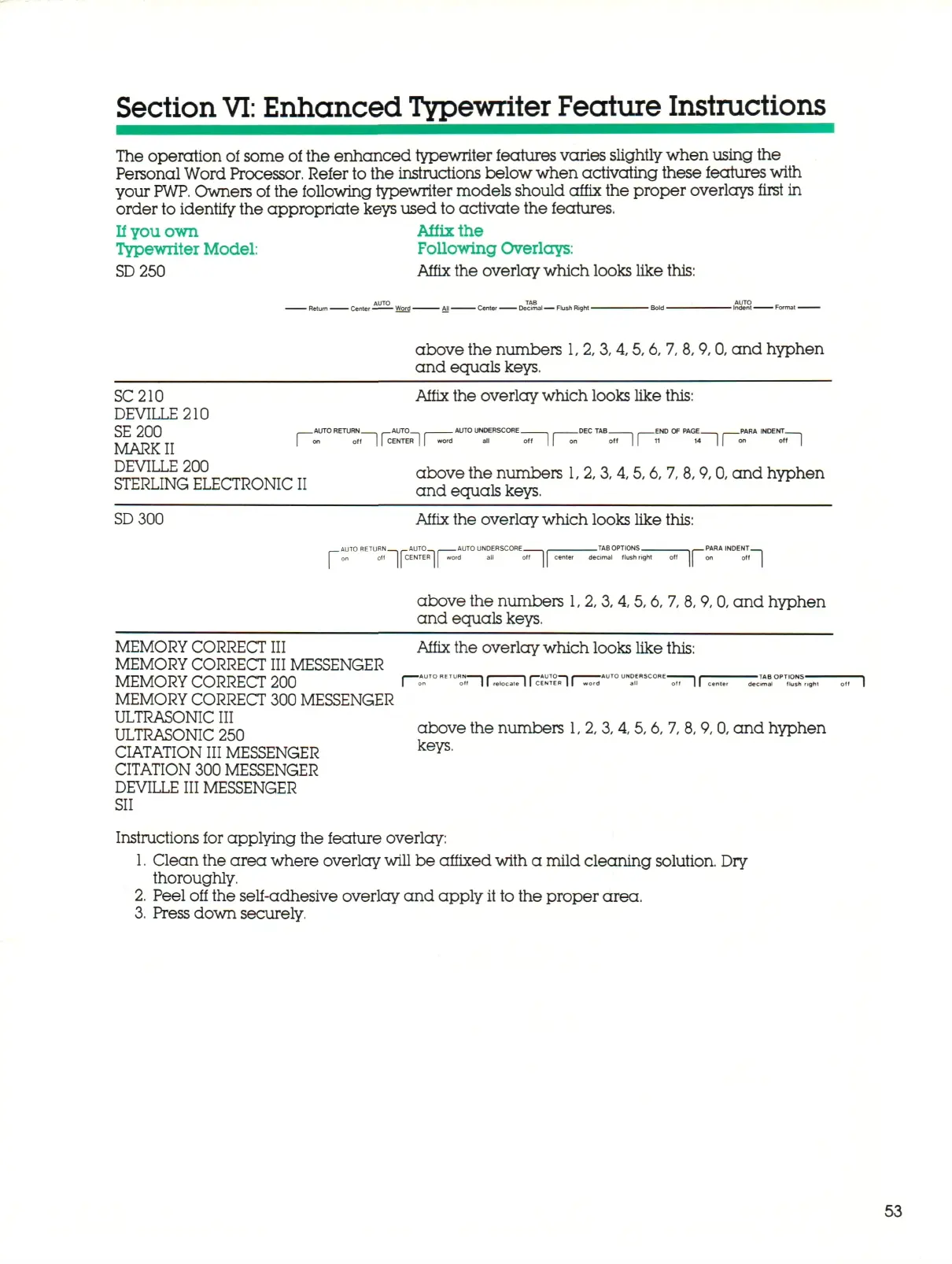
Owners of the following typewriter models should affix the proper overlays first in
order to identify the appropriate keys used to activate the features.
If
you own Affix the
Typewriter
Model:
Following Overlays:
SD
250 Affix the overlay which looks like this:
- Center ^ ^ — Decimal
—
Flush Right
-
above the numbers
1,
2,
3,
4,5, 6, 7, 8, 9, 0, a n d hyphen
and equals keys.
SC210
DEVILLE210
SE200
MARK
II
Affix the overlay which looks like this:
n
AUTO R E T U R N
— i
r n
i
f | | C E N T E R | I word
AUTO UNDERSCORE.
I
I
END OF PAGE. _PARA INDENT.
n
DEVILLE 200
STERLING ELECTRONIC II
above the numbers
1,
2, 3,4,5,6, 7, 8, 9,0, and hyphen
and equals keys.
SD300
Affix the overlay which looks like this:
_
A U T O R E T U R N
1(
_AUTO_
1|
AUTO U N D E R S C O R E -
word
all ol
on
off
CENTER
I
word
-TAB OPTIONS. PARA INDENT-
center decimal flush fight
off
If"
°"1
above the numbers
1,
2,
3,
4, 5, 6, 7, 8, 9, 0, and hyphen
and equals keys.
~ir
•TAB
OPTIONS-
decimal flush right
MEMORY CORRECT III Affix the overlay which looks like this:
MEMORY CORRECT III MESSENGER
MEMORY CORRECT 200 r-r°"
E,
THr^^i7^?nr^
AUTOUN
T
scor
~
MEMORY CORRECT 300 MESSENGER
ULTRASONIC III
. ..
^.oo^ATonn^K,*,
ULTRASONIC 250 above the numbers
1,
2,
3,
4,5, 6, 7, 8, 9, 0, a n d hyphen
CIATATION III MESSENGER
keys
'
CITATION 300 MESSENGER
DEVILLE III MESSENGER
SII
Instructions for applying the feature overlay:
1.
Clean the area where overlay
will
be affixed with
a
mild cleaning solution. Dry
thoroughly.
2.
Peel off the self-adhesive overlay and apply
it
to the proper area.
3.
Press down securely.
53



 To Next Page