2.3.3
2.3.4
EOI is
one
of the
five GPIB
management
lines.
Some
controllers automatically
assert
EOI
accompanied
by a
command
terminator.
In this case, select
"EOI” with
switches
FI and
F2.
If
the
controller
itself
offers a
choice of
command terminator, choose
carriage
return, line
feed,
or
semicolon: this
prevents command data being
lost or
corrupted.
Any
command
terminator
other than the one
selected is ignored by the instrument.
The
command
terminator
selected should
agree with that used by the GPIB
controller.
Details
of the command terminator
should appear in the controller
handbook.
Talk Only
Choose
between talk only and
talker/listener operation with the
TALK
ONLY switch:
Talk only ON. The instrument can act as a
talker only,
to
drive
a
listen-only
device, such as a
plotter, without
the
aid of
a
GPIB
controller.
Talk only OFF. The instrument can act as
either
a
listener or
a
talker,
as commanded by the GPIB controller.
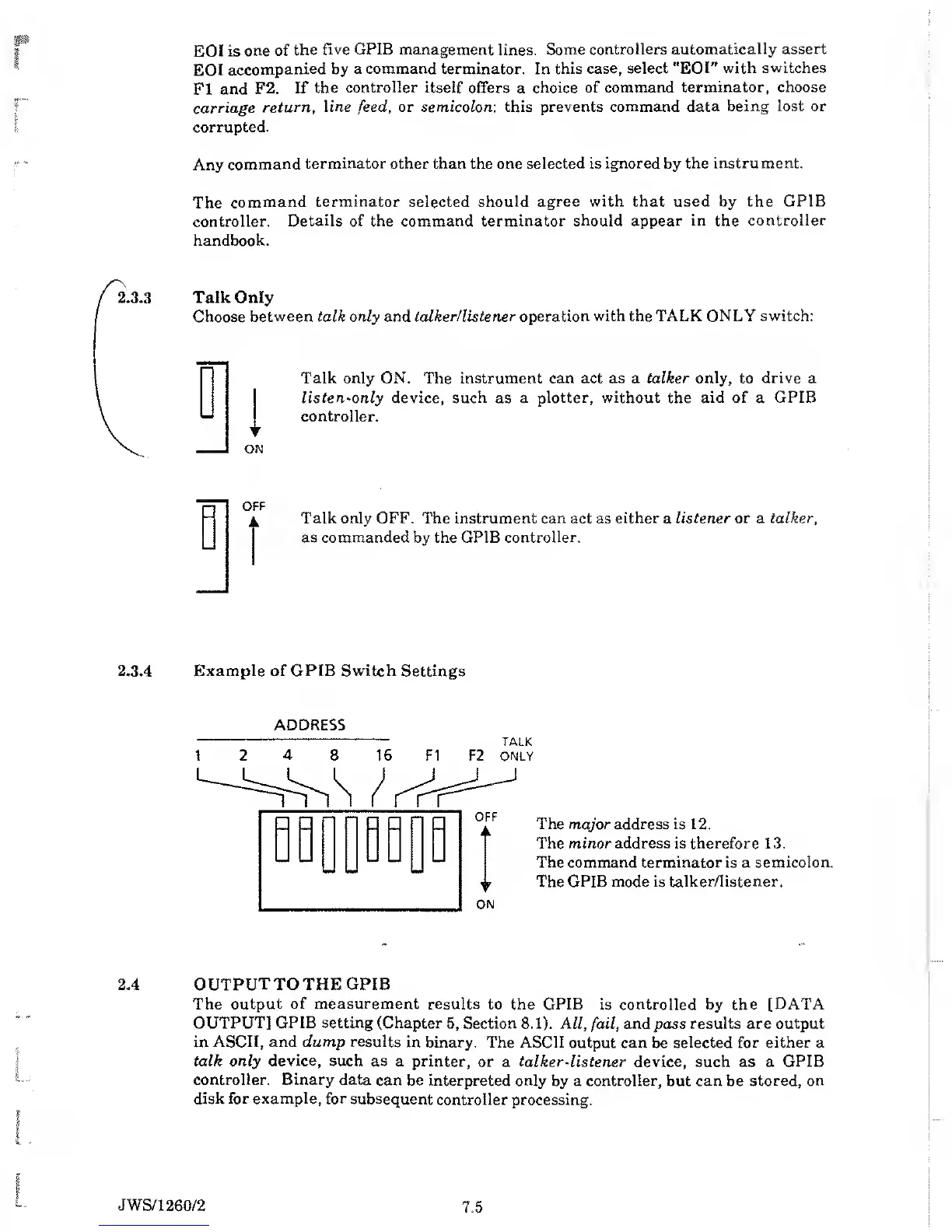
Example of
GPIB Switch
Settings
The major address is 12.
The minor address is therefore 13.
The command terminator
is a
semicolon.
The GPIB mode is
talker/listener.
OUTPUT
TO THE GPIB
The output
of measurement
results to the GPIB
is
controlled
by the
[DATA
OUTPUT] GPIB setting (Chapter
5,
Section
8.1).
All,
fail,
and pass results are output
in
ASCII, and dump results
in binary. The ASCII
output can be selected for
either
a
talk
only
device, such as
a printer,
or a
talker-listener
device, such as a
GPIB
controller. Binary data
can be interpreted only
by a controller, but can be
stored, on
disk
for example, for
subsequent
controller processing.
JWS/1
260/2
7.5



 To Next Page