EasyManua.ls Logo

Solartron 1260 - Data Output

Solartron 1260
295 pages
Print Icon
To Next Page IconTo Next Page
To Previous Page IconTo Previous Page
Loading...
DATA
OUTPUT
DATA
OUTPUT
selects:
>
the
data
output
ports,
>
the
data
to
be
output,
and
>
the
data
format.
[DATA
OUTPUT]
,
.
,
As
well
as
being
displayed,
the
measurement
results
may
be
output
through
any
combination
of
the
RS423
port, the
GPIB
port,
and
the
history
file.
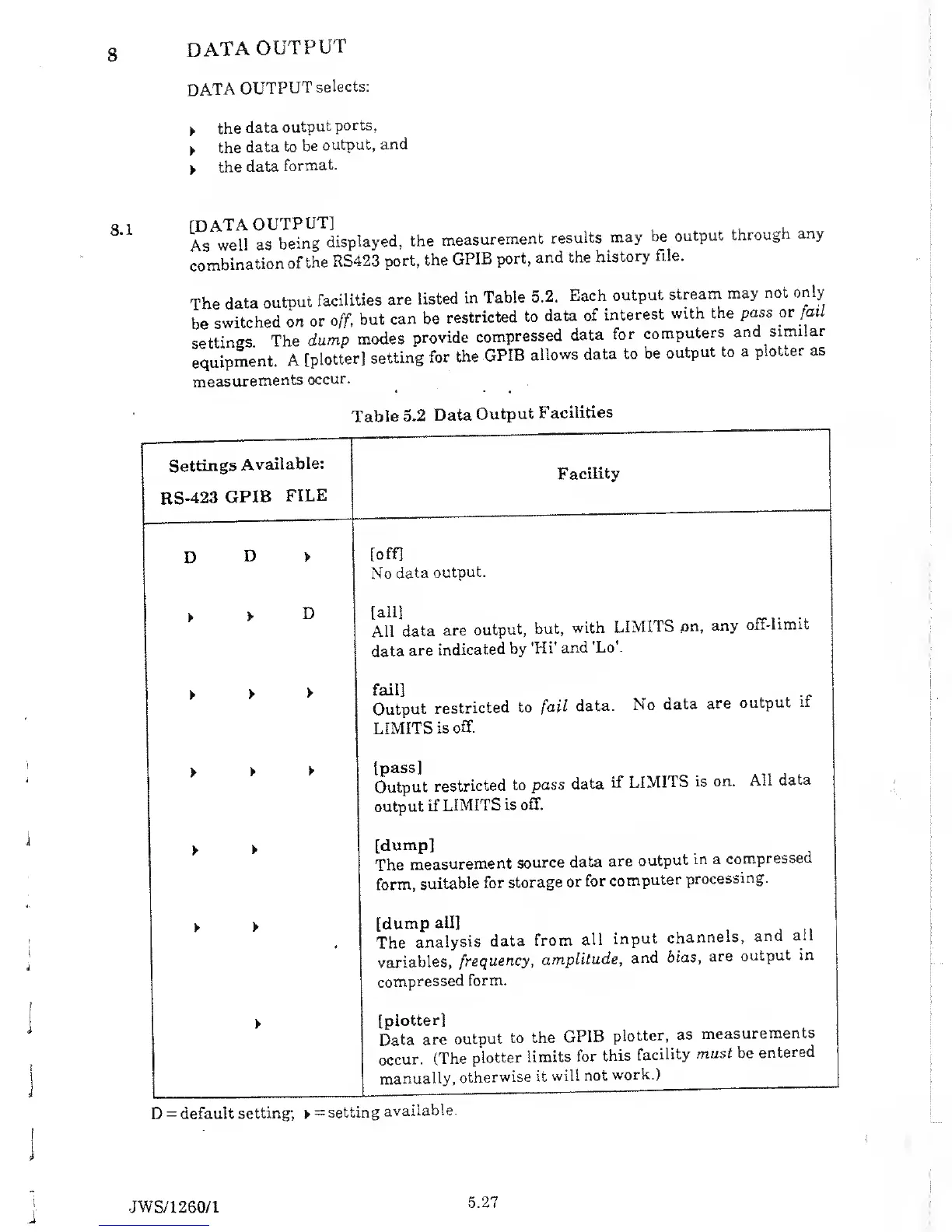
The
data
output
facilities
are
listed
in
Table
5.2.
Each
output
stream
may not
only
be
switched
on
or
off,
but
can be
restricted
to
data of
interest
with
the
pass
or
fail
settings
The
dump
modes
provide
compressed
data
for
computers
and
similar
equipment.
A
[plotter]
setting
for the
GPIB
allows
data
to
be
output to
a
plotter
as
measurements
occur.
Table
5.2
Data
Output
Facilities
Settings
Available:
RS-423
GPIB
FILE
Facility
D
D
[off]
No
data
output.
All
data
are
output,
but,
with
LIMITS
pn,
any
off-limit
data
are
indicated
by
'Hi'
and
'Lo\
lanj
Output
restricted
to fail
data.
No
data
are
output
if
LIMITS
is
off.
[pass]
Output
restricted
to
pass
data
if
LIMITS
is
on.
All
data
output
if
LIMITS
is
off.
[dump]
The
measurement
source
data
are
output
m a
compressed
form,
suitable
for
storage
or
for
computer
processing.
[dump
all]
The
analysis
data
from
all
input
channels,
and
ail
variables,
frequency,
amplitude,
and
bias,
are
output
in
compressed
form.
[plotter]
Data
are
output
to the
GPIB
plotter,
as
measurements
occur.
(The
plotter
limits
for
this
facility
must be
entered
manually,
otherwise
it
will
not
work.)
D
=
default
setting;
=
setting
available.
JW
S/1260/1

Table of Contents

Related product manuals