EasyManua.ls Logo

Solartron 1260 - Applying a Scaling Function

Solartron 1260
295 pages
Print Icon
To Next Page IconTo Next Page
To Previous Page IconTo Previous Page
Loading...
[Chap.
10]
3
7
APPLYING
A
SCALING
FUNCTION
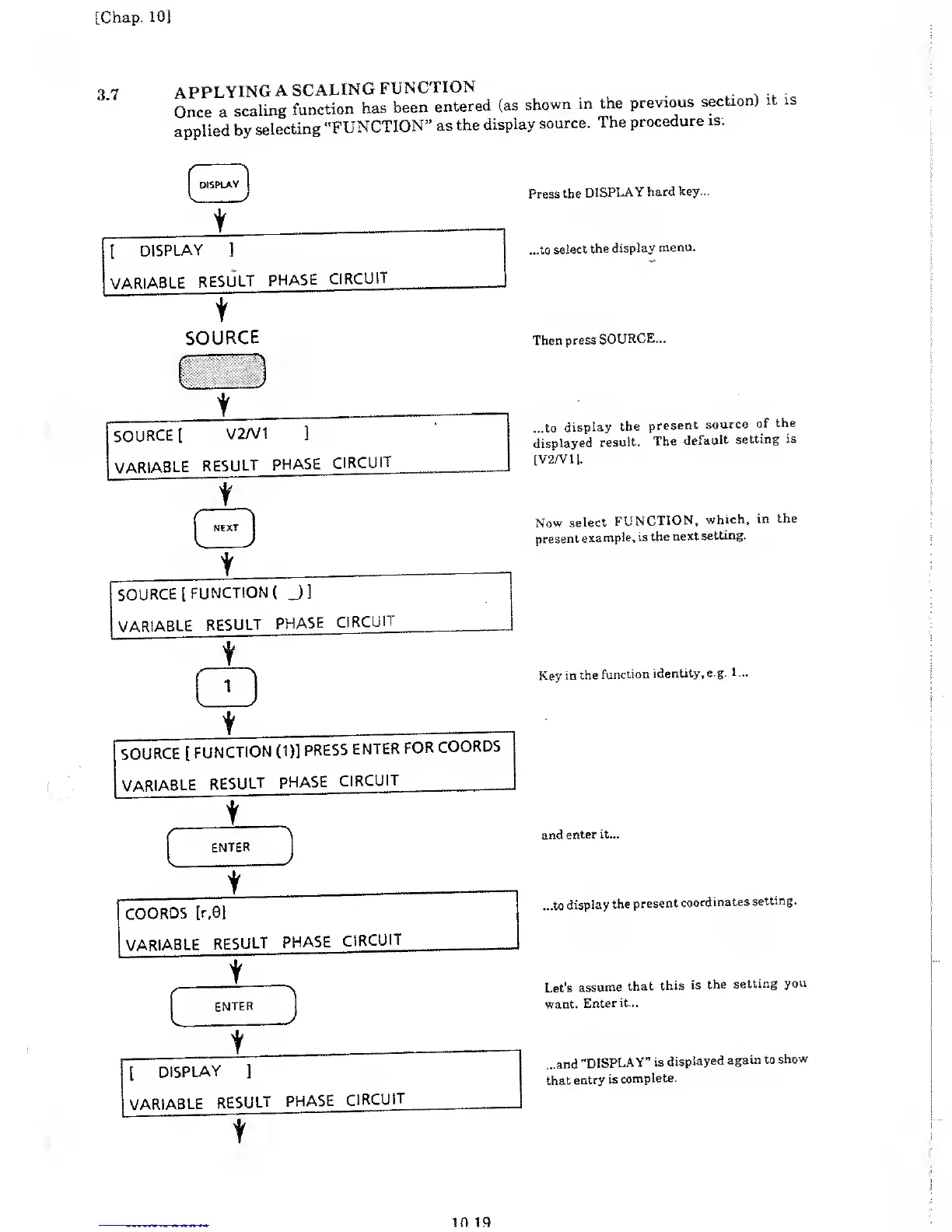
Once a
scaling
function
has
been
entered
(as
shown
in the
previous
section)
it is
applied
by
selecting
"FUNCTION”
as
the
display
source.
The
procedure
is:
DISPLAY
[
DISPLAY
]
VARIABLE
RESULT
PHASE
CIRCUIT
t
SOURCE
Press
the
DISPLAY
hard
key...
...to
select
the
display
menu.
Then
press
SOURCE...
...to
display
the
present
source
of
the
displayed
result.
The
default
setting
is
[V2/V11.
Now
select
FUNCTION,
which,
in
the
present
example, is
the
next
setting.
t
SOURCE
[
FUNCTION
(
J3
VARIABLE
RESULT
PHASE
CIRCUIT
t
\
1
v,
/
\
SOURCE
[
FUNCTION
(1)]
PRESS
ENTER
FOR
COORDS
VARIABLE
RESULT
PHASE
CIRCUIT
t
[
DISPLAY
]
VARIABLE
RESULT
PHASE
CIRCUIT
t
~
~~
Key
in the
function
identity, e.g.
1 ...
and
enter it...
...to
display
the
present
coordinates
setting.
Let's
assume
that
this
is
the
setting
you
want.
Enter
it...
...and
"DISPLAY”
is
displayed
again to
show
that
entry
is
complete.
10 19

Table of Contents

Related product manuals