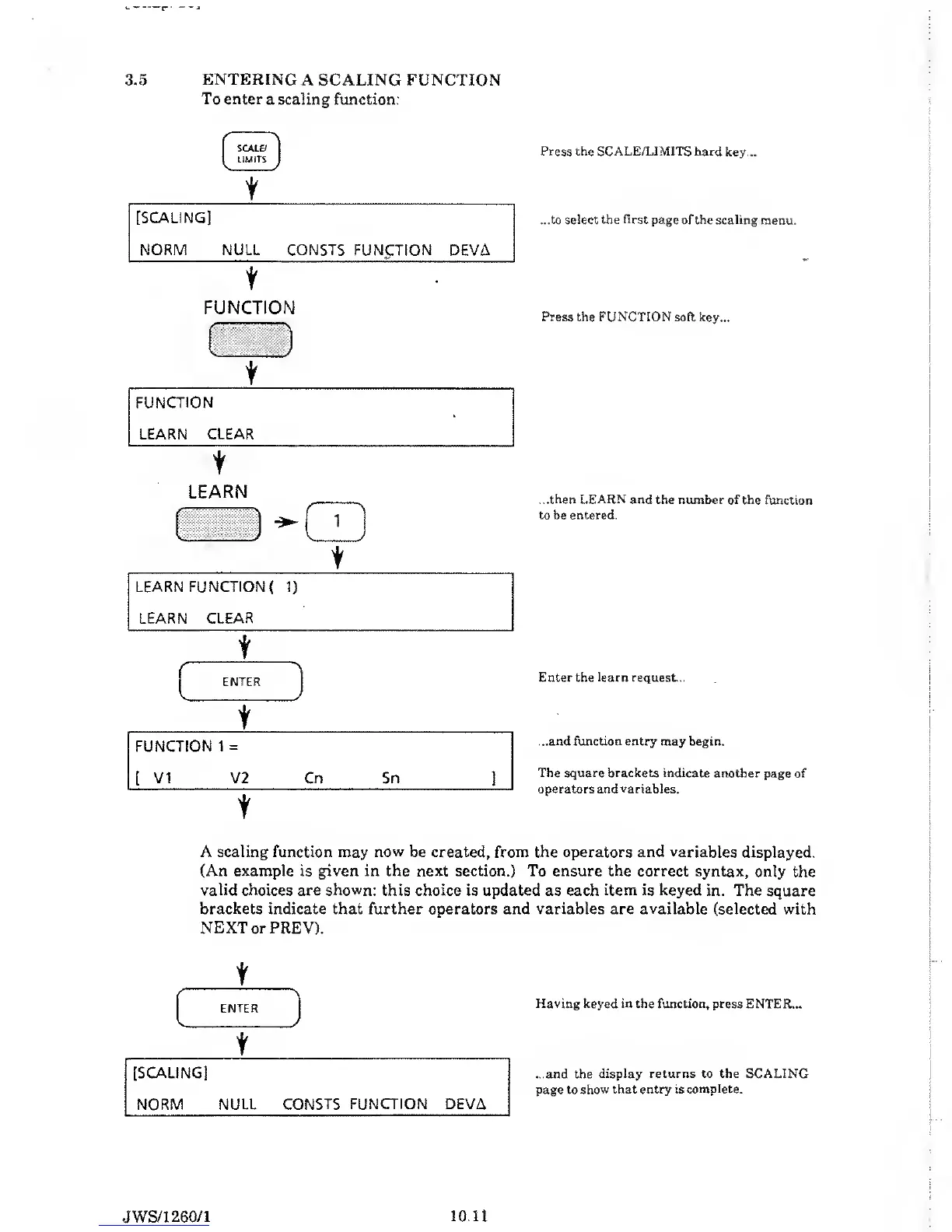
3.5 ENTERING A SCALING
FUNCTION
To enter
a
scaling
function:
SCALE/
l LIMITS
1
t
[SCALING]
NORM NULL CONSTS
FUNCTION DEVA
t
^
•
FUNCTION
f
LEARN
'•v J \
/
t
i
Press the SCALE/LIMITS hard key...
...to select the
first
page of the scaling
menu.
Press the FUNCTION
soft key...
...then LEARN
and the number of the
function
to
be
entered.
Enter the learn request...
...and function entry
may begin.
The square brackets indicate
another page of
operators and
variables.
A scaling function
may
now
be created, from the operators
and
variables displayed.
(An example
is
given
in the
next
section.) To ensure the correct syntax,
only the
valid
choices are
shown:
this choice is updated as each item is keyed in. The
square
brackets indicate that further operators and variables are available
(selected with
NEXT or PREY).
(
\
ENTER
L /
t
[SCALING]
NORM NULL
CONSTS FUNCTION DEVA
Having keyed in the
function, press ENTER...
...and the
display returns to the SCALING
page to
show that entry is complete.
JWS/1
260/1
10.11



 To Next Page