EasyManua.ls Logo

Solartron 1260 - Page 186

Solartron 1260
295 pages
Print Icon
To Next Page IconTo Next Page
To Previous Page IconTo Previous Page
Loading...
3.4
CLEARING
A SCALING FUNCTION
If none
of the functions presently
stored in the
instrument are
wanted
then
the
whole
program/function memory
may
be cleared
by initializing
the
instrument.
Remember,
however, that this will
also
erase
the
history
file and
other
stored data
and set the
control settings
to
their
default
states.
The battery-maintained
program
memory
(programs/functions
1
through
9)
is
always
cleared on
initialization,
but the
non-volatile
memory
(programs/functions
10 through
18) is cleared only if
the instrument
is operating
in the supervisor
mode,
i.e. when
the
PROGRAM
keyswitch
on
the instrument
rear panel
is
set to
SUPERVISOR
and BREAK
has been commanded.
If
you wish to
keep the
contents of the
non-volatile
memory, always
set the
PROGRAM
keyswitch to NORMAL
before
initializing
the instrument.
If some functions
are wanted, or if
you do not wish
to initialize
the instrument,
then
unwanted functions
may
be
cleared
selectively.
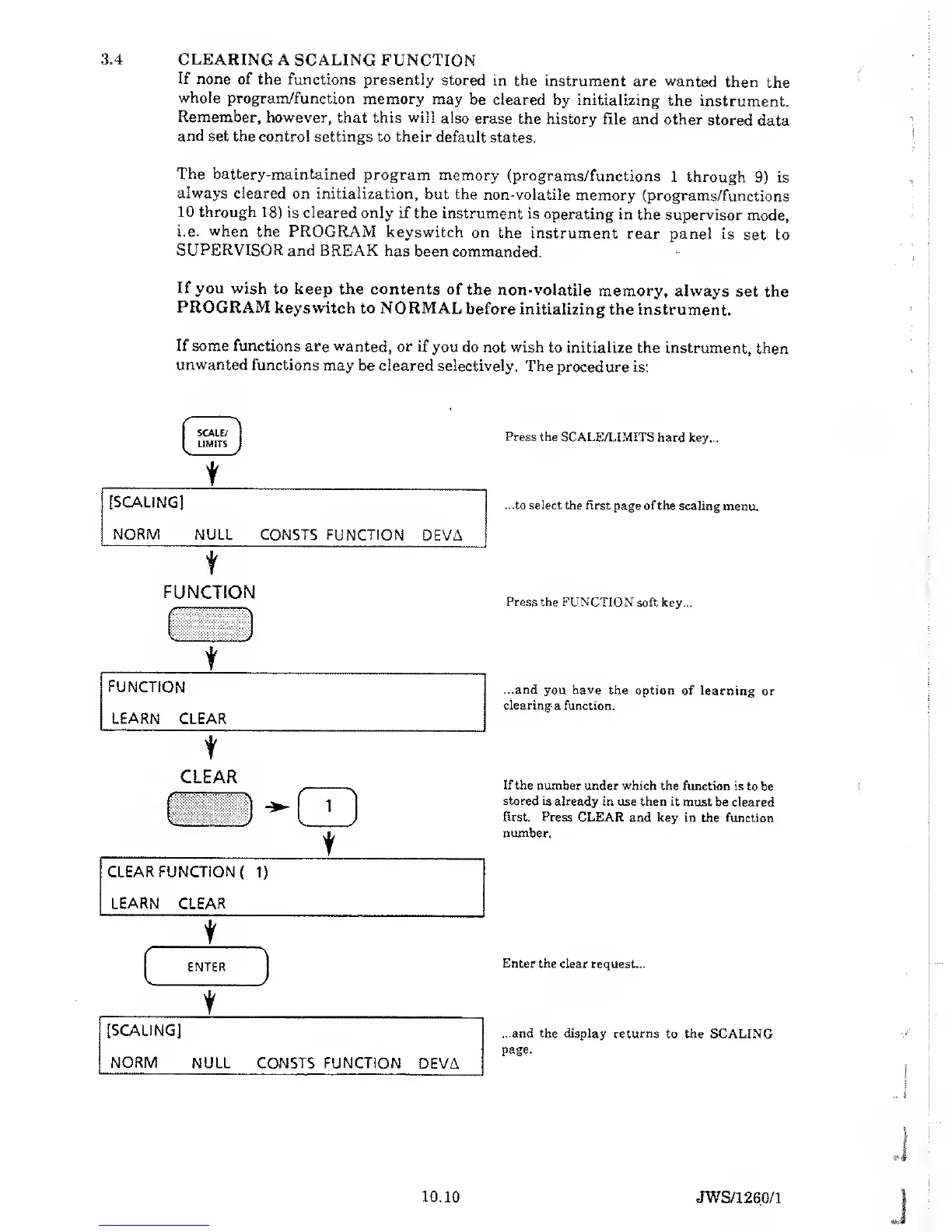
The procedure is:
SCALE/
LIMITS
t
[SCALING]
NORM
NULL CONSTS FUNCTION
DEVA
t
Press the SCALE/LIMITS
hard key...
...to
select
the first
page
of the
scaling menu.
FUNCTION
\\
v. J
Press
the FUNCTION
soft key...
t
...and you have the
option of learning
or
clearing- a function.
FUNCTION
LEARN CLEAR
t
CLEAR
t
CLEAR FUNCTION
{
1)
LEARN
CLEAR
t
r~
ENTER
j
t
[SCALING]
NORM
NULL CONSTS FUNCTION
DEVA
If the number
under
which
the function
is to
be
stored is
already in use then it must
be cleared
first. Press CLEAR
and
key
in the function
number.
Enter
the clear request...
...and the display returns
to the SCALING
page.
10.10
JWS/1260/1

Table of Contents

Related product manuals