7
USING THE SWEEP
FACILITY
SWEEP allows any one of
the
generator
output
parameters,
frequency, amplitude, or
bias, to
be stepped
through
a range of settings,
a
new
setting
being used for each
measurement. The basic data of the series of
measurements thus
made are held in
the
history file and may be
reviewed with
the
VIEW FILE
facility. A graph can be
plotted
from the stored data
with
the PLOT facility
(example in
Section
8).
In the
following example a series of
measurements is made of the
C,R circuit shown
in
Fig 3.
1,
using
a
frequency
sweep.
(The
settings of the GENERATOR,
ANALYZER
and
DISPLAY
menus are the same.)
The frequency is swept
between the limits
100Hz (F.MIN)
and 900kHz (F.MAX).
Fifty measurements are made, at
logarithmic
intervals, going
from the minimum to
the maximum frequency.
7.1
SETTING THE
SWEEP
The
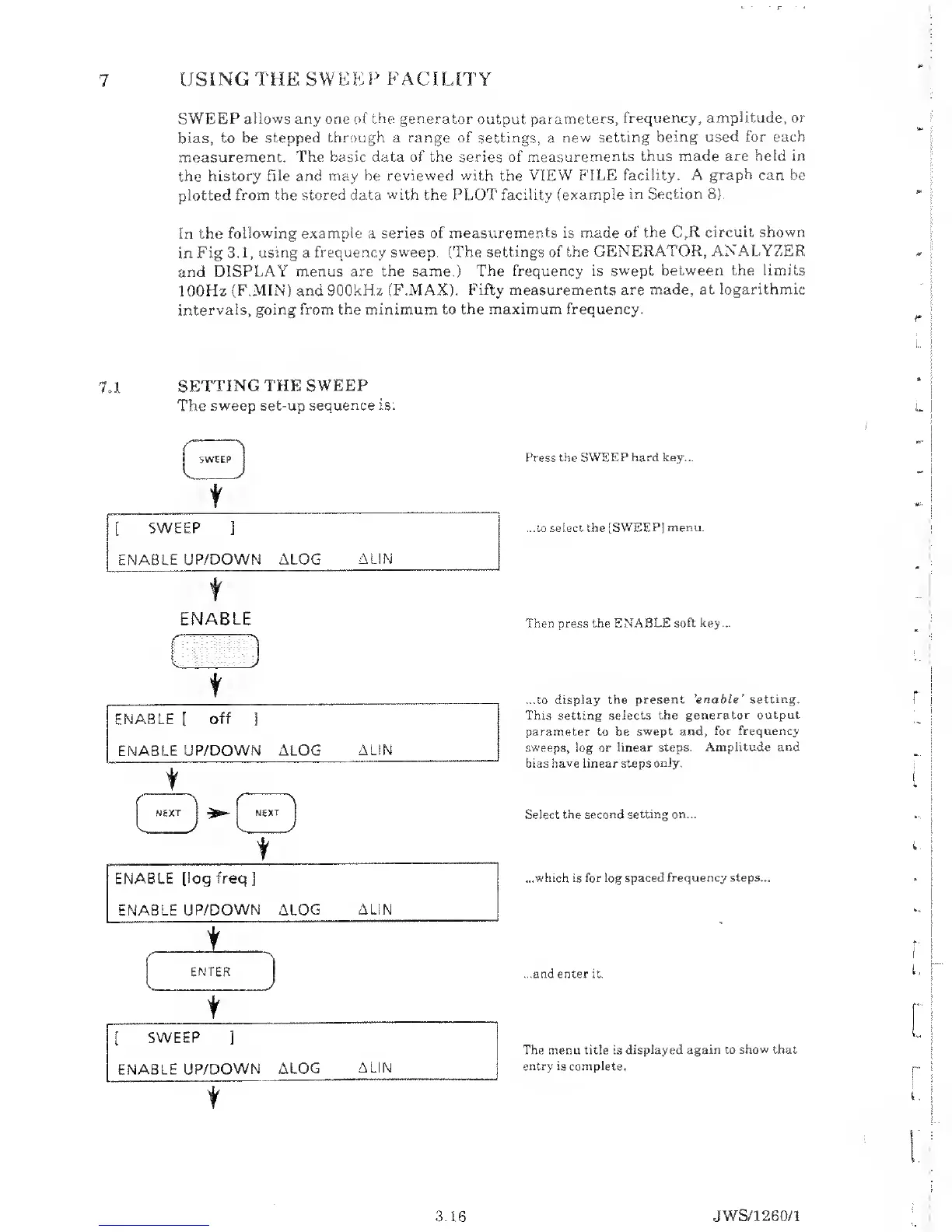
sweep set-up sequence is:
t
[
SWEEP
]
ENABLE
UP/DOWN ALOG
ALIN
t
Press the
SWEEP hard
key...
...to select the
[SWEEP] menu.
ENABLE
t
t
Then press the ENABLE
soft key...
...to
display the
present 'enable
'
setting.
This setting
selects the
generator output
parameter
to be
swept
and, for frequency
sweeps, log or
linear steps. Amplitude
and
bias
have
linear steps
only.
Select the second setting on...
...which is for log spaced
frequency steps...
...and
enter it.
The menu title is
displayed again to show that
entry is complete.
3.16 JWS/1 260/1



 To Next Page