US
IN G A
CO
NTRO L M EN
U
A
few
simple steps are all that is necessary
to
use
each
control menu. You are guided
through
these by
a
clear display of the choices
available,
shown in brackets.
The
steps
are:
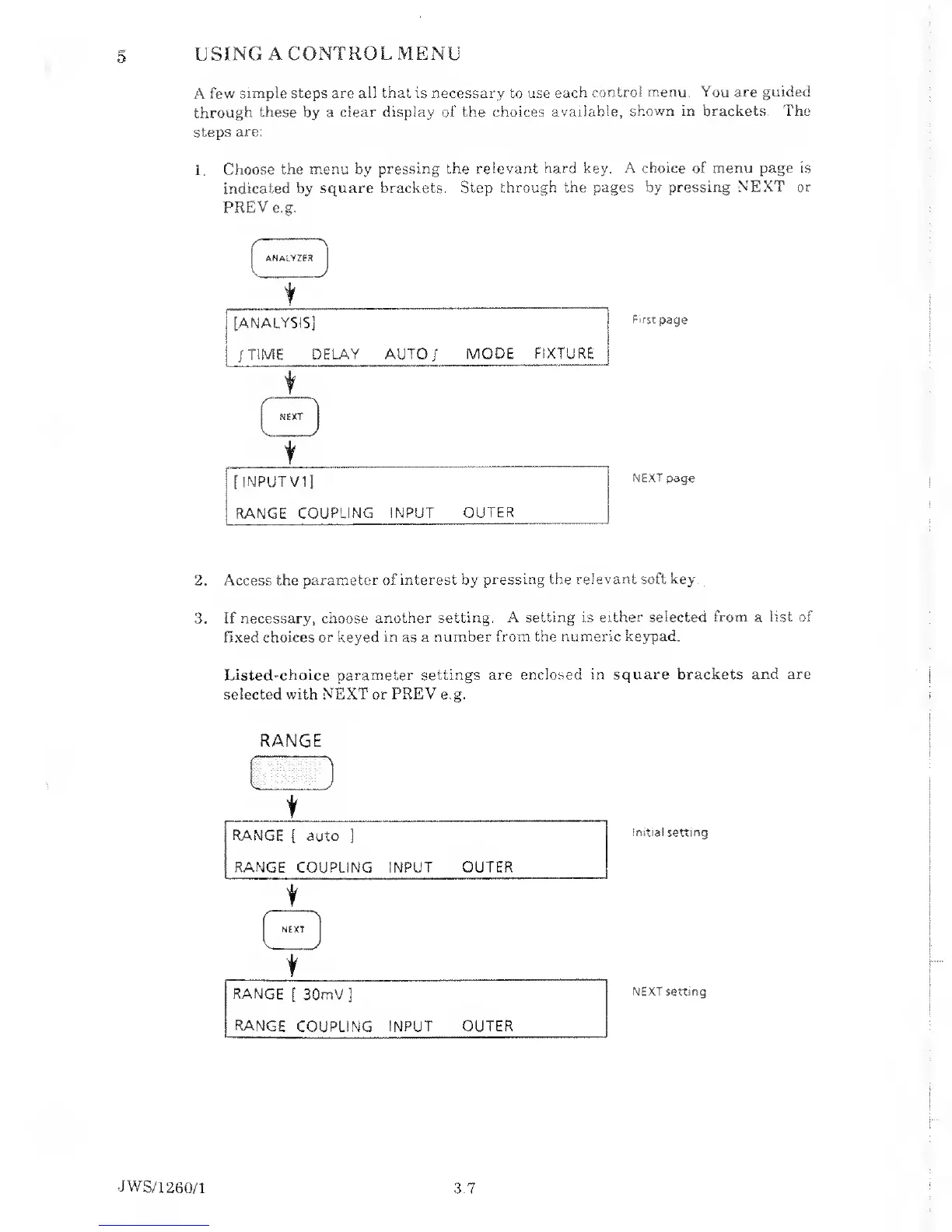
1.
Choose
the menu by
pressing the relevant
hard key. A choice of menu page
is
indicated by
square brackets. Step
through the pages by pressing
NEXT or
PREVe.g.
|
ANALYZER
)
t
[ANALYSIS]
/
TIME DELAY AUTO/
MODE
FIXTURE
t
f )
NEXT
t
[
INPUTV1]
RANGE
COUPLING INPUT
OUTER
NEXT
page
2. Access
the parameter of interest by
pressing the
relevant soft key.
3. If
necessary, choose
another setting. A setting is
either selected from a list of
fixed choices or keyed in as a
number from the numeric
keypad.
Listed'Choice parameter settings
are enclosed in
square brackets and are
selected with NEXT or
PREY
e.g.
RANGE
t
RANGE
(
auto
]
RANGE
COUPLING
INPUT OUTER
1
NEXT
V
1
r
RANGE
[
30mV
]
RANGE
COUPLING
INPUT OUTER
Initial
setting
NEXT setting
JWS/1
260/1 3.7



 To Next Page