10
VIEW
FILE
VIEW PILE
acts on the
basic
measurement data
stored in
the
history
file. The form
of
the output results
is selected
from
the DISPLAY
menu (see Section
4).
10.1
[VIEW FILE]
DISPLAY
Displays file
location #1.
Use the
[DISPLAY FILE1
menu
to
go to other
file locations.
LIST
On entry,
each file location is output in quick
succession.
This facility
is
intended for
sending filed data to an external
device, via
RS 423
or the
GPIB.
LIST may also
be used for updating the statistics
readings:
see Section
12.2.4.
CLEAR
Erases the file contents and displays
'40. FILE CLEARED'.
10,2
[DISPLAY
FILE!
When DISPLAY
is selected, in
the [VIEW FILE] menu, file
location
#1 is displayed.
Other
file
locations are
accessed as follows:
BOF
Beginning
of file.
(Location
1)
EOF
End of file.
(The highest numbered location
containing
a
result)
NEXT
Next location.
(Location n-t-
1)
PREV
Previous location.
(Location n
-
1)
LINE
Location
n.
10.3
FILE
SIZE
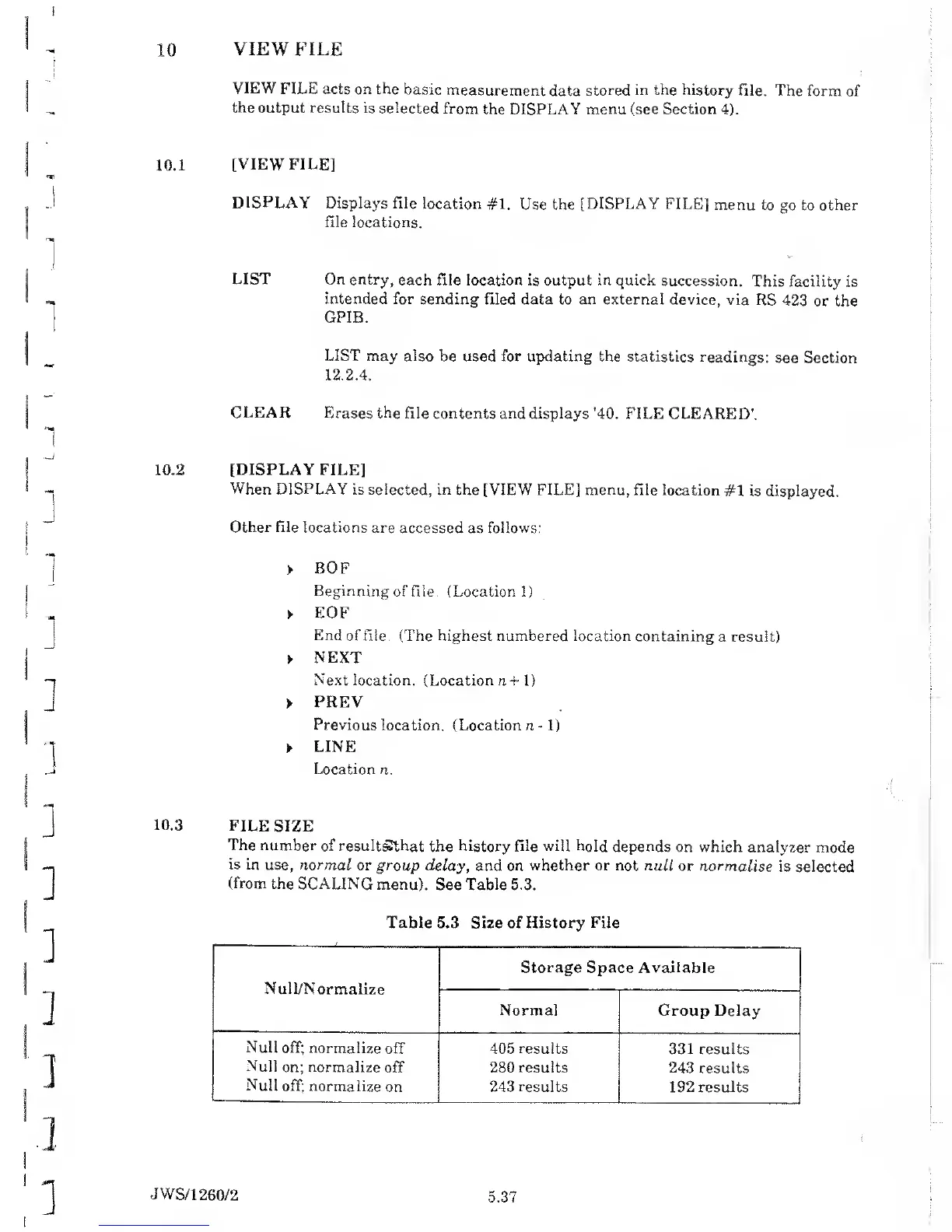
The
number
of resultgthat
the
history file will hold depends
on which
analyzer
mode
is
in use, normal
or group
delay, and on
whether or not
null or normalise
is
selected
(from
the
SCALING menu).
See Table
5.3.
Table 5.3 Size of History File
Null/Normaiize
Storage
Space Available
Normal Group
Delay
Null off;
normalize
off
Null
on; normalize
off
Null
off; normalize
on
405
results
280 results
243 results
331 results
243
results
192
results
JWS/1
260/2
5.37



 To Next Page