tv^iictp.
1UJ
4 THE LIMITS FACILITY
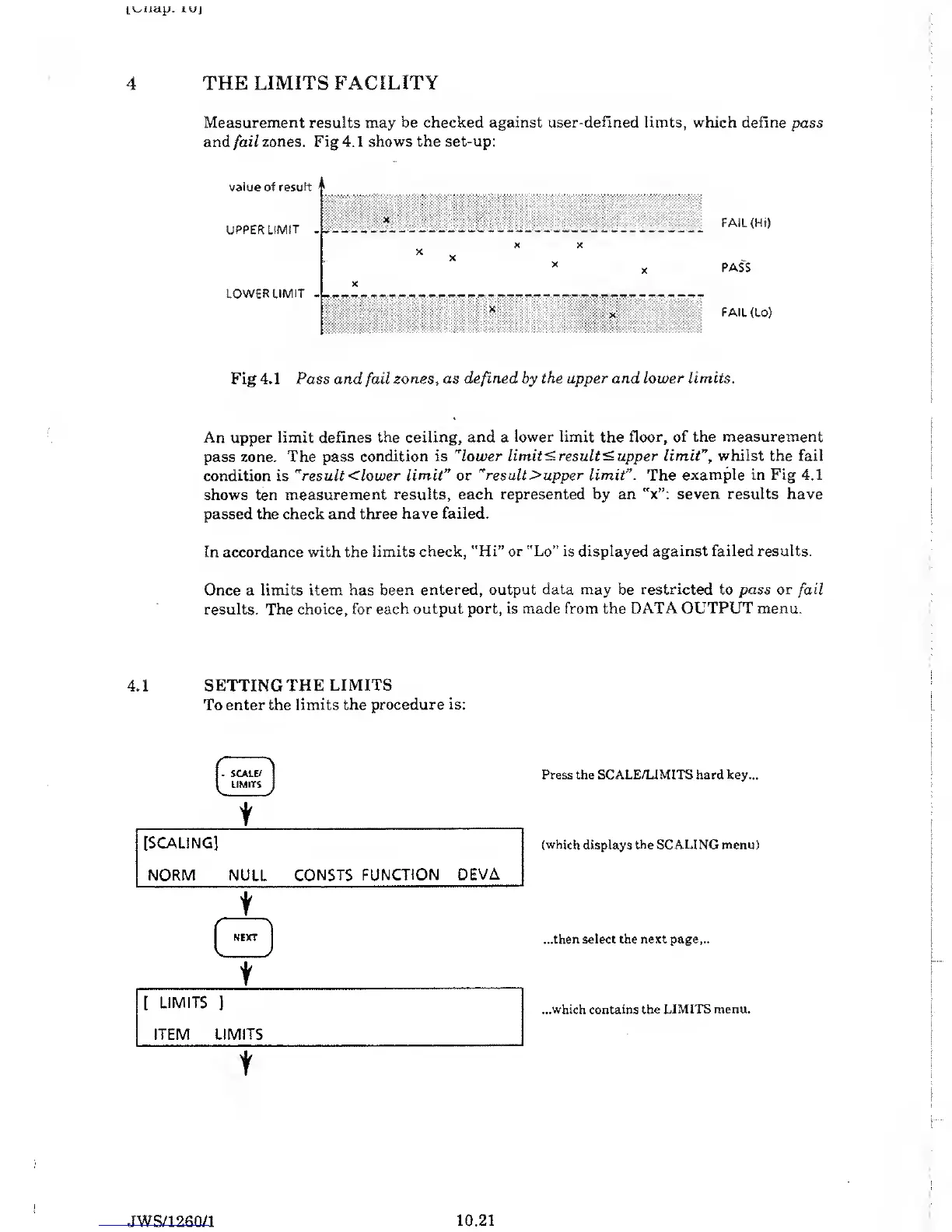
Measurement results may be checked against
user-defined limts, which
define pass
and
fail
zones. Fig 4.
1
shows the set-up:
FAIL (Hi)
PASS
FAIL
(Lo)
Fig 4.1 Pass and
fail
zones
,
as defined by the
upper
and
lower
limits.
An upper limit
defines the ceiling, and a
lower limit
the
floor, of the measurement
pass zone. The pass
condition is
"lower limits results upper limit
”,
whilst the fail
condition is
"result
<
lower limit
”
or
"
result >
upper
limit”. The
example in Fig 4.1
shows ten measurement
results, each represented by an
"x”: seven results have
passed the check and three
have failed.
In accordance with the
limits check, "Hi” or "Lo” is
displayed against failed results.
Once a
limits item has been
entered, output data may be restricted to pass
or
fail
results. The
choice, for each output
port, is made from the DATA OUTPUT
menu.
4.1 SETTING THE LIMITS
To enter the limits the
procedure is:
t
Press the
SCALE/LIMITS
hard
key...
(which displays the SCALING menu)
...then select the next page...
...which contains
the
LIMITS menu.
JWS/1260/1
10.21



 To Next Page