EasyManua.ls Logo

Solartron 1260 - Page 198

Solartron 1260
295 pages
Print Icon
To Next Page IconTo Next Page
To Previous Page IconTo Previous Page
Loading...
f
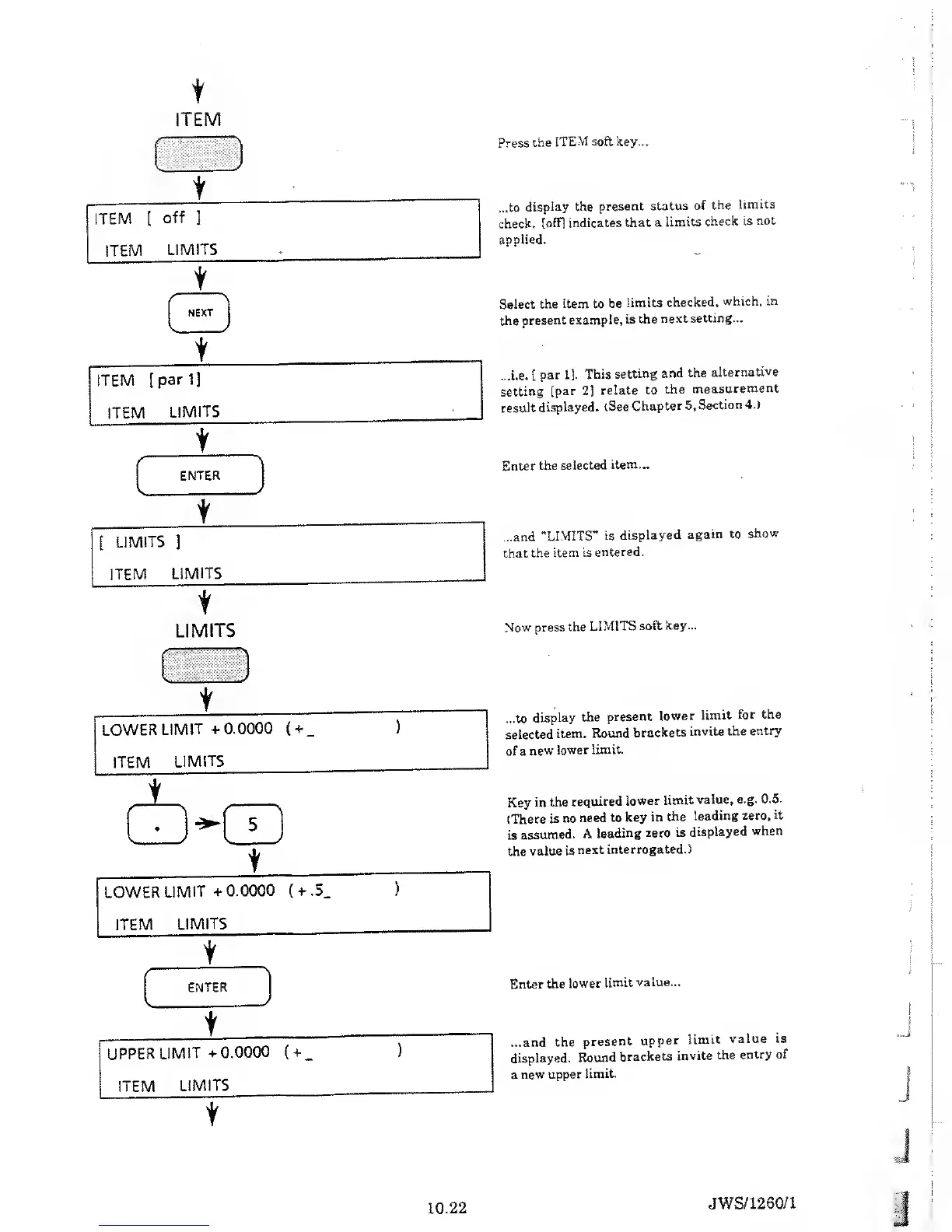
ITEM
t
LIMITS
Press
the
ITEM
soft key...
...to
display the
present
status
of
the
limits
check,
[off] indicates
that
a
limits
check is
not
applied.
Select
the item to
be
limits
checked,
which, in
the
present
example,
is the
next
setting...
...i.e.
[
par 11.
This
setting
and the
alternative
setting
[par
2]
relate
to
the
measurement
result
displayed.
(See
Chapter 5.
Section
4.)
Enter
the
selected
item...
...and
"LIMITS”
is
displayed
again to
show
that the
item
is
entered.
Now
press the
LIMITS
soft key...
LOWER
LIMIT
+0.0000
(
+
_
ITEM
LIMITS
t
LOWER
LIMIT
+
0.0000
(
+
.5.
ITEM
LIMITS
...to
display
the
present
lower
limit
for the
selected
item.
Round
brackets
invite
the entry
of a
new
lower
limit.
Key
in the
required
lower
limit
value, e.g.
0.5.
(There
is no
need
to key
in
the
leading zero,
it
is
assumed.
A
leading
zero
is
displayed
when
the
value
is
next
interrogated.)
Enter
the
lower
limit
value...
...and
the
present
upper
limit
value is
displayed.
Round
brackets
invite
the
entry of
a
new
upper
limit.
10.22
JWS/1260/1

Table of Contents

Related product manuals