EasyManua.ls Logo

Solartron 1260 - Scaling Facilities for Measurement Results; Normalizing Sweep Measurements

Solartron 1260
295 pages
Print Icon
To Next Page IconTo Next Page
To Previous Page IconTo Previous Page
Loading...
1
SCALING
FACILITIES
Measurement
results
may
be
scaled in
two
ways:
a)
sweep
measurements
may be
normalized,
and
b)
individual
results
may
have
a
scaling
function
applied
to
them.
These
two
facilities
may
be
used
independently.
When they
are
both
used,
normalisation
occurs
before
function.
NORMALIZING
SWEEP
MEASUREMENTS
The
normalize
facility
computes
the
ratio
of
two sets
of
values,
normalize
values and
the
values
resulting
from a
subsequent
measurement
sweep.
Two useful
application
are:
•
Separating
measurement
results
from
background
data.
•
Measuring
the effect
of a
modification
on
the
item
under
test.
Three
simple
steps
-
normalize,
modify,
measure
-
give
measurement
results
that
are
related
to
the difference
in
the
item
under
test,
after
modification.
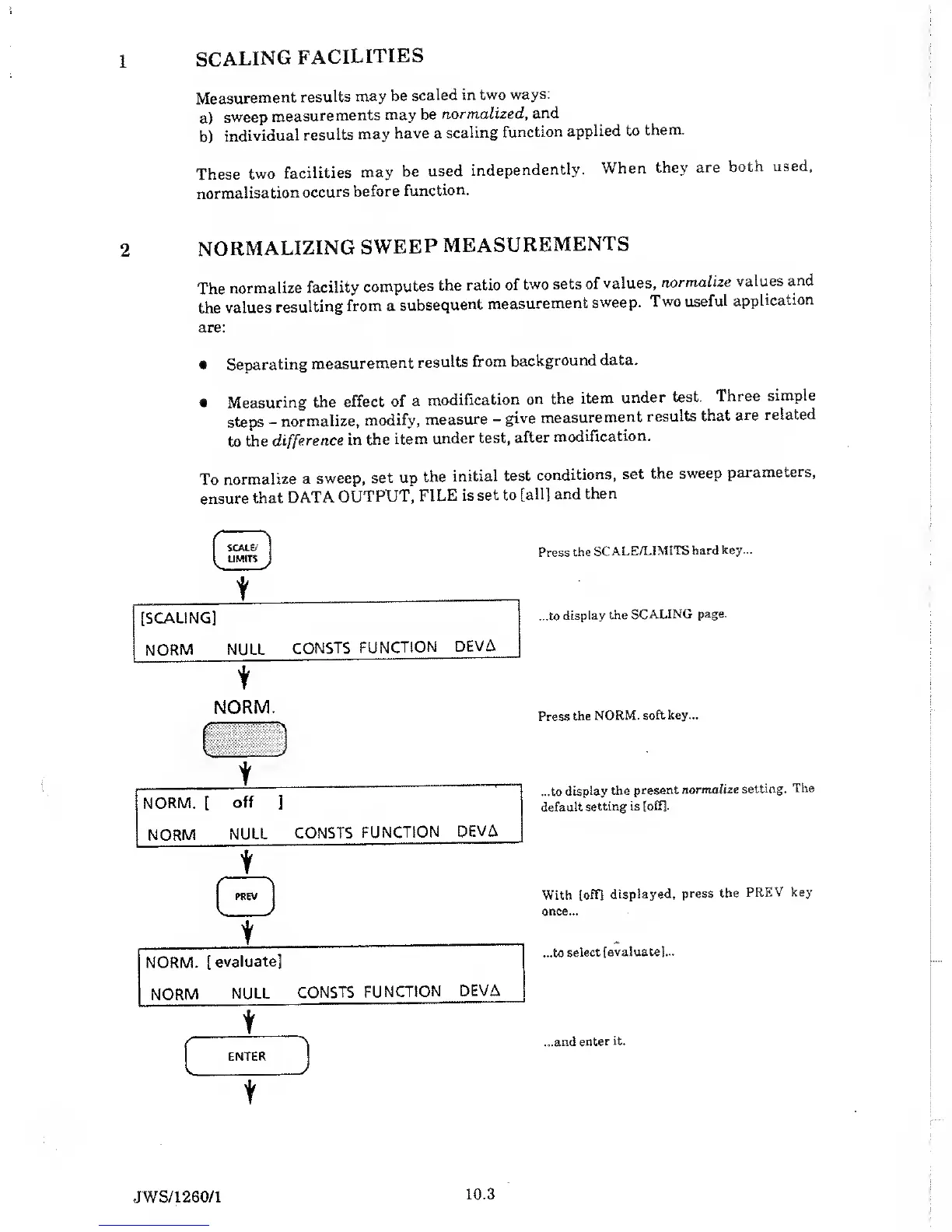
To
normalize
a
sweep,
set up
the
initial test
conditions,
set
the
sweep
parameters,
ensure
that
DATA
OUTPUT,
FILE is
set to
[all]
and
then
\
SCALE/
LIMITS
V V
t
[SCALING]
NORM
NULL
CONSTS
FUNCTION
DEVA
Press
the
SCALE/LIMITS
hard key...
...to
display
the
SCALING
page.
NORM.
t
Press
the
NORM,
soft key...
...to
display
the
present
normalize
setting.
The
default
setting is
[off].
With
[off]
displayed,
press
the
PREV
key
once...
...to
select
[evaluate]...
...and enter
it.
JWS/1
260/1
10.3

Table of Contents

Related product manuals