EasyManua.ls Logo

Solartron 1260 - Using the Plot Facility with the 1260 Analyzer

Solartron 1260
295 pages
Print Icon
To Next Page IconTo Next Page
To Previous Page IconTo Previous Page
Loading...
USING
THE
PLOT
FACILITY
8.1
8
.
1.1
With
the
present
example a
Z,Q
plot may
be
made
of
the
sweep
results
(stored
m
the
history
file)
simply
by
pressing
the
PLOT
key.
This
assumes,
of
course,
that a
digital
plotter,
suitably
set up,
is
connected
to
the
intrument’s
GPIB
interface.
Other
types
of
plot, e g.
R,X,
may be
made
from
the
same
basic
data.
The
procedures
for
making
a
Z,d
plot
and
an
R,X
plot
are
given
below.
The
appearance
of a
plot
may
be
changed
from
the
PLOTTER
menu.
For
example,
the
results
can be
plotted
as
points
rather
than
joined
by
straight
lines,
a
grid
can oe
printed
over
the
plot to
assist
in
interpreting
the
results,
and the
plot
can be
given a
title.
(See
Chapter
5,
Section 5.)
Measurement
results
may
also be
plotted
as
they
occur.
For
this,
however,
the
plotting
Field
must be
set
manually,
from
the
PLOTTER
AXES
menu.
(See
Chapter
5,
Section
7.)
MAKING
A Z.8
PLOT
OF
THE
HISTORY
FILE
DATA
This
example
uses
the
data
acquired
in
the
previous
example.
A
digital
plotter^
using
HPGL
(Hewlett
Packard
Graphics
Language),
is
connected
to
the
GPib
interface.
(For
plotters
using
ESGL
(Enertec
Schlumberger
Graphics
Language)
the
DEVICE
setting
in the
PLOTTER
menu
must
be
set
to
[ESGLJ.)
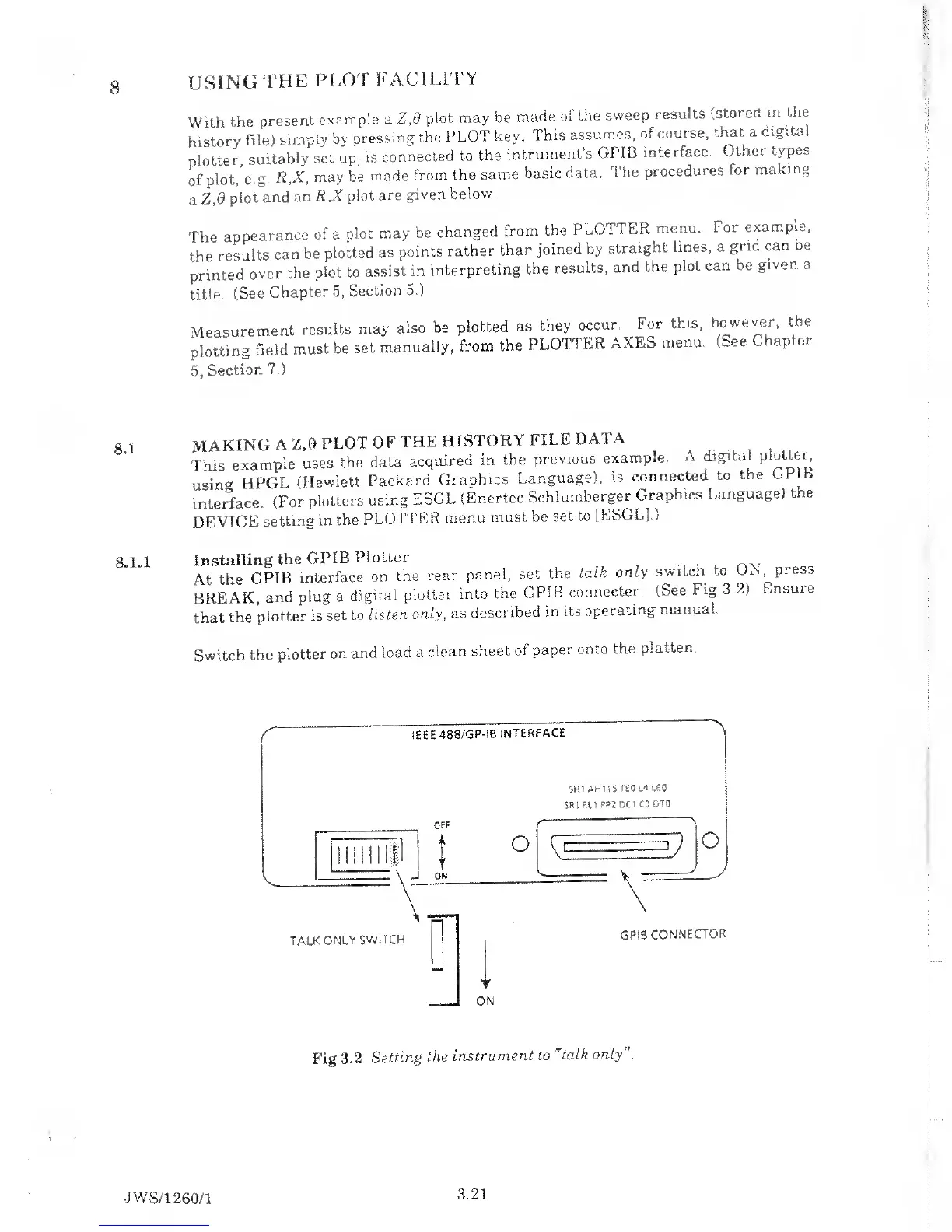
Installing
the
GPIB
Plotter
At
the
GPIB
interface
on
the
rear
panel,
set
the
talk only
switch to
OX
press
BREAK,
and
plug a
digital
plotter
into
the
GPIB
connecter
(See
Fig 3.2)
Ensure
that
the
plotter
is
set to
listen
only, as
described
in its
operating
manual.
Switch
the
plotter
on
and
load a
clean
sheet
of
paper
onto
the
platten.
r
IEEE
488/GP-IB
INTERFACE
A
Fig
3.2
Setting
the
instrument
to "
talk only”.
JWS/1
260/1
3.21

Table of Contents

Related product manuals