EasyManua.ls Logo

Solartron 1260 - Page 50

Solartron 1260
295 pages
Print Icon
To Next Page IconTo Next Page
To Previous Page IconTo Previous Page
Loading...
lunap. .1
1
c
view
j
FILE
I
1
VIEW FILE
DISPLAY
LIST CLEAR
t
DISPLAY
Line
number
\
t00.
00000
Hz nnn.nn
Q nnn.nn
dg
1
1
L
BOF
EOF NEXT PREV
LINE
t
NEXT
NEXT
F;
:
:
:•
vL'.
i :V:
Y
:
.
:
if
:
)
t
900.00000 kHz nnn.nn
D nnn.nn
dg
50
BOF
EOF
NEXT PREV
LINE
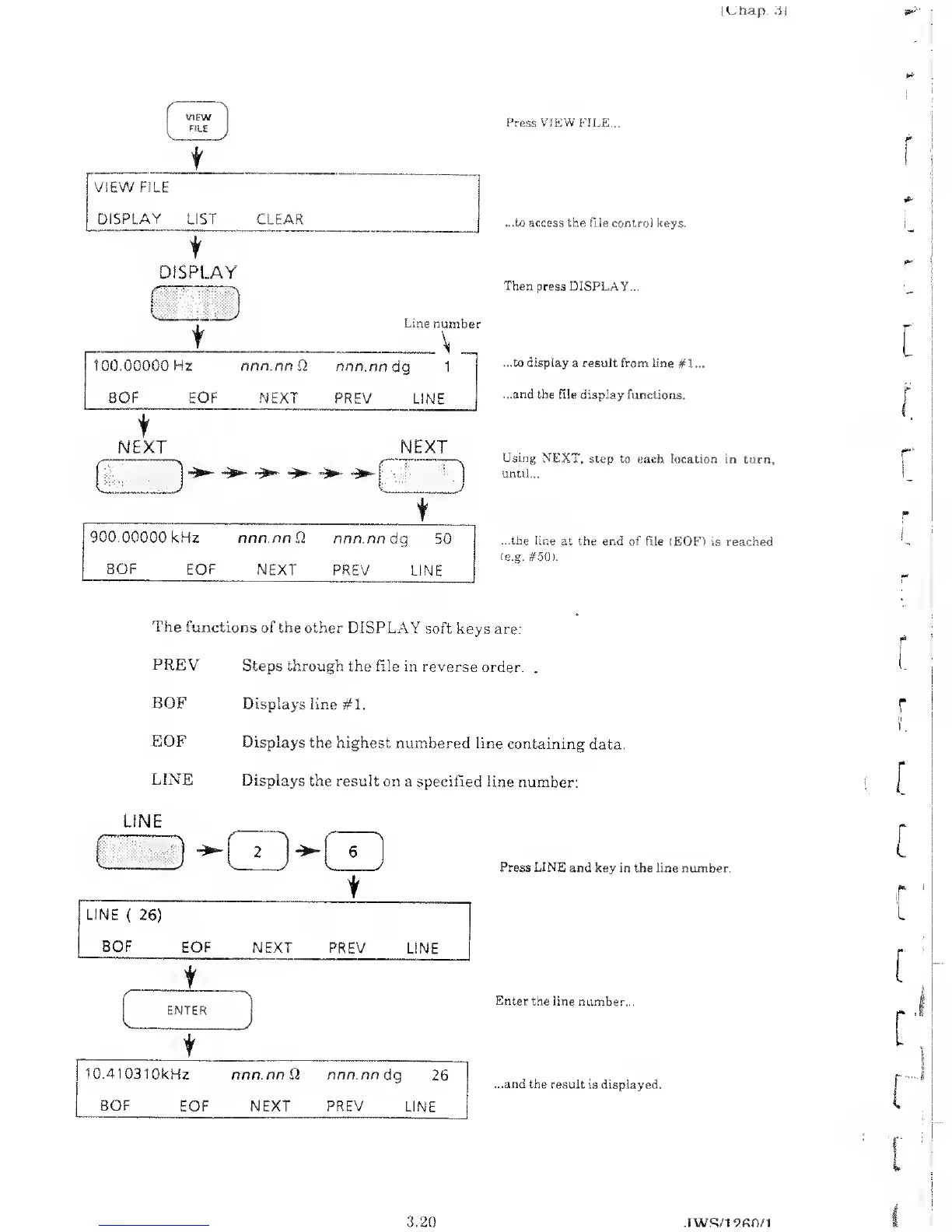
Press VIEW
FILE...
...to access
the file control keys.
Then press DISPLAY...
...to display
a result from line
#
1
...
...and
the file
display functions.
Using NEXT,
step to each location
in turn,
until...
...the line
at the end of file
(EOF)
is
reached
(e.g. #50).
The functions
of the other
DISPLAY
soft keys are:
PREV
Steps
through the file in
reverse
order.
.
BOF
Displays line
#1.
EOF
Displays
the highest numbered
line
containing
data.
LINE
Displays
the result on
a specified line
number:
Press LINE
and key in the line
number.
Enter the line
number...
...and
the result
is displayed.
LINE
t
LINE
(
BOF
26)
EOF
NEXT PREV
LINE
r
t
ENTER
t
D
10.
410310kHz nnn.nn D nnn.nn
dg
26
BOF
EOF NEXT PREV LINE
r
lO-
i
r
l
r
3.20 .TWRU1
9.
An/1

Table of Contents

Related product manuals